> ## Documentation Index
> Fetch the complete documentation index at: https://docs.thinkrr.ai/llms.txt
> Use this file to discover all available pages before exploring further.
# Appointment Reminder
> AI scenario for confirming upcoming appointments, rescheduling or canceling as needed, and ensuring clients stay informed. Ideal for service-based businesses and professionals who rely on appointment attendance.
## Details
The **Appointment Reminder** scenario is designed to automatically reach out to clients with upcoming appointments. It confirms attendance, handles rescheduling or cancellations, and logs any updates back into your system. This helps reduce no-shows and keeps client communications smooth and consistent.
It’s ideal for professionals in healthcare, consulting, fitness, and other appointment-driven industries where proactive reminders improve operational efficiency.
## Key Features
1. **Purpose**
* Automatically confirm, reschedule, or cancel appointments
* Reduce no-show rates with proactive reminders
* Maintain a professional and informative communication tone
2. **Customizable User Input Fields:**
The Appointment Reminder scenario includes structured fields to ensure each call provides clear, accurate, and personalized appointment information. It guides the AI’s introduction, confirms meeting details, and handles client decisions.
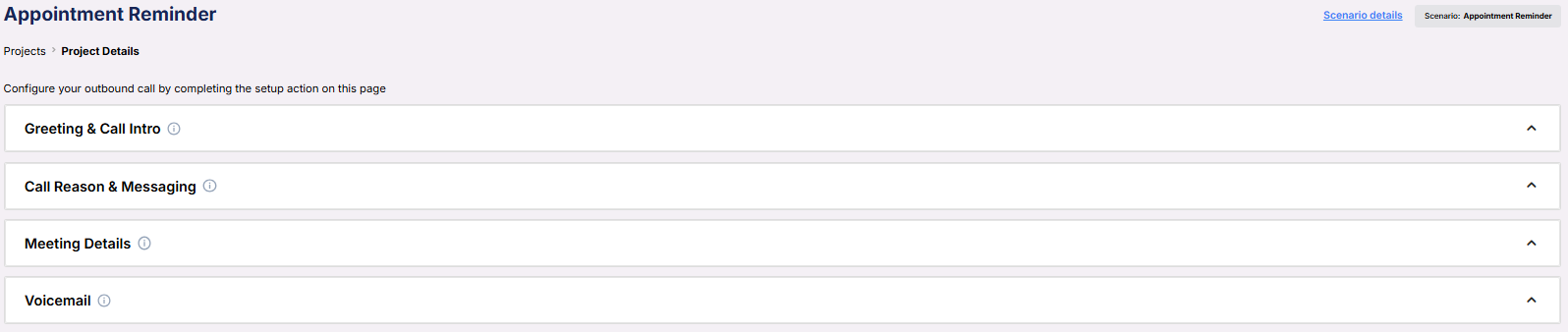 **Greeting & Call Intro**\
Defines how the AI greets and introduces the purpose of the call.
**Greeting & Call Intro**\
Defines how the AI greets and introduces the purpose of the call.
 * **Initial Greeting**: A simple opener that checks if the client is available.
* **Introduction**: Explains the call’s purpose and who it’s on behalf of.
* **Company Name**: The business the representative works for.
* **Profession**: The job title of the representative the client will meet.
* **Representative Name**: Who the meeting is scheduled with.
***
**Call Reason & Messaging**\
Outlines why the AI is calling and what it should say in different scenarios.
* **Initial Greeting**: A simple opener that checks if the client is available.
* **Introduction**: Explains the call’s purpose and who it’s on behalf of.
* **Company Name**: The business the representative works for.
* **Profession**: The job title of the representative the client will meet.
* **Representative Name**: Who the meeting is scheduled with.
***
**Call Reason & Messaging**\
Outlines why the AI is calling and what it should say in different scenarios.
 * **Reason for Appointment**: Describes the original intent behind the scheduled meeting.
* **Appointment Reminder Message**: Spoken when a client answers and the meeting is on.
* **Cancellation Message**: Used if the client chooses to cancel.
***
**Meeting Details**\
All the key logistics related to the scheduled appointment.
* **Reason for Appointment**: Describes the original intent behind the scheduled meeting.
* **Appointment Reminder Message**: Spoken when a client answers and the meeting is on.
* **Cancellation Message**: Used if the client chooses to cancel.
***
**Meeting Details**\
All the key logistics related to the scheduled appointment.
 * **Meeting Date and Time**: When the appointment is scheduled to take place.
* **Meeting Duration (minutes)**: The expected length of the meeting.
* **Location of Meeting**: Whether it’s virtual or in-person.
* **Calendar**: Where the meeting is logged and managed.
***
**Voicemail**\
The fallback message the AI leaves if the contact doesn’t answer.
* **Meeting Date and Time**: When the appointment is scheduled to take place.
* **Meeting Duration (minutes)**: The expected length of the meeting.
* **Location of Meeting**: Whether it’s virtual or in-person.
* **Calendar**: Where the meeting is logged and managed.
***
**Voicemail**\
The fallback message the AI leaves if the contact doesn’t answer.
 * **Voicemail Message**: A clear, professional message prompting rescheduling or follow-up.
***
3. **Objective:**
* Confirm upcoming appointments
* Minimize no-shows and scheduling gaps
* Handle last-minute changes with professionalism
Here is the **Project Configurations** interface of this scenario, alongside instructions and some examples:
* **Voicemail Message**: A clear, professional message prompting rescheduling or follow-up.
***
3. **Objective:**
* Confirm upcoming appointments
* Minimize no-shows and scheduling gaps
* Handle last-minute changes with professionalism
Here is the **Project Configurations** interface of this scenario, alongside instructions and some examples:
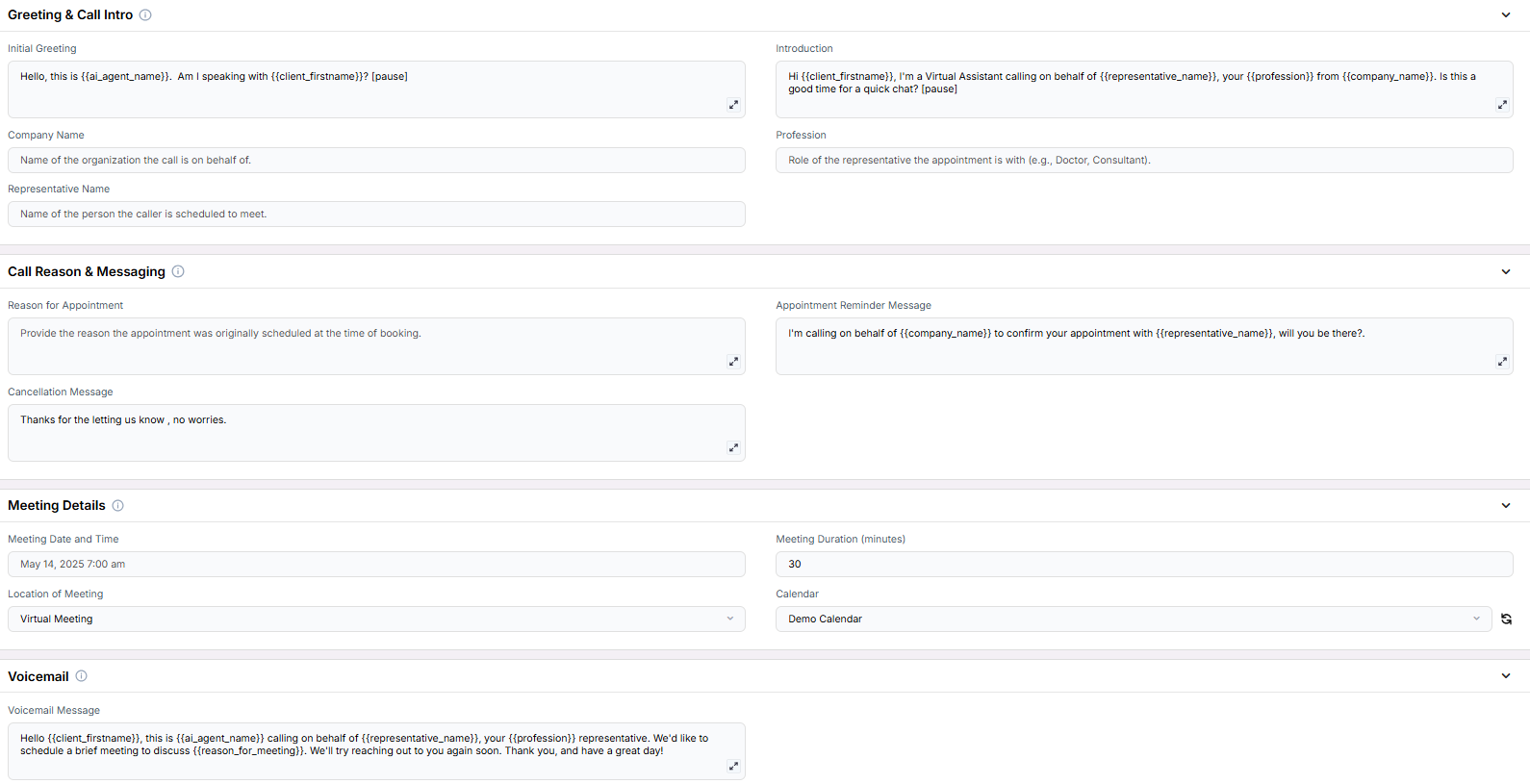 Remember that Scenarios are defined at the Project level, and every Campaign inherits the pre-filled fields from the Project, which means every Campaign can have different information in the input boxes, allowing you to tailor communications per Campaign to align with your customer/client or business needs.
## Example Configurations
1. **Appointment Reminder Message**
* “Hi, this is a reminder from Nova Medical to confirm your consultation with Dr. Patel at 3:00 PM this Thursday.”
2. **Cancellation Message**
* “Thanks for letting us know. We'll cancel your appointment and follow up if needed.”
3. **Voicemail Message**
* “Hi {client_firstname}, this is a reminder from Nova Medical regarding your upcoming appointment. Please call us back to confirm or reschedule.”
## FAQs & Troubleshooting
### General Questions
The AI will respond with the **Cancellation Message** and log the cancellation in your system if integrated.
Yes. The **Location of Meeting** field allows you to define whether the appointment is virtual or in-person.
### Configuration
Rescheduling requires additional logic or webhook integrations, but this scenario supports capturing intent and flagging the request for manual or automated rescheduling follow-up.
The **Reminder Message** is essential. The **Cancellation** and **Voicemail Messages** are recommended but optional depending on your workflow.
### Usage and Results
It confirms attendance ahead of time, gives clients a chance to reschedule, and logs the outcome. This proactive approach greatly reduces the chance of no-shows.
With the right CRM or calendar integration, the outcome (confirmed, canceled, or reschedule needed) can be recorded and used to trigger follow-ups.
***
For additional questions or guidance, try using our [**Virtual Support Agent**](/Thinkrr-Support-Agent)! Available 24/7 to help resolve most issues quickly at [thinkrr.ai/support](https://thinkrr.ai/support).
If you still need assistance, visit our support site at [help.thinkrr.ai](http://help.thinkrr.ai) and submit a [Ticket](/Support-Ticket-System) or contact our team directly at [hello@thinkrr.ai](mailto:hello@thinkrr.ai).
Remember that Scenarios are defined at the Project level, and every Campaign inherits the pre-filled fields from the Project, which means every Campaign can have different information in the input boxes, allowing you to tailor communications per Campaign to align with your customer/client or business needs.
## Example Configurations
1. **Appointment Reminder Message**
* “Hi, this is a reminder from Nova Medical to confirm your consultation with Dr. Patel at 3:00 PM this Thursday.”
2. **Cancellation Message**
* “Thanks for letting us know. We'll cancel your appointment and follow up if needed.”
3. **Voicemail Message**
* “Hi {client_firstname}, this is a reminder from Nova Medical regarding your upcoming appointment. Please call us back to confirm or reschedule.”
## FAQs & Troubleshooting
### General Questions
The AI will respond with the **Cancellation Message** and log the cancellation in your system if integrated.
Yes. The **Location of Meeting** field allows you to define whether the appointment is virtual or in-person.
### Configuration
Rescheduling requires additional logic or webhook integrations, but this scenario supports capturing intent and flagging the request for manual or automated rescheduling follow-up.
The **Reminder Message** is essential. The **Cancellation** and **Voicemail Messages** are recommended but optional depending on your workflow.
### Usage and Results
It confirms attendance ahead of time, gives clients a chance to reschedule, and logs the outcome. This proactive approach greatly reduces the chance of no-shows.
With the right CRM or calendar integration, the outcome (confirmed, canceled, or reschedule needed) can be recorded and used to trigger follow-ups.
***
For additional questions or guidance, try using our [**Virtual Support Agent**](/Thinkrr-Support-Agent)! Available 24/7 to help resolve most issues quickly at [thinkrr.ai/support](https://thinkrr.ai/support).
If you still need assistance, visit our support site at [help.thinkrr.ai](http://help.thinkrr.ai) and submit a [Ticket](/Support-Ticket-System) or contact our team directly at [hello@thinkrr.ai](mailto:hello@thinkrr.ai).