> ## Documentation Index
> Fetch the complete documentation index at: https://docs.thinkrr.ai/llms.txt
> Use this file to discover all available pages before exploring further.
# Client Follow Up
## Details
The **Client Follow-up** scenario is ideal for businesses that want to maintain client engagement and gather sentiment-based feedback after appointments or services. This AI-powered agent conducts follow-up outreach via **phone call or SMS**, adapting its messaging based on the client’s sentiment (positive, neutral, or negative).
## Key Features
1. **Purpose**
* Conduct follow-up conversations with clients
* Assess and respond to client sentiment in real time
* Maintain professionalism in post-service interactions
* Ensure successful delivery of follow-up content via SMS
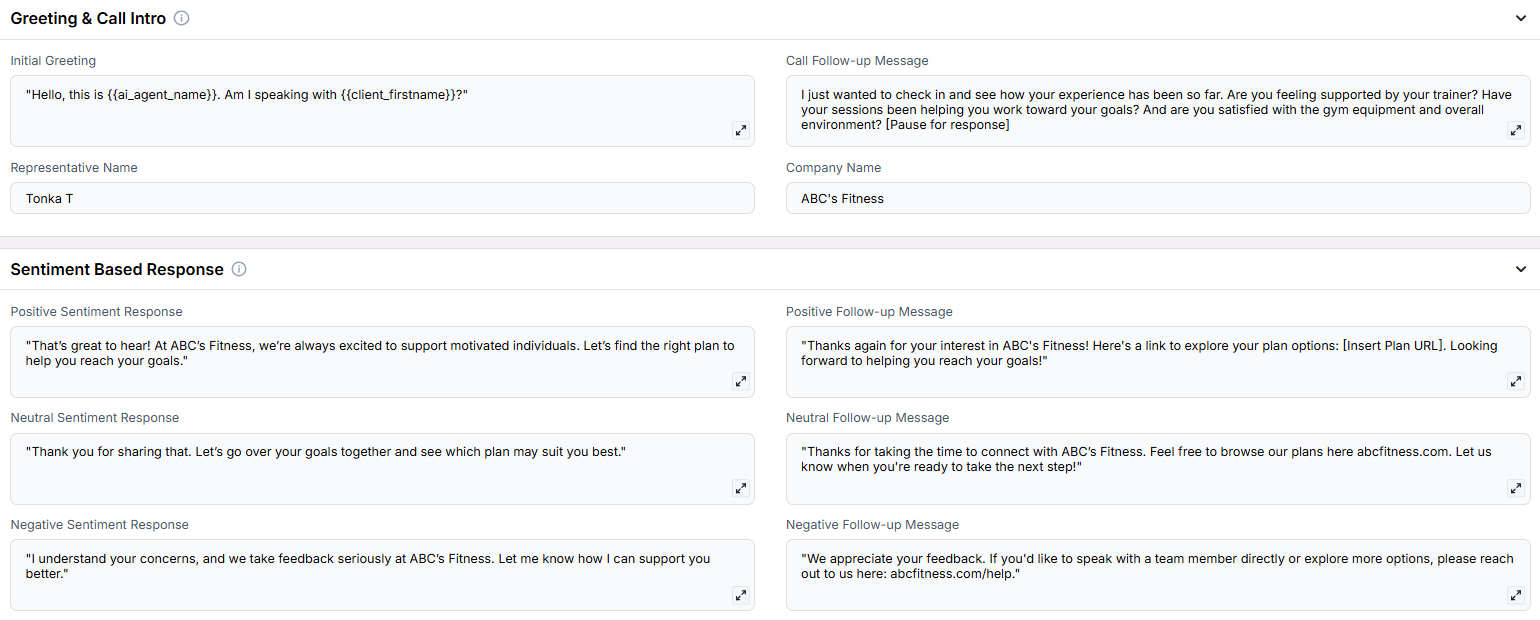
2. **Customizable User Input Fields:** This scenario is designed to follow up with gym clients, assess their satisfaction, and tailor continued engagement based on sentiment. Fields are grouped by purpose to reflect the structure of the conversation and follow-up flow.
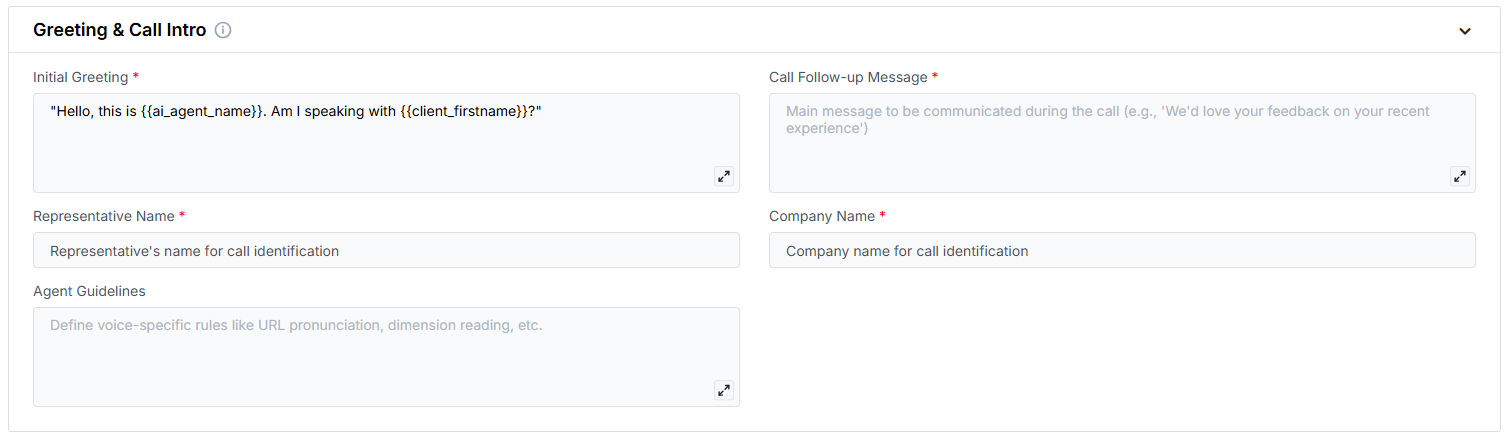
**Greeting & Call Intro** These fields define how the AI begins the conversation and re-engages the client.
* **Initial Greeting**: The opening line used to confirm the client’s identity.
* **Call Follow-up Message**: A check-in message that invites feedback on their fitness experience.
* **Representative Name**: The person the AI is calling on behalf of.
* **Company Name**: The name of the gym or fitness organization.
* **Agent Guidelines**: Behavior constraints you can set to shape how the AI communicates (e.g. emphasis, or handling edge cases).
***
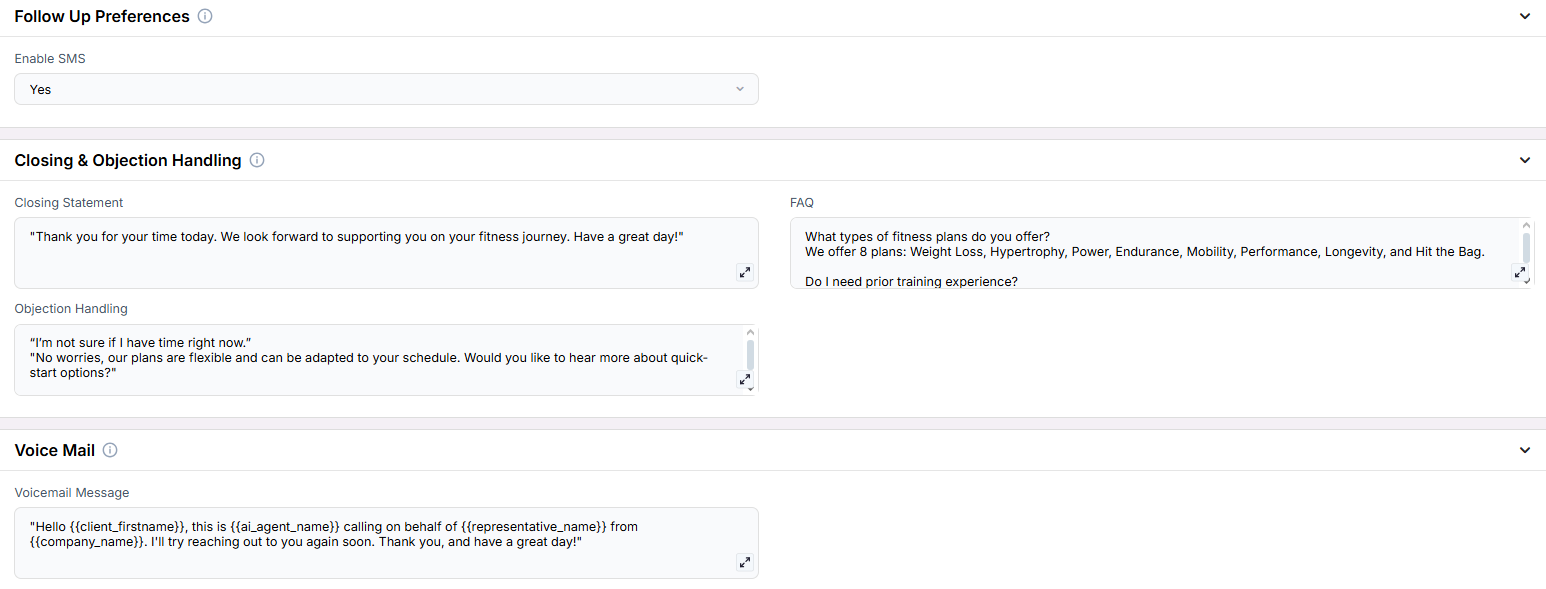
**Follow-Up Preferences** Options for additional communication beyond the call.
* **Enable SMS**: Enables the AI to send SMS-based follow-ups if needed.
***
**Sentiment-Based Response** Based on the client’s sentiment, the AI will deliver the corresponding response and follow-up text message if SMS is enabled.
* **Positive Sentiment Response**: What the AI says if the client expresses satisfaction.
* **Positive Follow-up Message**: The follow-up message or link provided after positive feedback.
* **Neutral Sentiment Response**: Response used when the client is unsure or undecided.
* **Neutral Follow-up Message**: Link or message sent to maintain engagement with neutral clients.
* **Negative Sentiment Response**: Messaging used to acknowledge dissatisfaction.
* **Negative Follow-up Message**: Support-oriented message or escalation path for unhappy clients.
***
**Closing & Objection Handling** Wrap-up content and prepared responses to common objections.
* **Closing Statement**: Message used to end the call on a positive note.
* **FAQ**: Common questions and their answers, used by the AI to assist clients during the call.
* **Objection Handling**: Prewritten rebuttals to help keep clients engaged despite initial hesitation. **Voicemail** Message used when the contact does not answer.
* **Voicemail Message**: The fallback script left if the client is unavailable.
***
3. **Objective:**
* To re-engage existing fitness clients and gather feedback on their experience
* To tailor follow-up messaging based on the client’s satisfaction level
* To provide seamless escalation or rebooking options through sentiment-driven flows
Here is the **Project Configurations** interface of this scenario, alongside instructions and some examples:
Remember that Scenarios are defined at the Project level, and every Campaign inherits the pre-filled fields from the Project, which means every Campaign can have different information in the input boxes, allowing you to tailor communications per Campaign to align with your customer/client or business needs.
## Example Configurations
1. **Initial Greeting**
* "Hello client\_firstname, this is ai\_agent\_name. I'm calling to follow up about your recent experience with company\_name. Is this a good time?"
* "Hi client\_firstname, this is ai\_agent\_name calling on behalf of representative\_name. Do you have a moment?"
2. **Follow-up Message**
* "We wanted to follow up on your recent service experience. How was everything?"
* "I'm reaching out regarding your recent appointment with representative\_name. How did everything go?"
3. **Sentiment Responses**
* **Positive Response:**
* "That's wonderful to hear! Would you like me to send you a special discount code for your next visit?"
* "I'm glad you had a great experience! I'll send you a link to our loyalty program."
* **Neutral Response:**
* "Thank you for sharing that. Would you like to receive some information about our additional services?"
* "I appreciate your feedback. May I send you details about how we can enhance your next experience?"
* **Negative Response:**
* "I understand your concerns. I'd like to send you a feedback form so we can improve our service."
* "I apologize for your experience. I'll send you contact information for our customer care team."
4. **SMS Follow-up Messages**
* **Positive Message:** "Thank you for your feedback! Here's your exclusive 10% discount code: THANK10"
* **Neutral Message:** "Thanks for your feedback. Learn more about our services: [https://www.thinkrr.ai/](https://www.thinkrr.ai/)"
* **Negative Message:** "We value your feedback. Please share your experience: [https://www.thinkrr.ai/](https://www.thinkrr.ai/)"
5. **Enable SMS**
* Boolean field set to **Yes** or **No**
* If **No**, the agent will skip sending SMS even if follow-up messages are populated
* If **Yes**, ensure sentiment-based messages are configured properly
> **Note:** Do not include variables like `{{client_firstname}}` in SMS messages—these will not render correctly in the final message.
## GHL/Thinkrr CRM Integration and Data Extraction
1. **Data Capture in GHL/Thinkrr CRM**
* Data capture occurs via the GHL Trigger once the call is completed.
2. **Payload Access Example**
| Field | Variable | Example Values |
| :----------------------- | :--------------------------------------------- | :---------------------------------------------- |
| Call Status | `{{thinkrr_contact_called.call_status}}` | Callback, Completed, Voicemail, No answer, etc. |
| Sentiment | `{{thinkrr_contact_called.sentiment}}` | positive, neutral, negative |
| Alternative Phone Number | `{{thinkrr_contact_called.alternative_phone}}` | empty or alternative number |
| Follow-up Message Sent | `{{thinkrr_contact_called.message_sent}}` | 1 = sent, 0 = not sent |
## FAQs & Troubleshooting
### General Questions
This scenario is designed to automate client follow-ups, gather feedback, and deliver personalized SMS communications based on client sentiment, ensuring efficient and professional follow-up interactions.
Yes. All fields—such as **Call Follow-up Message**, **Sentiment Responses**, and **SMS content**—can be tailored at the Campaign level to suit different business needs and client segments.
### Configuration
This occurs when certain key fields (e.g., greeting or sentiment response messages) are left blank. The AI attempts to read a value, but finds an empty input or placeholder, resulting in it vocalizing "slash slash." Until stricter guardrails are added, make sure all fields are filled—even if optional.
To get started, configure the **Initial Greeting**, **Call Follow-up Message**, **Representative Name**, **Sentiment Responses**, and the **SMS follow-up messages** (Positive Follow-up Message, Neutral Follow-up Message, Negative Follow-up Message). Any required fields that are not filled will be highlighted when trying to execute the Campaign.
The scenario supports three sentiment categories: positive, neutral, and negative. Each category can have a unique voice response and corresponding SMS message.
### Usage and Results
The AI first checks if the client wants to use their current number (the number being called). If the client wishes to use a new number, the AI will confirm the new number digit by digit before sending any SMS messages. This new number will be saved in the extraction.
The AI will attempt to resend the message once. If delivery issues persist, the AI will inform the customer and notify the representative. The representative can then decide if it’s necessary to follow up based on the extracted information from the call.
All information from interactions is extracted and stored within thinkrr, including sentiment assessment and message delivery status. This includes successful deliveries, failed attempts, and any alternative contact numbers provided.
***
For additional questions or guidance, try using our [**Virtual Support Agent**](/Thinkrr-Support-Agent)! Available 24/7 to help resolve most issues quickly at [thinkrr.ai/support](https://thinkrr.ai/support).
If you still need assistance, visit our support site at [help.thinkrr.ai](http://help.thinkrr.ai) and submit a [Ticket](/Support-Ticket-System) or contact our team directly at [hello@thinkrr.ai](mailto:hello@thinkrr.ai).
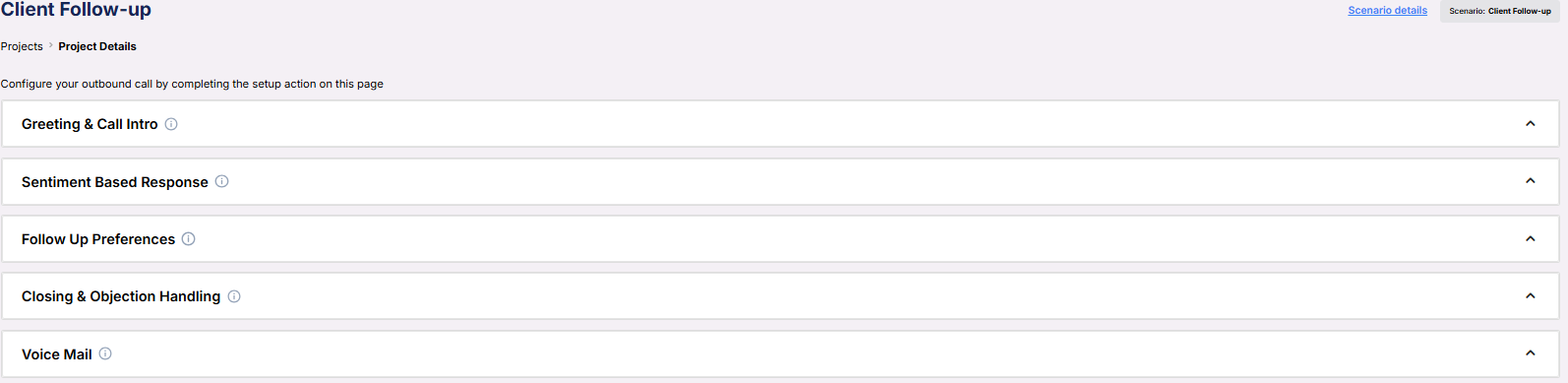 **Greeting & Call Intro**
 * **Initial Greeting**: The opening line used to confirm the client’s identity.
* **Call Follow-up Message**: A check-in message that invites feedback on their fitness experience.
* **Representative Name**: The person the AI is calling on behalf of.
* **Company Name**: The name of the gym or fitness organization.
* **Agent Guidelines**: Behavior constraints you can set to shape how the AI communicates (e.g. emphasis, or handling edge cases).
***
**Follow-Up Preferences**
* **Initial Greeting**: The opening line used to confirm the client’s identity.
* **Call Follow-up Message**: A check-in message that invites feedback on their fitness experience.
* **Representative Name**: The person the AI is calling on behalf of.
* **Company Name**: The name of the gym or fitness organization.
* **Agent Guidelines**: Behavior constraints you can set to shape how the AI communicates (e.g. emphasis, or handling edge cases).
***
**Follow-Up Preferences** * **Enable SMS**: Enables the AI to send SMS-based follow-ups if needed.
***
**Sentiment-Based Response**
* **Enable SMS**: Enables the AI to send SMS-based follow-ups if needed.
***
**Sentiment-Based Response**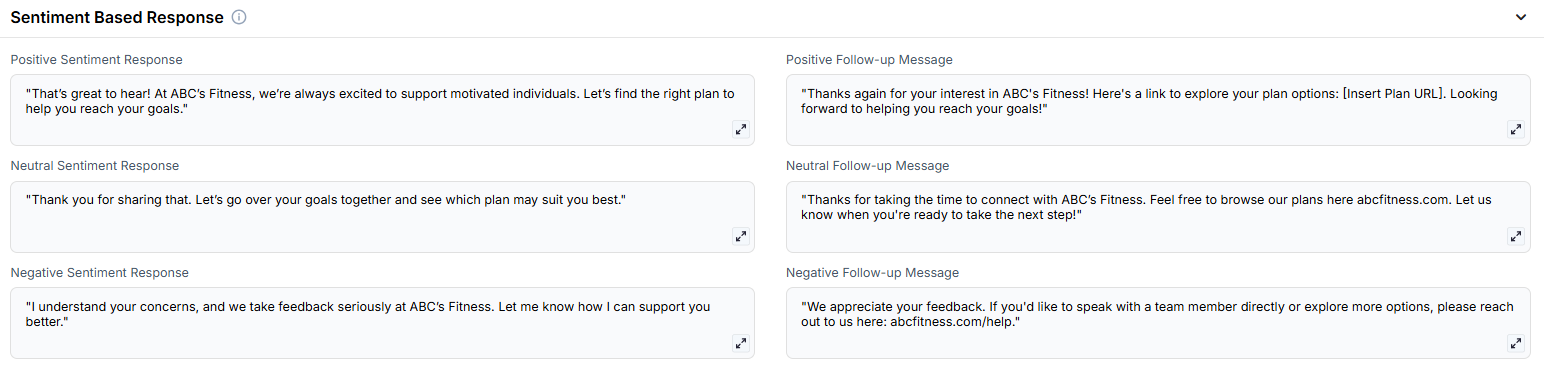 * **Positive Sentiment Response**: What the AI says if the client expresses satisfaction.
* **Positive Follow-up Message**: The follow-up message or link provided after positive feedback.
* **Neutral Sentiment Response**: Response used when the client is unsure or undecided.
* **Neutral Follow-up Message**: Link or message sent to maintain engagement with neutral clients.
* **Negative Sentiment Response**: Messaging used to acknowledge dissatisfaction.
* **Negative Follow-up Message**: Support-oriented message or escalation path for unhappy clients.
***
**Closing & Objection Handling**
* **Positive Sentiment Response**: What the AI says if the client expresses satisfaction.
* **Positive Follow-up Message**: The follow-up message or link provided after positive feedback.
* **Neutral Sentiment Response**: Response used when the client is unsure or undecided.
* **Neutral Follow-up Message**: Link or message sent to maintain engagement with neutral clients.
* **Negative Sentiment Response**: Messaging used to acknowledge dissatisfaction.
* **Negative Follow-up Message**: Support-oriented message or escalation path for unhappy clients.
***
**Closing & Objection Handling** * **Closing Statement**: Message used to end the call on a positive note.
* **FAQ**: Common questions and their answers, used by the AI to assist clients during the call.
* **Objection Handling**: Prewritten rebuttals to help keep clients engaged despite initial hesitation. **Voicemail**
* **Closing Statement**: Message used to end the call on a positive note.
* **FAQ**: Common questions and their answers, used by the AI to assist clients during the call.
* **Objection Handling**: Prewritten rebuttals to help keep clients engaged despite initial hesitation. **Voicemail**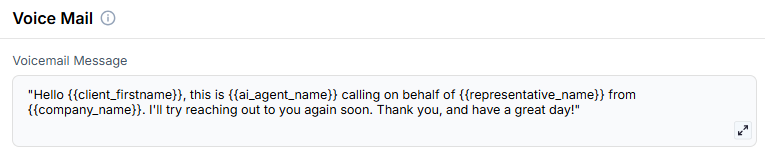 * **Voicemail Message**: The fallback script left if the client is unavailable.
***
3. **Objective:**
* To re-engage existing fitness clients and gather feedback on their experience
* To tailor follow-up messaging based on the client’s satisfaction level
* To provide seamless escalation or rebooking options through sentiment-driven flows
Here is the **Project Configurations** interface of this scenario, alongside instructions and some examples:
* **Voicemail Message**: The fallback script left if the client is unavailable.
***
3. **Objective:**
* To re-engage existing fitness clients and gather feedback on their experience
* To tailor follow-up messaging based on the client’s satisfaction level
* To provide seamless escalation or rebooking options through sentiment-driven flows
Here is the **Project Configurations** interface of this scenario, alongside instructions and some examples:
 Remember that Scenarios are defined at the Project level, and every Campaign inherits the pre-filled fields from the Project, which means every Campaign can have different information in the input boxes, allowing you to tailor communications per Campaign to align with your customer/client or business needs.
## Example Configurations
1. **Initial Greeting**
* "Hello client\_firstname, this is ai\_agent\_name. I'm calling to follow up about your recent experience with company\_name. Is this a good time?"
* "Hi client\_firstname, this is ai\_agent\_name calling on behalf of representative\_name. Do you have a moment?"
2. **Follow-up Message**
* "We wanted to follow up on your recent service experience. How was everything?"
* "I'm reaching out regarding your recent appointment with representative\_name. How did everything go?"
3. **Sentiment Responses**
* **Positive Response:**
* "That's wonderful to hear! Would you like me to send you a special discount code for your next visit?"
* "I'm glad you had a great experience! I'll send you a link to our loyalty program."
* **Neutral Response:**
* "Thank you for sharing that. Would you like to receive some information about our additional services?"
* "I appreciate your feedback. May I send you details about how we can enhance your next experience?"
* **Negative Response:**
* "I understand your concerns. I'd like to send you a feedback form so we can improve our service."
* "I apologize for your experience. I'll send you contact information for our customer care team."
4. **SMS Follow-up Messages**
* **Positive Message:**
Remember that Scenarios are defined at the Project level, and every Campaign inherits the pre-filled fields from the Project, which means every Campaign can have different information in the input boxes, allowing you to tailor communications per Campaign to align with your customer/client or business needs.
## Example Configurations
1. **Initial Greeting**
* "Hello client\_firstname, this is ai\_agent\_name. I'm calling to follow up about your recent experience with company\_name. Is this a good time?"
* "Hi client\_firstname, this is ai\_agent\_name calling on behalf of representative\_name. Do you have a moment?"
2. **Follow-up Message**
* "We wanted to follow up on your recent service experience. How was everything?"
* "I'm reaching out regarding your recent appointment with representative\_name. How did everything go?"
3. **Sentiment Responses**
* **Positive Response:**
* "That's wonderful to hear! Would you like me to send you a special discount code for your next visit?"
* "I'm glad you had a great experience! I'll send you a link to our loyalty program."
* **Neutral Response:**
* "Thank you for sharing that. Would you like to receive some information about our additional services?"
* "I appreciate your feedback. May I send you details about how we can enhance your next experience?"
* **Negative Response:**
* "I understand your concerns. I'd like to send you a feedback form so we can improve our service."
* "I apologize for your experience. I'll send you contact information for our customer care team."
4. **SMS Follow-up Messages**
* **Positive Message:**