> ## Documentation Index
> Fetch the complete documentation index at: https://docs.thinkrr.ai/llms.txt
> Use this file to discover all available pages before exploring further.
# Community Forum
> The **Community Forum** is a dedicated community hub where Thinkrr.ai users can connect, collaborate, and grow together. It’s designed to encourage knowledge sharing, problem-solving, and professional development around Thinkrr’s products and use cases. Whether you want to troubleshoot issues, ask questions, share insights, or stay updated on new features, the **Community Forum** page offers a space to engage with both fellow users and expert team members from Thinkrr. It’s where experience meets collaboration. Join the community to get help, offer support, and level up your expertise in Voice AI.
### **Overview**
The [**Community Forum**](https://members.thinkrr.ai/communities/groups/thinkrr-ai---ai-voice-calling/home) is a dedicated community hub where Thinkrr.ai users can connect, collaborate, and grow together. It’s designed to encourage knowledge sharing, problem-solving, and professional development around Thinkrr’s products and use cases.
Whether you want to troubleshoot issues, ask questions, share insights, or stay updated on new features, the [**Community Forum**](https://members.thinkrr.ai/communities/groups/thinkrr-ai---ai-voice-calling/home) offers a space to engage with both fellow users and expert team members from Thinkrr. It’s where experience meets collaboration.
Join the community to get help, offer support, and level up your expertise in Voice AI.
### **Details**
The community page allows you to:
* **Ask Questions** – Get help from the community or Thinkrr experts.
* **Share Experiences** – Talk about your wins, learnings, or creative use cases.
* **Find Resources** – Access learning content, videos, and product guides.
* **Stay Updated** – Receive news on product releases, strategy tips, and more.
* **Collaborate** – Work together with like-minded professionals.
* **Discuss Strategies** – Share sales, marketing, or operational tactics.
* **Troubleshoot Issues** – Solve technical challenges with help from peers.
* **Get Expert Guidance** – Connect with Thinkrr’s team members and contributors.
***
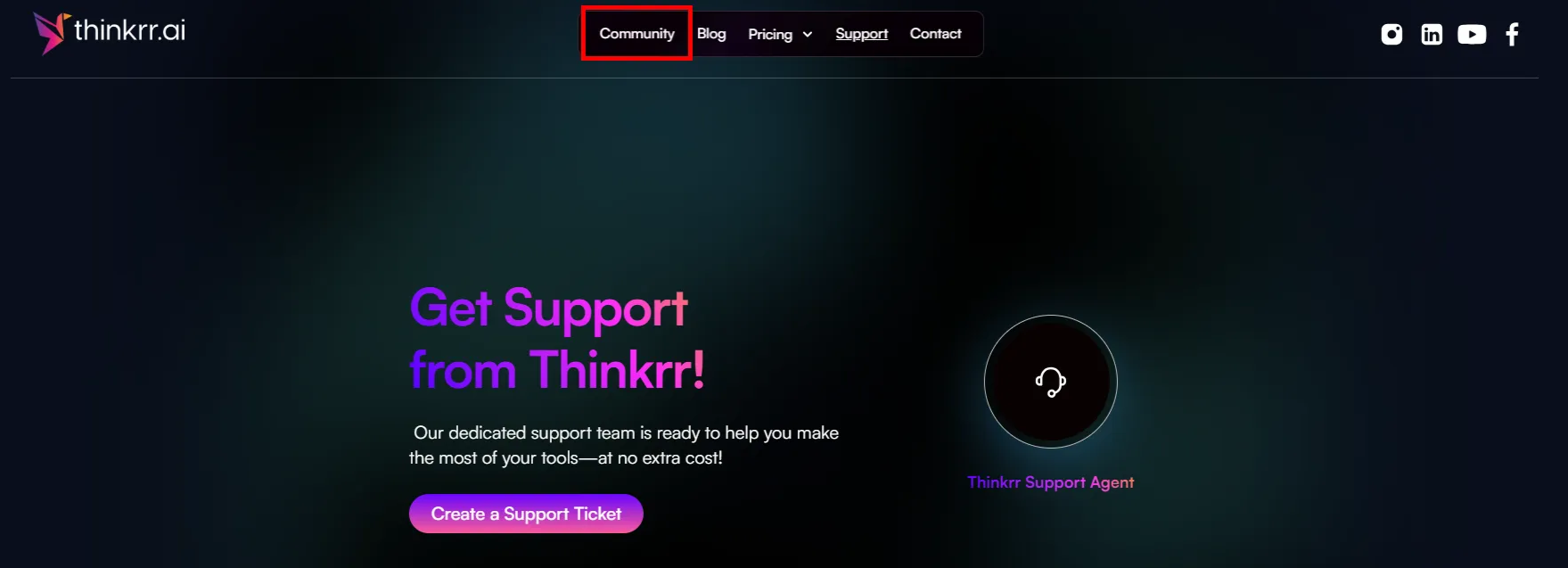
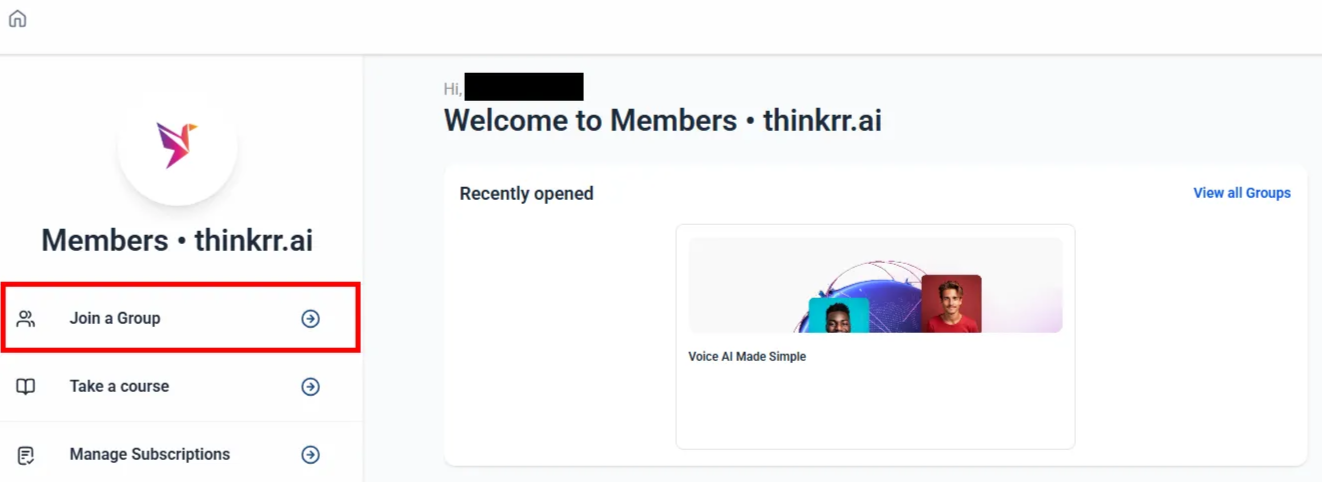
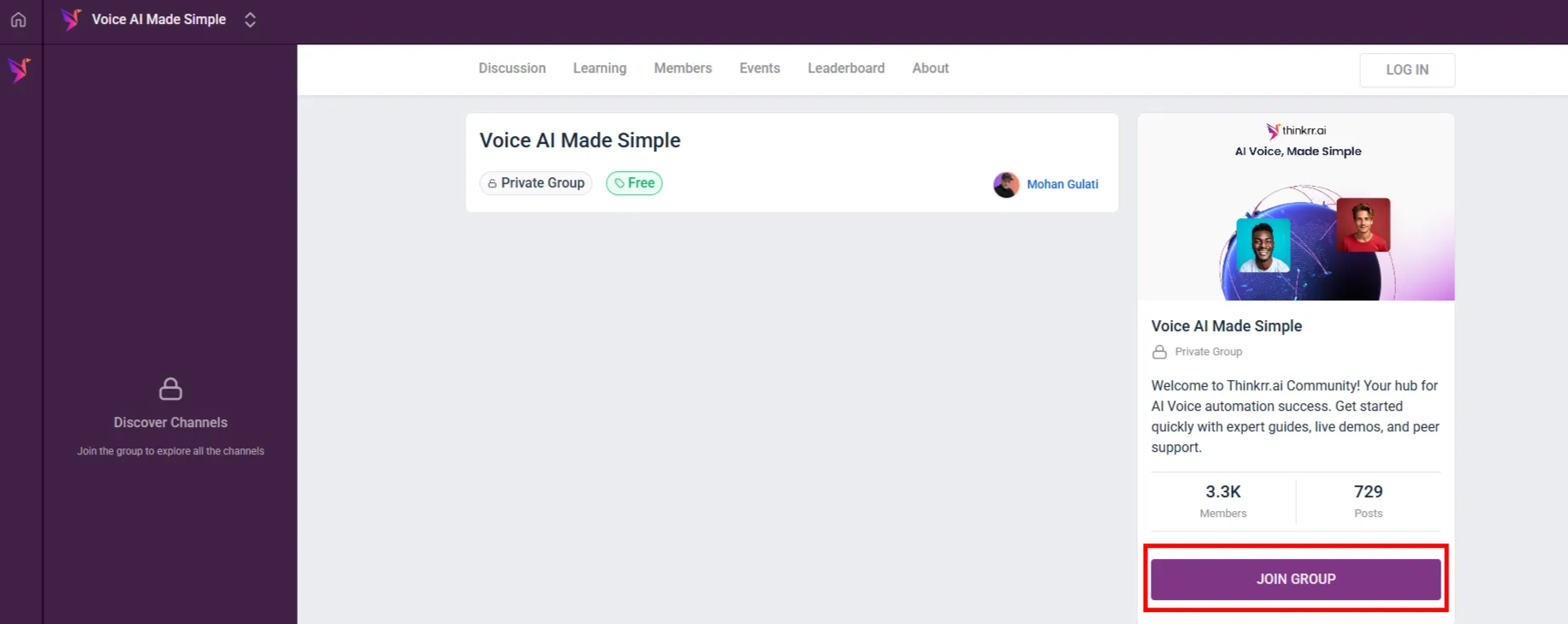
### **How to Join the Community**
 ### **What You’ll Find Inside**
Once you’re a member, you’ll unlock access to:
* **Discussion Board** – The core of the community. Post questions, tips, and discussions.
* **Learning Page** – A library of valuable material including video-based online courses on how to use Thinkrr's software effectively. This section also includes **Agency Webinars**, a collection of recorded past webinars for those who may have missed the live sessions.
* **Members Directory** – Discover and connect with other users, contributors, and admins.
* **Event Board** – Weekly office hours and a recurring webinar series. Each event includes a **Zoom link** directly within the event listing. Sessions cover product updates, strategy discussions, sales tips, and community highlights.
* **Leaderboard** – A fun gamified feature that rewards quality engagement. Earn points when others like your posts or comments — 1 like = 1 point. As you earn points, you level up and gain visibility in the community.
***
### **FAQs & Troubleshooting**
Anyone with an interest in Thinkrr’s tools — whether you're a client, partner, or exploring the platform.
Membership requests are typically approved within 1–2 business days.
No — all contributions are tied to your member profile to ensure transparency and engagement.
No, joining the Members Page is completely free.
***
For additional questions or guidance, try using our [**Virtual Support Agent**](/Thinkrr-Support-Agent)! Available 24/7 to help resolve most issues quickly at [thinkrr.ai/support](https://thinkrr.ai/support).
If you still need assistance, visit our support site at [help.thinkrr.ai](http://help.thinkrr.ai) and submit a [Ticket](/Support-Ticket-System) or contact our team directly at [hello@thinkrr.ai](mailto:hello@thinkrr.ai).
### **What You’ll Find Inside**
Once you’re a member, you’ll unlock access to:
* **Discussion Board** – The core of the community. Post questions, tips, and discussions.
* **Learning Page** – A library of valuable material including video-based online courses on how to use Thinkrr's software effectively. This section also includes **Agency Webinars**, a collection of recorded past webinars for those who may have missed the live sessions.
* **Members Directory** – Discover and connect with other users, contributors, and admins.
* **Event Board** – Weekly office hours and a recurring webinar series. Each event includes a **Zoom link** directly within the event listing. Sessions cover product updates, strategy discussions, sales tips, and community highlights.
* **Leaderboard** – A fun gamified feature that rewards quality engagement. Earn points when others like your posts or comments — 1 like = 1 point. As you earn points, you level up and gain visibility in the community.
***
### **FAQs & Troubleshooting**
Anyone with an interest in Thinkrr’s tools — whether you're a client, partner, or exploring the platform.
Membership requests are typically approved within 1–2 business days.
No — all contributions are tied to your member profile to ensure transparency and engagement.
No, joining the Members Page is completely free.
***
For additional questions or guidance, try using our [**Virtual Support Agent**](/Thinkrr-Support-Agent)! Available 24/7 to help resolve most issues quickly at [thinkrr.ai/support](https://thinkrr.ai/support).
If you still need assistance, visit our support site at [help.thinkrr.ai](http://help.thinkrr.ai) and submit a [Ticket](/Support-Ticket-System) or contact our team directly at [hello@thinkrr.ai](mailto:hello@thinkrr.ai).