> ## Documentation Index
> Fetch the complete documentation index at: https://docs.thinkrr.ai/llms.txt
> Use this file to discover all available pages before exploring further.
# Data Collection
> Gathers information details through guided questions. Perfect for surveys, enrolment forms, customer profiles, or any detailed information collection needs.
## Details
The AI Agent asks pre-configured questions, adapts to responses, and manages objections to ensure seamless data collection. Integrations with NIKO/GHL workflows allow for dynamic storage and post-processing of the collected information. This Scenario helps organizations systematically gather information while maintaining professionalism and privacy compliance.
## Key Features
1. **Purpose**
* Focused on structured and compliant data collection.
* Ensures professional communication to build trust with contacts.
* Adaptable for various use cases, including market research, feedback collection, and more.
2. **Customizable User Input Fields:** This scenario is designed for fast, structured data collection during live calls. Fields are grouped by purpose, from caller introduction through to consent, questions, and closing.
***
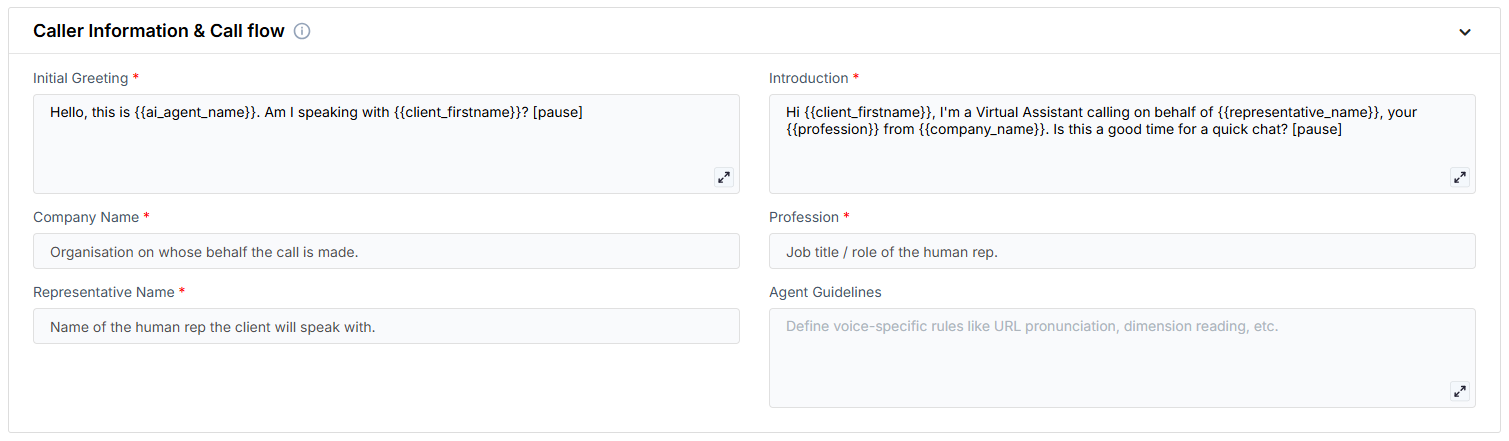
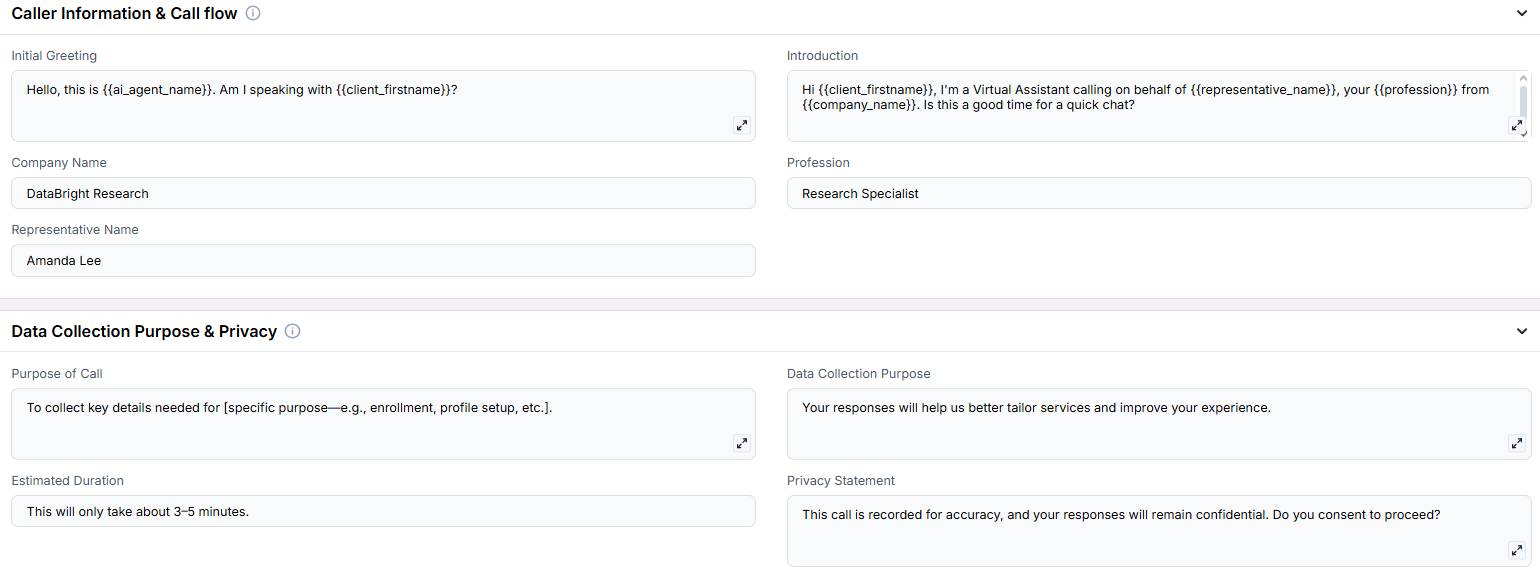
**Caller Information & Call Flow**\
Fields that define who the AI represents and how the conversation is initiated.
* **Initial Greeting**: The first line used to confirm the contact’s identity.
* **Introduction**: A brief explanation of the purpose and who the AI is calling on behalf of.
* **Company Name**: The organization requesting the information.
* **Profession**: The role of the representative the AI is referencing.
* **Representative Name**: The person the AI is assisting or representing.
* **Agent Guidelines**: Behavior constraints you can set to shape how the AI communicates (e.g. emphasis, or handling edge cases).
***
**Data Collection Purpose & Privacy**\
Establishes the reason for the call, how the data will be used, and secures verbal consent.
* **Purpose of Call**: A direct statement explaining what kind of data is being collected.
* **Data Collection Purpose**: A line that frames the value or reason for collecting this information.
* **Estimated Duration**: An estimate of how long the interaction will take.
* **Privacy Statement**: A message used to disclose call recording and request consent.
***
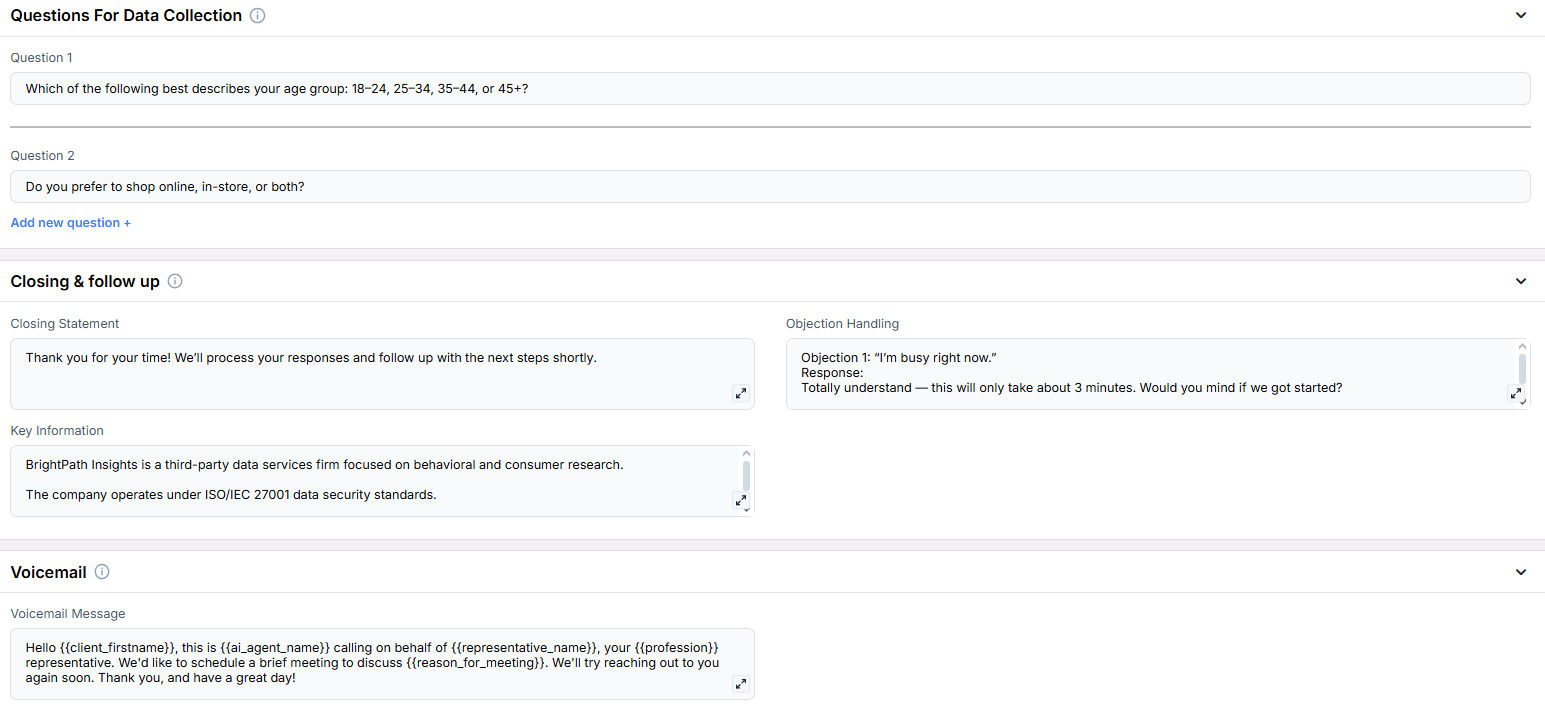
**Questions For Data Collection**\
Customizable prompts used to collect structured information from the contact. More questions can be added as needed.
* **Question 1**: The first question to be asked.
* **Question 2**: The second question in the sequence.
***
**Closing & Follow-Up**\
Fields used to wrap up the call, handle objections, and reinforce next steps.
* **Closing Statement**: A short message used to thank the contact and describe what happens next.
* **Objection Handling**: A set of prewritten rebuttals to common concerns or hesitations.
* **Key Information**: Additional details or talking points that must be mentioned during the call.
***
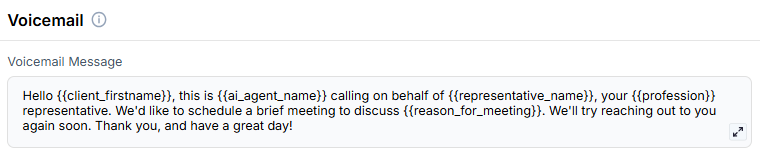
**Voicemail**\
Defines the message used when the contact doesn’t answer.
* **Voicemail Message**: The fallback message left by the AI if the contact is unavailable.
***
3. **Objective:**
* To gather structured information from contacts quickly and respectfully
* To reduce manual intake time through guided AI-led questioning
* To assist teams with compliant, consistent data collection processes
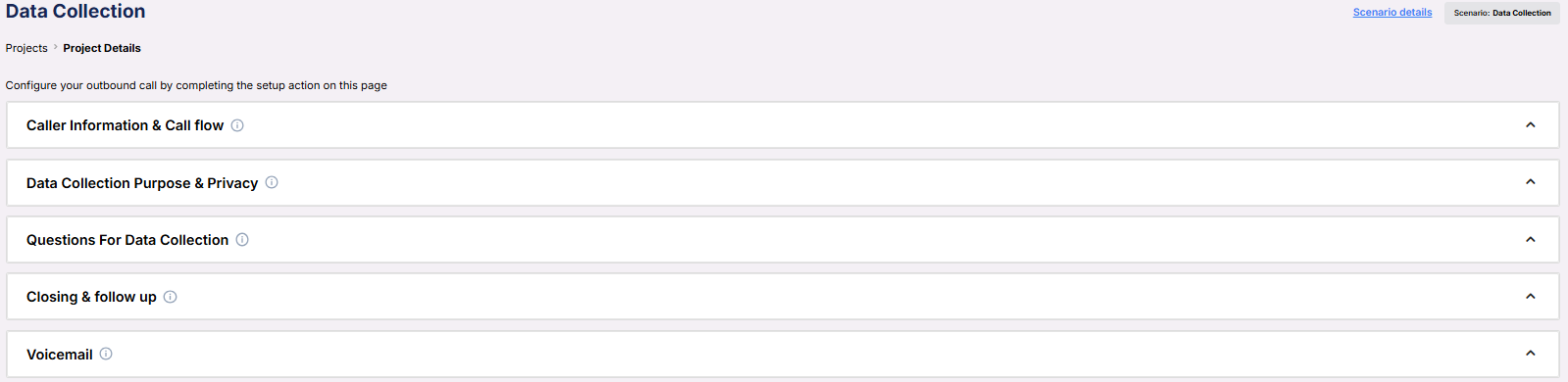
Here is the **Project Configurations** interface of this scenario, alongside instructions and some examples:
Remember that Scenarios are defined at the Project level, and every Campaign inherits the pre-filled fields from the Project, which means every Campaign can have different information in the input boxes, allowing you to tailor communications per Campaign to align with your customer/client or business needs.
## Example Configuration & Demo
### Caller Information & Call Flow
**Initial Greeting**\
Hello, this is ai\_agent\_name. Am I speaking with client\_firstname?\
**Introduction**\
Hi client\_firstname, I'm a Virtual Assistant calling on behalf of representative\_name, your profession from company\_name. Is this a good time for a quick chat?\
**Company Name**\
BrightPath Wellness Group\
**Profession**\
Enrollment Specialist\
**Representative Name**\
Sarah Li
### Data Collection Purpose & Privacy
**Purpose of Call**\
“We’re gathering insights to help tailor our services and make sure we’re delivering what matters most to people like you.”\
**Data Collection Purpose**\
“We’re gathering a few insights to better understand your preferences and tailor our offerings accordingly.”\
**Estimated Duration**\
3 to 5 minutes\
**Privacy Statement**\
“All answers will be kept confidential and are only used internally to improve our services. Is it okay to continue?”
### Questions For Data Collection
**Question 1**\
“Which of the following age groups do you fall into: under 18, 18 to 24, 25 to 34, 35 to 44, or over 45?”\
**Question 2**\
“How would you describe your current level of interest in our services: just browsing, somewhat interested, or very interested?”\
**Question 3**\
“What’s your preferred way to be contacted—email, phone, or text message?”\
**Question 4**\
“Are you currently using any similar products or services? If so, which ones?”\
**Question 5**\
“On a scale of 1 to 10, how likely are you to recommend us to a friend or colleague?”
### Closing & Follow-Up
**Closing Statement**\
“Thanks so much for your time and thoughtful answers. We’ll use this to better serve you, and you may hear from us with helpful updates based on your preferences. Have a great day!”\
**Objection Handling**\
“I totally understand. It’s just a few short questions and your input really helps us improve. If now isn’t a good time, I can follow up later—what works best for you?”\
**Key Information**\
Customer filled out the pre-registration form but didn’t complete the final step
### Voicemail
**Voicemail Message**\
Hello client\_firstname, this is ai\_agent\_name calling on behalf of representative\_name, your profession representative. We'd like to schedule a brief meeting to discuss reason\_for\_meeting. We'll try reaching out to you again soon. Thank you, and have a great day!
## **GHL/NIKO Integration and Data Storage**
1. **Data Capture in GHL/NIKO**
* Questions and answers are stored in the contact’s **Notes** section.
* Data is organized by groups for easy reference (e.g., demographics, preferences).
* Responses can trigger automated workflows in NIKO/GHL.
2. **Payload Access Example (Accurate Syntax)**
Use the following syntax for post-processing in workflows:
```javascript theme={null}
Call Status: {thinkrr_contact_called.call_status}
Data Gathering Status: {thinkrr_contact_called.data_status}
Demographic & Contact Information
Q1: Age Group — {thinkrr_contact_called.questions_and_answers.0.answer}
Q2: Shopping Preference — {thinkrr_contact_called.questions_and_answers.1.answer}
Q6: Phone Number Confirmation — {thinkrr_contact_called.questions_and_answers.5.answer}
Shopping Behavior & Preferences
Q5: Brand Preferences — {thinkrr_contact_called.questions_and_answers.4.answer}
Q8: Monthly Budget — {thinkrr_contact_called.questions_and_answers.7.answer}
Future Participation & Preferences
Q12: Future Participation Interest — {thinkrr_contact_called.questions_and_answers.11.answer}
```
3. **Example stored data in GHL**:
```jsx theme={null}
Call Status: Completed
Data Gathering Status: Successful
Demographic Information:
Q1: Age Group - 25-34
Q2: Shopping Preference - Online
Shopping Preferences:
Q5: Brand Preferences - Sustainable products
```
4. **Automation Possibilities**
* Trigger follow-up campaigns based on specific responses.
* Apply tags for segmentation.
* Generate reports from gathered data.
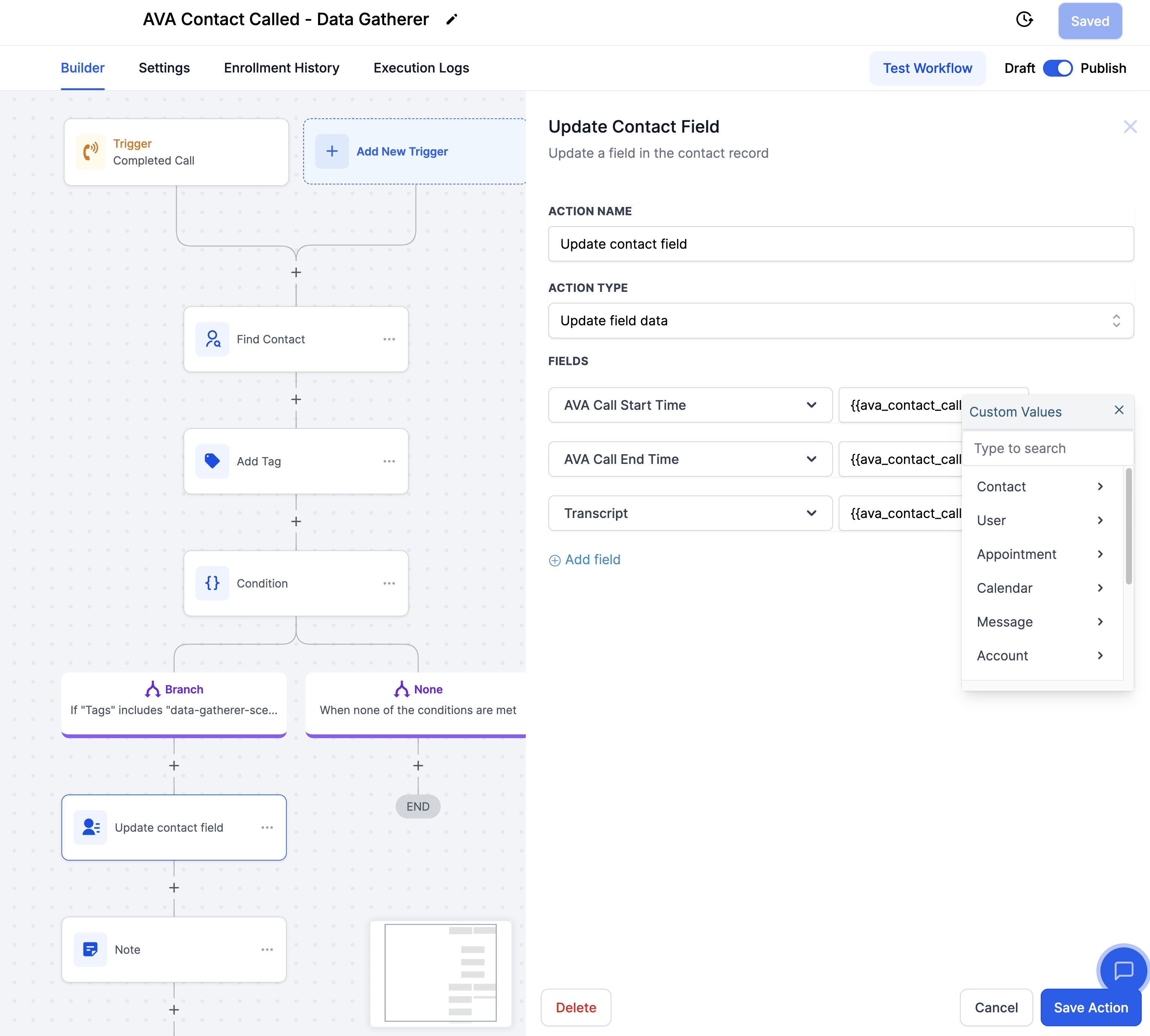
**Example Workflow in NIKO/GHL**
Below is a sample automation workflow setup for processing Data Gatherer results:
Use the **Contact Called** trigger with filters based on **Call Status** (e.g., “Completed” or “No Answer”).
Store answers in custom fields using the **Update Contact Field** action.
* Use responses (e.g., Q1-Q16) to tag contacts or trigger follow-ups.
* Send the call transcript to ChatGPT for summarization or analysis.
* Generate insights, trigger email sequences, or notify team members.
## FAQs & Troubleshooting
### General Questions
**Q: How do I access specific answers from a call in my workflow?**\
A: Use the `{thinkrr_contact_called.questions_and_answers} `payload with an index to access individual answers. For example:\
`{thinkrr_contact_called.questions_and_answers.0.answer} `retrieves the first answer.
**Q: What if I need more than 16 questions in a scenario?**\
A: Currently, scenarios support up to 16 questions. If more questions are needed, consider splitting the data collection into multiple calls or campaigns. You do not need to ask 16 questions as well, you must ask at least one question.
**Q: Can I trigger specific workflows based on collected responses?**\
A: Yes! Use conditions in your workflows to evaluate specific answers. For example:\
• If **Q5 = Sustainable Products**, apply a “Sustainability” tag to the contact.
**Q: Can I customize the privacy statement and questions?**\
A: Yes. You can fully customize the privacy statement, questions, and objection handling scripts in the **Project Configuration** section of thinkrr.
**Q. What if a call is disconnected before completion?**\
A: Thinkrr saves progress in real-time. The system stores completed responses up to the point of disconnection.
**Q: Can I customize the questions?**\
A: Yes, you can fully customize up to 16 questions for your campaign. Tailor them to fit your specific data collection needs.
### Configuration
* Group questions into logical sections (e.g., demographics, preferences).
* Progress from general to specific questions.
* Store call transcripts using the Transcript payload for later analysis.
* Use data to personalize follow-up emails or assign specific tasks.
* Include clear privacy statements at the start of the call.
* Confirm consent before proceeding with sensitive data collection.
### Usage and Results
* Customer preference studies
* Product feedback collection
* Brand perception surveys
* Service satisfaction surveys
* Net Promoter Score (NPS) surveys
* Product reviews
* Claims information collection
* Policy application processing
* Student enrolment data
* Academic surveys
* Job application data
* HR documentation
* Volunteer applications
* Availability scheduling
***
For additional questions or guidance, try using our [**Virtual Support Agent**](/Thinkrr-Support-Agent)! Available 24/7 to help resolve most issues quickly at [thinkrr.ai/support](https://thinkrr.ai/support).
If you still need assistance, visit our support site at [help.thinkrr.ai](http://help.thinkrr.ai) and submit a [Ticket](/Support-Ticket-System) or contact our team directly at [hello@thinkrr.ai](mailto:hello@thinkrr.ai).
 ***
**Caller Information & Call Flow**\
Fields that define who the AI represents and how the conversation is initiated.
***
**Caller Information & Call Flow**\
Fields that define who the AI represents and how the conversation is initiated.
 * **Initial Greeting**: The first line used to confirm the contact’s identity.
* **Introduction**: A brief explanation of the purpose and who the AI is calling on behalf of.
* **Company Name**: The organization requesting the information.
* **Profession**: The role of the representative the AI is referencing.
* **Representative Name**: The person the AI is assisting or representing.
* **Agent Guidelines**: Behavior constraints you can set to shape how the AI communicates (e.g. emphasis, or handling edge cases).
***
**Data Collection Purpose & Privacy**\
Establishes the reason for the call, how the data will be used, and secures verbal consent.
* **Initial Greeting**: The first line used to confirm the contact’s identity.
* **Introduction**: A brief explanation of the purpose and who the AI is calling on behalf of.
* **Company Name**: The organization requesting the information.
* **Profession**: The role of the representative the AI is referencing.
* **Representative Name**: The person the AI is assisting or representing.
* **Agent Guidelines**: Behavior constraints you can set to shape how the AI communicates (e.g. emphasis, or handling edge cases).
***
**Data Collection Purpose & Privacy**\
Establishes the reason for the call, how the data will be used, and secures verbal consent.
 * **Purpose of Call**: A direct statement explaining what kind of data is being collected.
* **Data Collection Purpose**: A line that frames the value or reason for collecting this information.
* **Estimated Duration**: An estimate of how long the interaction will take.
* **Privacy Statement**: A message used to disclose call recording and request consent.
***
**Questions For Data Collection**\
Customizable prompts used to collect structured information from the contact. More questions can be added as needed.
* **Purpose of Call**: A direct statement explaining what kind of data is being collected.
* **Data Collection Purpose**: A line that frames the value or reason for collecting this information.
* **Estimated Duration**: An estimate of how long the interaction will take.
* **Privacy Statement**: A message used to disclose call recording and request consent.
***
**Questions For Data Collection**\
Customizable prompts used to collect structured information from the contact. More questions can be added as needed.
 * **Question 1**: The first question to be asked.
* **Question 2**: The second question in the sequence.
***
**Closing & Follow-Up**\
Fields used to wrap up the call, handle objections, and reinforce next steps.
* **Question 1**: The first question to be asked.
* **Question 2**: The second question in the sequence.
***
**Closing & Follow-Up**\
Fields used to wrap up the call, handle objections, and reinforce next steps.
 * **Closing Statement**: A short message used to thank the contact and describe what happens next.
* **Objection Handling**: A set of prewritten rebuttals to common concerns or hesitations.
* **Key Information**: Additional details or talking points that must be mentioned during the call.
***
**Voicemail**\
Defines the message used when the contact doesn’t answer.
* **Closing Statement**: A short message used to thank the contact and describe what happens next.
* **Objection Handling**: A set of prewritten rebuttals to common concerns or hesitations.
* **Key Information**: Additional details or talking points that must be mentioned during the call.
***
**Voicemail**\
Defines the message used when the contact doesn’t answer.
 * **Voicemail Message**: The fallback message left by the AI if the contact is unavailable.
***
3. **Objective:**
* To gather structured information from contacts quickly and respectfully
* To reduce manual intake time through guided AI-led questioning
* To assist teams with compliant, consistent data collection processes
Here is the **Project Configurations** interface of this scenario, alongside instructions and some examples:
* **Voicemail Message**: The fallback message left by the AI if the contact is unavailable.
***
3. **Objective:**
* To gather structured information from contacts quickly and respectfully
* To reduce manual intake time through guided AI-led questioning
* To assist teams with compliant, consistent data collection processes
Here is the **Project Configurations** interface of this scenario, alongside instructions and some examples:
 Remember that Scenarios are defined at the Project level, and every Campaign inherits the pre-filled fields from the Project, which means every Campaign can have different information in the input boxes, allowing you to tailor communications per Campaign to align with your customer/client or business needs.
## Example Configuration & Demo
### Caller Information & Call Flow
**Initial Greeting**\
Hello, this is ai\_agent\_name. Am I speaking with client\_firstname?\
**Introduction**\
Hi client\_firstname, I'm a Virtual Assistant calling on behalf of representative\_name, your profession from company\_name. Is this a good time for a quick chat?\
**Company Name**\
BrightPath Wellness Group\
**Profession**\
Enrollment Specialist\
**Representative Name**\
Sarah Li
### Data Collection Purpose & Privacy
**Purpose of Call**\
“We’re gathering insights to help tailor our services and make sure we’re delivering what matters most to people like you.”\
**Data Collection Purpose**\
“We’re gathering a few insights to better understand your preferences and tailor our offerings accordingly.”\
**Estimated Duration**\
3 to 5 minutes\
**Privacy Statement**\
“All answers will be kept confidential and are only used internally to improve our services. Is it okay to continue?”
### Questions For Data Collection
**Question 1**\
“Which of the following age groups do you fall into: under 18, 18 to 24, 25 to 34, 35 to 44, or over 45?”\
**Question 2**\
“How would you describe your current level of interest in our services: just browsing, somewhat interested, or very interested?”\
**Question 3**\
“What’s your preferred way to be contacted—email, phone, or text message?”\
**Question 4**\
“Are you currently using any similar products or services? If so, which ones?”\
**Question 5**\
“On a scale of 1 to 10, how likely are you to recommend us to a friend or colleague?”
### Closing & Follow-Up
**Closing Statement**\
“Thanks so much for your time and thoughtful answers. We’ll use this to better serve you, and you may hear from us with helpful updates based on your preferences. Have a great day!”\
**Objection Handling**\
“I totally understand. It’s just a few short questions and your input really helps us improve. If now isn’t a good time, I can follow up later—what works best for you?”\
**Key Information**\
Customer filled out the pre-registration form but didn’t complete the final step
### Voicemail
**Voicemail Message**\
Hello client\_firstname, this is ai\_agent\_name calling on behalf of representative\_name, your profession representative. We'd like to schedule a brief meeting to discuss reason\_for\_meeting. We'll try reaching out to you again soon. Thank you, and have a great day!
## **GHL/NIKO Integration and Data Storage**
1. **Data Capture in GHL/NIKO**
* Questions and answers are stored in the contact’s **Notes** section.
* Data is organized by groups for easy reference (e.g., demographics, preferences).
* Responses can trigger automated workflows in NIKO/GHL.
2. **Payload Access Example (Accurate Syntax)**
Use the following syntax for post-processing in workflows:
```javascript theme={null}
Call Status: {thinkrr_contact_called.call_status}
Data Gathering Status: {thinkrr_contact_called.data_status}
Demographic & Contact Information
Q1: Age Group — {thinkrr_contact_called.questions_and_answers.0.answer}
Q2: Shopping Preference — {thinkrr_contact_called.questions_and_answers.1.answer}
Q6: Phone Number Confirmation — {thinkrr_contact_called.questions_and_answers.5.answer}
Shopping Behavior & Preferences
Q5: Brand Preferences — {thinkrr_contact_called.questions_and_answers.4.answer}
Q8: Monthly Budget — {thinkrr_contact_called.questions_and_answers.7.answer}
Future Participation & Preferences
Q12: Future Participation Interest — {thinkrr_contact_called.questions_and_answers.11.answer}
```
3. **Example stored data in GHL**:
```jsx theme={null}
Call Status: Completed
Data Gathering Status: Successful
Demographic Information:
Q1: Age Group - 25-34
Q2: Shopping Preference - Online
Shopping Preferences:
Q5: Brand Preferences - Sustainable products
```
4. **Automation Possibilities**
* Trigger follow-up campaigns based on specific responses.
* Apply tags for segmentation.
* Generate reports from gathered data.
**Example Workflow in NIKO/GHL**
Below is a sample automation workflow setup for processing Data Gatherer results:
Remember that Scenarios are defined at the Project level, and every Campaign inherits the pre-filled fields from the Project, which means every Campaign can have different information in the input boxes, allowing you to tailor communications per Campaign to align with your customer/client or business needs.
## Example Configuration & Demo
### Caller Information & Call Flow
**Initial Greeting**\
Hello, this is ai\_agent\_name. Am I speaking with client\_firstname?\
**Introduction**\
Hi client\_firstname, I'm a Virtual Assistant calling on behalf of representative\_name, your profession from company\_name. Is this a good time for a quick chat?\
**Company Name**\
BrightPath Wellness Group\
**Profession**\
Enrollment Specialist\
**Representative Name**\
Sarah Li
### Data Collection Purpose & Privacy
**Purpose of Call**\
“We’re gathering insights to help tailor our services and make sure we’re delivering what matters most to people like you.”\
**Data Collection Purpose**\
“We’re gathering a few insights to better understand your preferences and tailor our offerings accordingly.”\
**Estimated Duration**\
3 to 5 minutes\
**Privacy Statement**\
“All answers will be kept confidential and are only used internally to improve our services. Is it okay to continue?”
### Questions For Data Collection
**Question 1**\
“Which of the following age groups do you fall into: under 18, 18 to 24, 25 to 34, 35 to 44, or over 45?”\
**Question 2**\
“How would you describe your current level of interest in our services: just browsing, somewhat interested, or very interested?”\
**Question 3**\
“What’s your preferred way to be contacted—email, phone, or text message?”\
**Question 4**\
“Are you currently using any similar products or services? If so, which ones?”\
**Question 5**\
“On a scale of 1 to 10, how likely are you to recommend us to a friend or colleague?”
### Closing & Follow-Up
**Closing Statement**\
“Thanks so much for your time and thoughtful answers. We’ll use this to better serve you, and you may hear from us with helpful updates based on your preferences. Have a great day!”\
**Objection Handling**\
“I totally understand. It’s just a few short questions and your input really helps us improve. If now isn’t a good time, I can follow up later—what works best for you?”\
**Key Information**\
Customer filled out the pre-registration form but didn’t complete the final step
### Voicemail
**Voicemail Message**\
Hello client\_firstname, this is ai\_agent\_name calling on behalf of representative\_name, your profession representative. We'd like to schedule a brief meeting to discuss reason\_for\_meeting. We'll try reaching out to you again soon. Thank you, and have a great day!
## **GHL/NIKO Integration and Data Storage**
1. **Data Capture in GHL/NIKO**
* Questions and answers are stored in the contact’s **Notes** section.
* Data is organized by groups for easy reference (e.g., demographics, preferences).
* Responses can trigger automated workflows in NIKO/GHL.
2. **Payload Access Example (Accurate Syntax)**
Use the following syntax for post-processing in workflows:
```javascript theme={null}
Call Status: {thinkrr_contact_called.call_status}
Data Gathering Status: {thinkrr_contact_called.data_status}
Demographic & Contact Information
Q1: Age Group — {thinkrr_contact_called.questions_and_answers.0.answer}
Q2: Shopping Preference — {thinkrr_contact_called.questions_and_answers.1.answer}
Q6: Phone Number Confirmation — {thinkrr_contact_called.questions_and_answers.5.answer}
Shopping Behavior & Preferences
Q5: Brand Preferences — {thinkrr_contact_called.questions_and_answers.4.answer}
Q8: Monthly Budget — {thinkrr_contact_called.questions_and_answers.7.answer}
Future Participation & Preferences
Q12: Future Participation Interest — {thinkrr_contact_called.questions_and_answers.11.answer}
```
3. **Example stored data in GHL**:
```jsx theme={null}
Call Status: Completed
Data Gathering Status: Successful
Demographic Information:
Q1: Age Group - 25-34
Q2: Shopping Preference - Online
Shopping Preferences:
Q5: Brand Preferences - Sustainable products
```
4. **Automation Possibilities**
* Trigger follow-up campaigns based on specific responses.
* Apply tags for segmentation.
* Generate reports from gathered data.
**Example Workflow in NIKO/GHL**
Below is a sample automation workflow setup for processing Data Gatherer results: