> ## Documentation Index
> Fetch the complete documentation index at: https://docs.thinkrr.ai/llms.txt
> Use this file to discover all available pages before exploring further.
# Event Attendance Confirmation
> Outbound calls to confirm event attendance, provide reminders, and update contact information. Adaptable for various events with customizable details.
## Details
The **Event Attendance Confirmation** scenario is designed to increase turnout by verifying attendance and sharing reminders in advance of an event. It is adaptable to both in-person and virtual formats and includes event-specific context to make conversations more relevant.
Clients using this scenario have experienced a dramatic increase in event turnout, from just **20–25%** attendance to approximately **70%**. That is an average of over **200%** increase in attendance rate.
## Key Features
1. **Purpose:**
* Increase attendance rates by confirming participation ahead of the event.
* Provide a reminder that helps reduce no-shows and last-minute cancellations.
* Gather updated contact details if necessary.
2. **Customizable User Input Fields:**
The customizable fields in the Event Attendance Confirmation scenario are organized into grouped sections that clarify how the AI Agent presents event information and confirms attendance. Each section reflects a stage in the interaction.
***
**Basic Information**\
General identifiers for the company and representative hosting the event.
* **Company Name**: The business or organization hosting the event.
* **Representative Name**: The name or title of the person reaching out on behalf of the company.
* **Agent Guidelines**: Behavior constraints you can set to shape how the AI communicates (e.g. emphasis, or handling edge cases).
***
**Event Details**\
Core information about the event the contact is being reminded of or invited to.
* **Event Name**: The title of the event the contact is expected to attend.
* **Event Date**: The calendar date the event will take place.
* **Event Time**: The time the event is scheduled to begin.
* **Event Location**: Where the event will be held (e.g., virtual or physical).
***
**Additional Information**\
Extra context or messaging used to enhance the interaction and personalize delivery.
* **Event Purpose**: A brief statement describing the event’s objective or theme.
* **Custom Message**: A free-text message used to customize the AI's delivery beyond standard event details.
***
4. **Objective:**
* To confirm attendance and offer last-minute event support if needed.
* To provide a customized reminder while verifying key attendance details.
* To update RSVP status or contact info depending on call outcome.
Here is the **Project Configurations** interface of this scenario, alongside instructions and some examples:
Remember that Scenarios are defined at the Project level, and every Campaign inherits the pre-filled fields from the Project, which means every Campaign can have different information in the input boxes, allowing you to tailor communications per Campaign to align with your customer or business needs.
## Example Configuration & Demo
### Basic Information
**Company Name**\
NovaTech Collective\
**Representative Name**\
Sarah from NovaTech
### Event Details
**Event Name**\
Future of Work Innovation Forum\
**Event Date**\
May 22, 2025\
**Event Time**\
3:00 PM EST\
**Event Location**\
Virtual via Zoom, link provided in your registration email
### Additional Information
**Event Purpose**\
Explore how automation and AI are reshaping workplace productivity and team collaboration\
**Custom Message**\
Just checking in to confirm your attendance, we’re excited to have you join us in this forward-looking session!
## FAQs & Troubleshooting
### General Questions
Yes. The scenario supports both formats. Be sure to include accurate event location or video link information in the input fields.
The AI uses the configured fields such as Event Name, Date, Time, and Purpose to craft the conversation. The more detailed your input, the better the AI performs.
The AI can record declines and offer to update the contact’s RSVP status, depending on the platform integration.
Attendance tracking is handled through your event registration or CRM platform. This scenario contributes by increasing confirmations, with users reporting increases from 20–25% up to 70%.
Yes. You can provide a custom voicemail script to match your brand’s tone or event style.
### Configuration
At a minimum, include Event Name, Event Date, Event Time, and Event Location. Additional fields like Event Purpose and Custom Message can further improve performance.
Yes. Each Campaign can have different pre-filled inputs even if they’re based on the same Scenario template.
Yes. If not configured, the AI will default to a general voicemail message.
### Usage and Results
That depends on your integration. If connected to a CRM or event management tool, updates will be synced there.
Yes. It can pass the updated status to your team or integrated platform based on the contact’s response.
Most users experience a 200%+ increase in confirmed attendance, going from 20–25% to roughly 70% after using this scenario.
***
For additional questions or guidance, try using our [Virtual Support Agent](/Thinkrr-Support-Agent)! Available 24/7 to help resolve most issues quickly at [thinkrr.ai/support](https://thinkrr.ai/support).
If you still need assistance, visit our support site at help.thinkrr.ai and submit a [Ticket](/Support-Ticket-System) or contact our team directly at [hello@thinkrr.ai](mailto:hello@thinkrr.ai).
 ***
**Basic Information**\
General identifiers for the company and representative hosting the event.
***
**Basic Information**\
General identifiers for the company and representative hosting the event.
 * **Company Name**: The business or organization hosting the event.
* **Representative Name**: The name or title of the person reaching out on behalf of the company.
* **Agent Guidelines**: Behavior constraints you can set to shape how the AI communicates (e.g. emphasis, or handling edge cases).
***
**Event Details**\
Core information about the event the contact is being reminded of or invited to.
* **Company Name**: The business or organization hosting the event.
* **Representative Name**: The name or title of the person reaching out on behalf of the company.
* **Agent Guidelines**: Behavior constraints you can set to shape how the AI communicates (e.g. emphasis, or handling edge cases).
***
**Event Details**\
Core information about the event the contact is being reminded of or invited to.
 * **Event Name**: The title of the event the contact is expected to attend.
* **Event Date**: The calendar date the event will take place.
* **Event Time**: The time the event is scheduled to begin.
* **Event Location**: Where the event will be held (e.g., virtual or physical).
***
**Additional Information**\
Extra context or messaging used to enhance the interaction and personalize delivery.
* **Event Name**: The title of the event the contact is expected to attend.
* **Event Date**: The calendar date the event will take place.
* **Event Time**: The time the event is scheduled to begin.
* **Event Location**: Where the event will be held (e.g., virtual or physical).
***
**Additional Information**\
Extra context or messaging used to enhance the interaction and personalize delivery.
 * **Event Purpose**: A brief statement describing the event’s objective or theme.
* **Custom Message**: A free-text message used to customize the AI's delivery beyond standard event details.
***
4. **Objective:**
* To confirm attendance and offer last-minute event support if needed.
* To provide a customized reminder while verifying key attendance details.
* To update RSVP status or contact info depending on call outcome.
Here is the **Project Configurations** interface of this scenario, alongside instructions and some examples:
* **Event Purpose**: A brief statement describing the event’s objective or theme.
* **Custom Message**: A free-text message used to customize the AI's delivery beyond standard event details.
***
4. **Objective:**
* To confirm attendance and offer last-minute event support if needed.
* To provide a customized reminder while verifying key attendance details.
* To update RSVP status or contact info depending on call outcome.
Here is the **Project Configurations** interface of this scenario, alongside instructions and some examples:
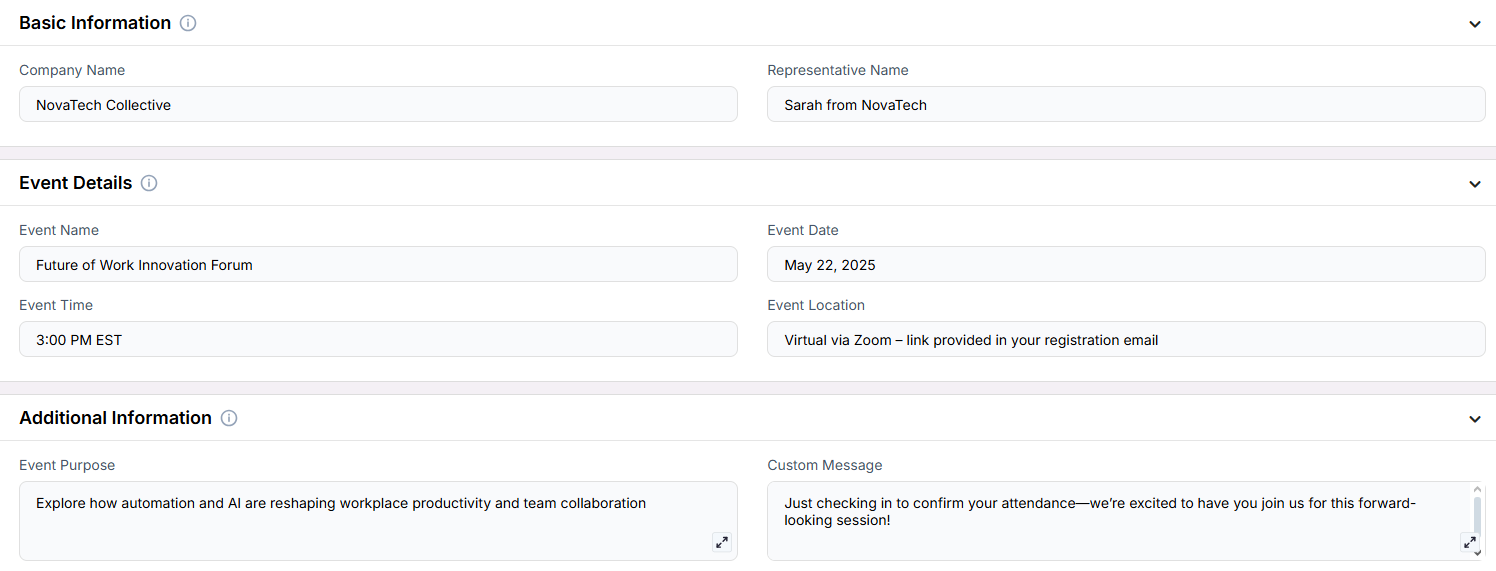 Remember that Scenarios are defined at the Project level, and every Campaign inherits the pre-filled fields from the Project, which means every Campaign can have different information in the input boxes, allowing you to tailor communications per Campaign to align with your customer or business needs.
## Example Configuration & Demo
### Basic Information
**Company Name**\
NovaTech Collective\
**Representative Name**\
Sarah from NovaTech
### Event Details
**Event Name**\
Future of Work Innovation Forum\
**Event Date**\
May 22, 2025\
**Event Time**\
3:00 PM EST\
**Event Location**\
Virtual via Zoom, link provided in your registration email
### Additional Information
**Event Purpose**\
Explore how automation and AI are reshaping workplace productivity and team collaboration\
**Custom Message**\
Just checking in to confirm your attendance, we’re excited to have you join us in this forward-looking session!
## FAQs & Troubleshooting
### General Questions
Remember that Scenarios are defined at the Project level, and every Campaign inherits the pre-filled fields from the Project, which means every Campaign can have different information in the input boxes, allowing you to tailor communications per Campaign to align with your customer or business needs.
## Example Configuration & Demo
### Basic Information
**Company Name**\
NovaTech Collective\
**Representative Name**\
Sarah from NovaTech
### Event Details
**Event Name**\
Future of Work Innovation Forum\
**Event Date**\
May 22, 2025\
**Event Time**\
3:00 PM EST\
**Event Location**\
Virtual via Zoom, link provided in your registration email
### Additional Information
**Event Purpose**\
Explore how automation and AI are reshaping workplace productivity and team collaboration\
**Custom Message**\
Just checking in to confirm your attendance, we’re excited to have you join us in this forward-looking session!
## FAQs & Troubleshooting
### General Questions