> ## Documentation Index
> Fetch the complete documentation index at: https://docs.thinkrr.ai/llms.txt
> Use this file to discover all available pages before exploring further.
# GHL Variable Error: [object Object] in thinkrr Calls
> **How to resolve '[object Object]' errors caused by unsupported or misformatted GHL dynamic variables in thinkrr Voice AI.**
## Overview
If you're seeing `[object Object]` in your thinkrr Voice AI calls—especially where a variable like a name or phone number should be—you're running into a formatting conflict between thinkrr and GoHighLevel (GHL).
This error most often appears when thinkrr is expecting a plain text string but receives a complex data object instead. It usually stems from:
* Incorrect formatting of dynamic variables (particularly for thinkrr-specific placeholders)
* Missing data in the contact record that GHL tries to send into thinkrr
* Legacy templates using outdated variable syntax
## What's Actually Happening
There is a two-way sync between GHL and thinkrr:
* Thinkrr sends data to GHL (scripts, prompts, transcripts)
* GHL sends data to thinkrr (contact variables, inputs, call info)
When one side sends improperly formatted data—or empty/incomplete contact values—the system can't interpret the input and defaults to showing `[object Object]`.
### Common Triggers for this Issue
* Using **thinkrr variables** inside GHL with **double or triple curly brackets** like `{client_firstname}` or `{meeting_location}`.
* These formats are not supported.
* **Thinkrr variables must use single curly braces only**, like `{client_firstname}`.
* Using native **GHL variables** (like `{{contact.first_name}}`) when the associated contact **has no value assigned** to that field.
* If the value is empty, GHL sends an undefined object, which thinkrr reads as `[object Object]`.
### Legacy Templates
Older thinkrr scenario templates included double/triple curly brace formatting for variables. While new templates use the correct single-curly format, older users may still have these legacy inputs.
If your workflows or outbound/inbound scenarios were set up before the fix, this is likely the cause.
## Fixing the Error
### If You're Using thinkrr-Specific Variables (like `{client_firstname}`)
* Open your GHL workflow or action block.
* Find the thinkrr variable you're passing in (usually part of a script, prompt, or custom input).
* Make sure the variable uses **single curly braces only**:
* ✅ `{client_firstname}`
* ❌ `{{client_firstname}}`
* ❌ `{{{client_firstname}}}`
* Save the changes and test again.
### Basic Contact Variables
These are the most commonly used variables for referencing contact information:
* `{client_firstname}`
* `{client_lastname}`
* `{client_phone}`
* `{client_email}`
* `{client_insight}`
### Contextual Variables
Used to reference time and environment details dynamically:
* `{current_data_time}`
* `{time_zone}`
### Scenario-Specific Dynamic Variables
These are configured per scenario to tailor the conversation and logic:
* `{ai_agent_name}`
* `{representative_name}`
* `{profession}`
* `{company_name}`
* `{initial_greeting}`
* `{introduction}`
* `{closing_statement}`
* `{reason_for_meeting}`
* `{meeting_value_proposition}`
* `{appointment_timeframe}`
* `{alternative_timeframe}`
* `{meeting_location}`
* `{calendar_id}`
* `{voicemail_message}`
* `{event}`
* `{event_occurrence}`
### Response Variables (Populated After AI Interaction)
These variables are filled in live during the call based on AI-captured responses:
* `{appointment}`
* `{meeting_duration}`
* `{meeting_location}`
### If You're Using GHL Native Variables (like `{{contact.phone_raw}}`)
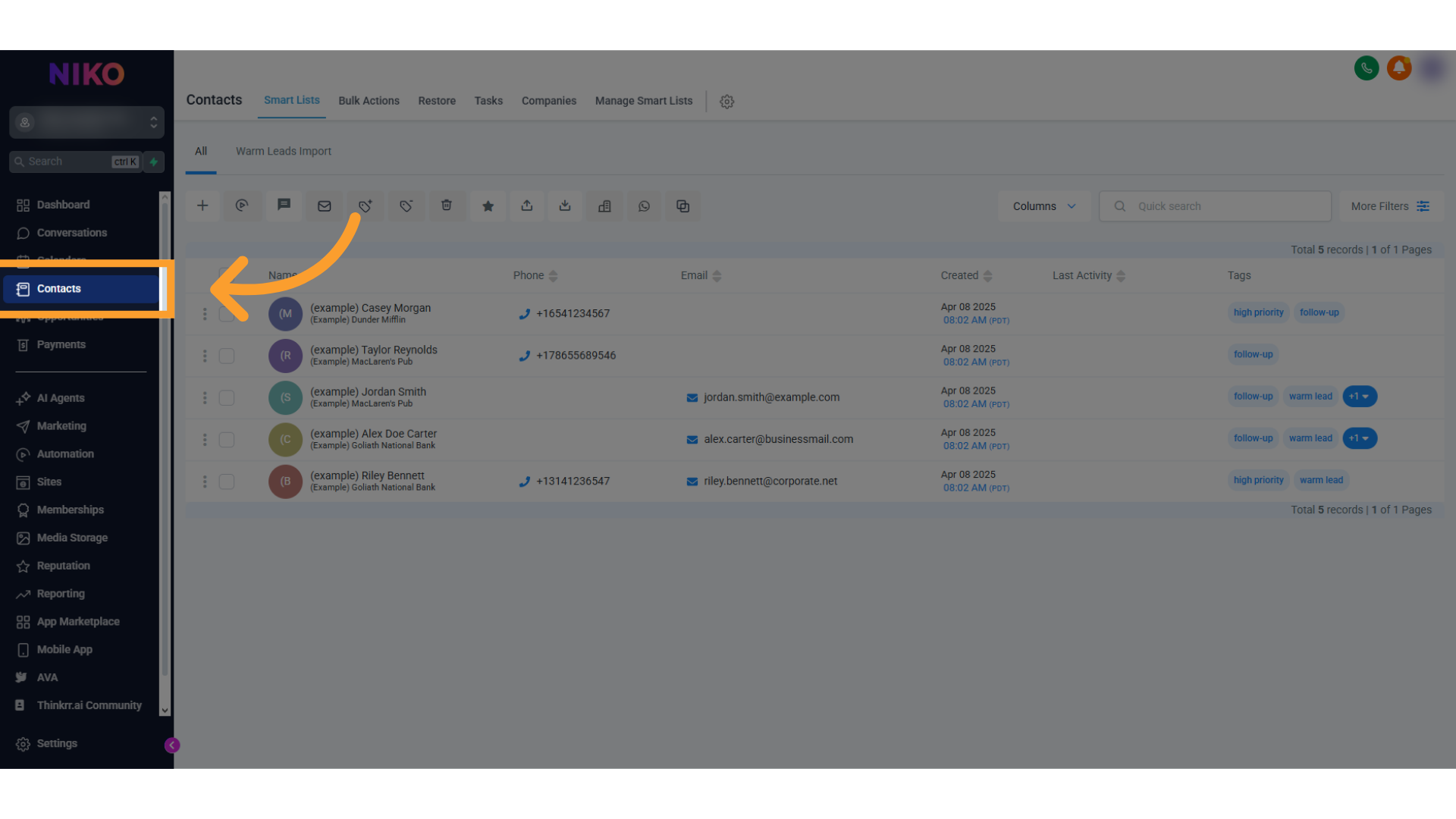
* Open the **Contacts** tab in GHL.
 * Check the record for the specific contact used in your test or call.
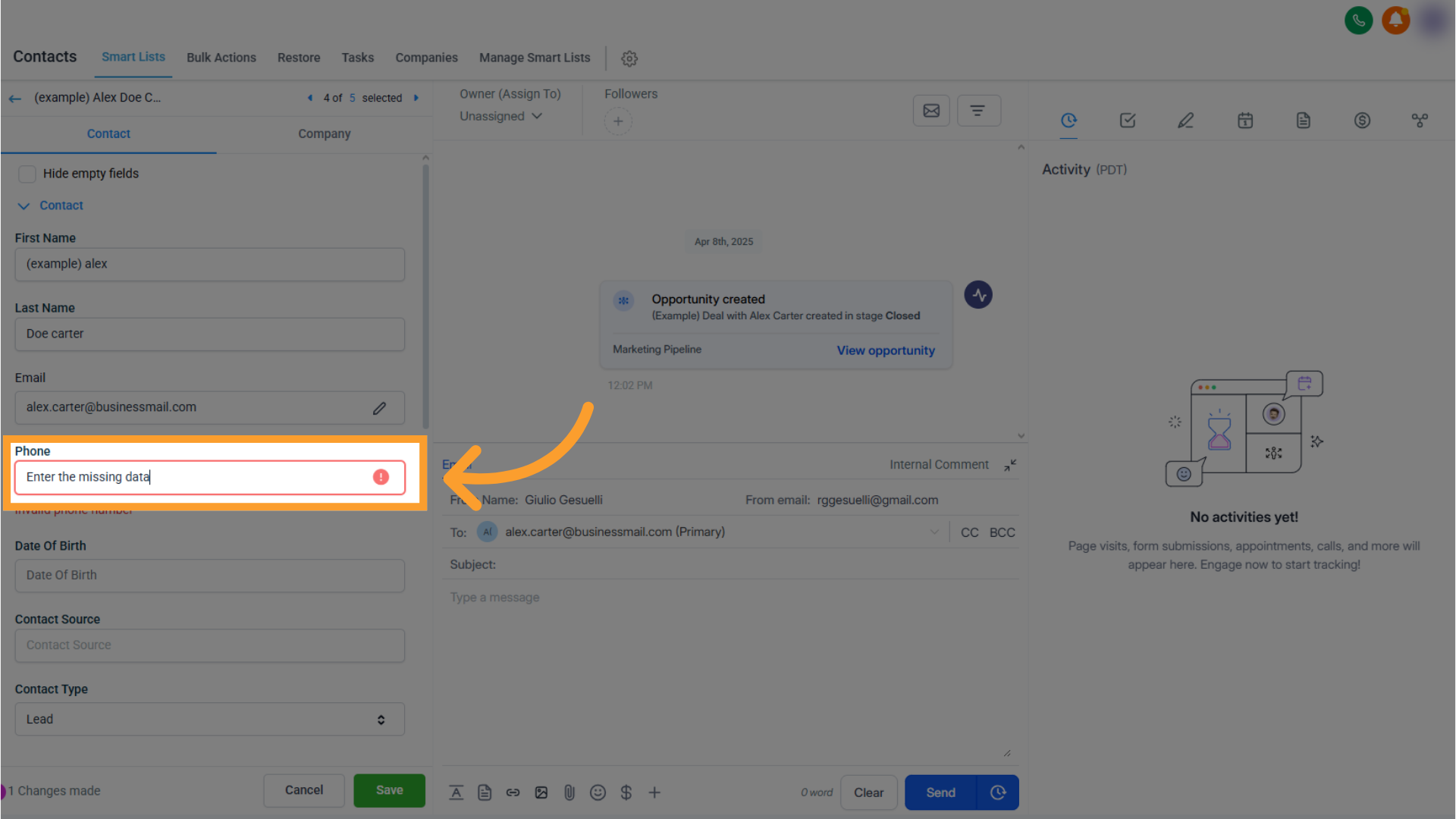
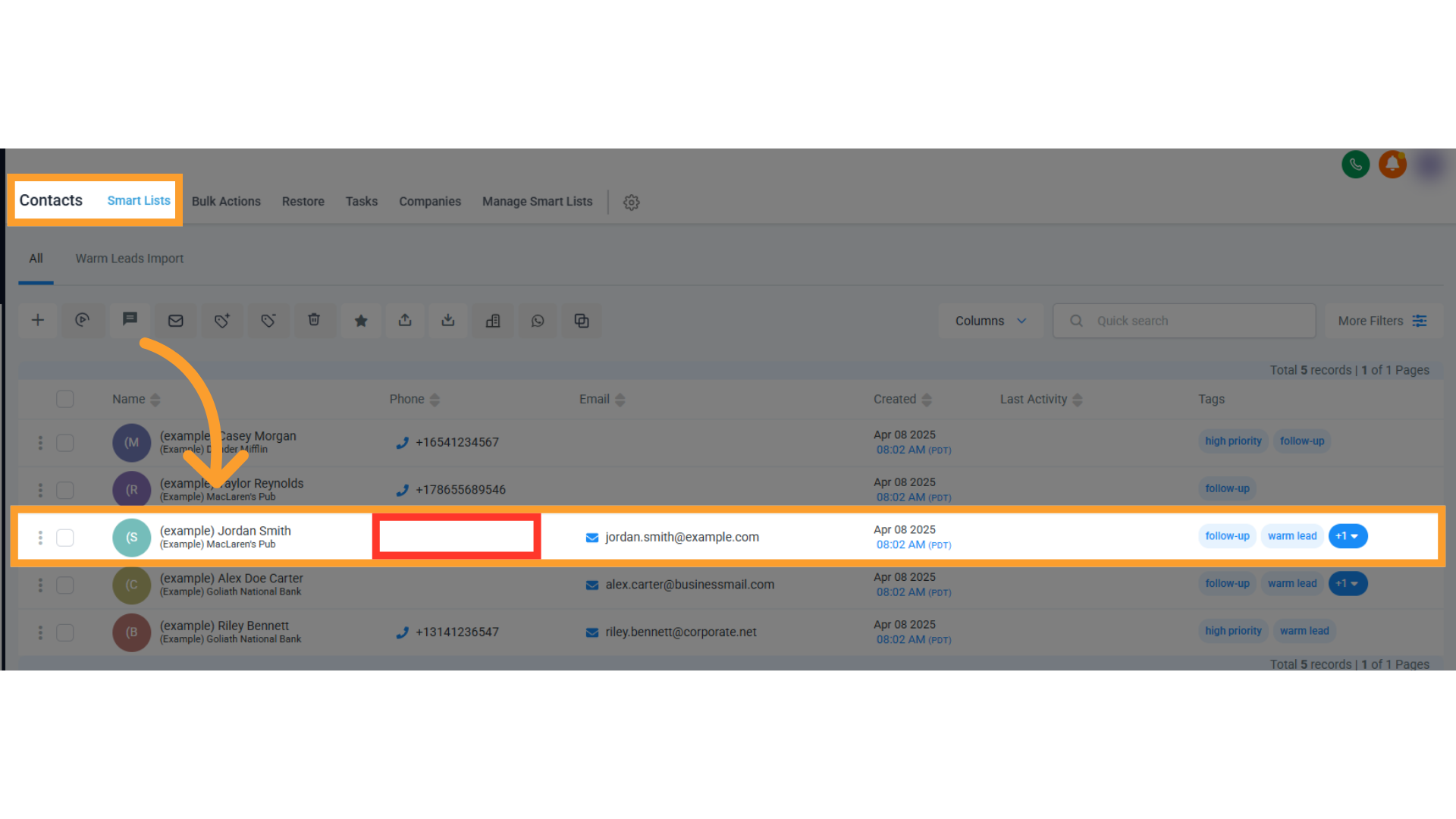 * If any variable field (e.g. `First Name`, `Phone`, etc.) is empty, fill it in manually if you need to call that value in your workflow.
 * Re-run the workflow or trigger to confirm it's resolved.
This issue can be caused by:
* **Incomplete data capture** during lead opt-in
* A **misconfigured workflow** failing to assign contact details
* An **internal GHL bug** that drops or misroutes data
Once corrected, GHL will send usable string values to thinkrr, and the `[object Object]` message will disappear.
## Workarounds
Always use `{variable}` format inside any thinkrr inputs when building workflows in GHL. Do not wrap them in `{{` or `{{{` brackets unless it's a GHL native variable.
Rebuild any thinkrr scenario using a clean, updated template to avoid inherited syntax issues.
If native GHL variables still return `[object Object]`, it's likely the contact profile is missing values. Manually update the record and re-test.
If testing, replace the dynamic variable with a static fallback (e.g. "Hi John!") to rule out variable mapping issues.
## FAQs & Troubleshooting
### General Questions
This means thinkrr received a variable from GHL that was either misformatted or empty. thinkrr doesn't know how to interpret it, so it defaults to `[object Object]`.
No. This primarily affects legacy thinkrr users who built scenarios using older templates that included double or triple curly braces.
Yes. thinkrr variables must use **single curly braces**, while GHL native variables often use `{{contact.*}}` format. Mixing them incorrectly can cause formatting errors.
### Configuration
Yes. Update any `{}` variables to use the correct bracket format and double-check your contact records for missing values.
Listen to your thinkrr call recording or read the transcript. The section where `[object Object]` is read aloud tells you which variable is broken.
No. thinkrr no longer supports triple braces in input fields. Avoid using them unless explicitly instructed by the documentation or support.
### Usage and Results
Yes — if left unresolved, `[object Object]` will appear in live calls, voicemails, and transcripts. It's best to fix the root issue as soon as possible.
It's usually a formatting or data sync issue, not a platform bug. That said, incomplete contact data and old workflows are common culprits.
Only if they rely on thinkrr variables with incorrect bracket formatting. New workflows created from updated templates are unaffected.
***
For additional questions or guidance, try using our [**Virtual Support Agent**](/Thinkrr-Support-Agent)! Available 24/7 at [thinkrr.ai/support](https://thinkrr.ai/support).
If you still need assistance, visit our help site at [help.thinkrr.ai](https://help.thinkrr.ai) and submit a [Ticket](/Support-Ticket-System) or contact our team directly at [hello@thinkrr.ai](mailto:hello@thinkrr.ai).
* Re-run the workflow or trigger to confirm it's resolved.
This issue can be caused by:
* **Incomplete data capture** during lead opt-in
* A **misconfigured workflow** failing to assign contact details
* An **internal GHL bug** that drops or misroutes data
Once corrected, GHL will send usable string values to thinkrr, and the `[object Object]` message will disappear.
## Workarounds
Always use `{variable}` format inside any thinkrr inputs when building workflows in GHL. Do not wrap them in `{{` or `{{{` brackets unless it's a GHL native variable.
Rebuild any thinkrr scenario using a clean, updated template to avoid inherited syntax issues.
If native GHL variables still return `[object Object]`, it's likely the contact profile is missing values. Manually update the record and re-test.
If testing, replace the dynamic variable with a static fallback (e.g. "Hi John!") to rule out variable mapping issues.
## FAQs & Troubleshooting
### General Questions
This means thinkrr received a variable from GHL that was either misformatted or empty. thinkrr doesn't know how to interpret it, so it defaults to `[object Object]`.
No. This primarily affects legacy thinkrr users who built scenarios using older templates that included double or triple curly braces.
Yes. thinkrr variables must use **single curly braces**, while GHL native variables often use `{{contact.*}}` format. Mixing them incorrectly can cause formatting errors.
### Configuration
Yes. Update any `{}` variables to use the correct bracket format and double-check your contact records for missing values.
Listen to your thinkrr call recording or read the transcript. The section where `[object Object]` is read aloud tells you which variable is broken.
No. thinkrr no longer supports triple braces in input fields. Avoid using them unless explicitly instructed by the documentation or support.
### Usage and Results
Yes — if left unresolved, `[object Object]` will appear in live calls, voicemails, and transcripts. It's best to fix the root issue as soon as possible.
It's usually a formatting or data sync issue, not a platform bug. That said, incomplete contact data and old workflows are common culprits.
Only if they rely on thinkrr variables with incorrect bracket formatting. New workflows created from updated templates are unaffected.
***
For additional questions or guidance, try using our [**Virtual Support Agent**](/Thinkrr-Support-Agent)! Available 24/7 at [thinkrr.ai/support](https://thinkrr.ai/support).
If you still need assistance, visit our help site at [help.thinkrr.ai](https://help.thinkrr.ai) and submit a [Ticket](/Support-Ticket-System) or contact our team directly at [hello@thinkrr.ai](mailto:hello@thinkrr.ai).