> ## Documentation Index
> Fetch the complete documentation index at: https://docs.thinkrr.ai/llms.txt
> Use this file to discover all available pages before exploring further.
# Generic Outbound Scenario with Cold Transfer
> Provides the ultimate flexibility to define an outbound call, includes identity, call-flow, objection-handling and key information. Includes Cold Transfer.
## Details
The **Generic Outbound Scenario with Cold Transfer** builds on the original Generic Outbound framework by adding support for **live cold transfers**, allowing your AI agent to connect the contact directly to a human representative during the call. This gives your outreach efforts an immediate handoff option—ideal for sales, support, or follow-up teams looking to increase conversions through real-time engagement.
You’ll retain full control over the AI's persona, tone, objection handling, and call structure, while also defining how and when to initiate the transfer.
## Key Features
1. **Purpose**
* Conduct fully customized outbound AI conversations
* Support real-time **cold transfers** to live agents
* Define detailed flow, tone, and objection handling logic
* Equip agents with fallback voicemail messages
2. **Customizable User Input Fields:**\
This scenario supports value-first outbound calls with the added ability to **cold transfer** contacts to a live representative. Fields below define how the AI presents itself, delivers key information, handles logic, and executes the transfer.
***
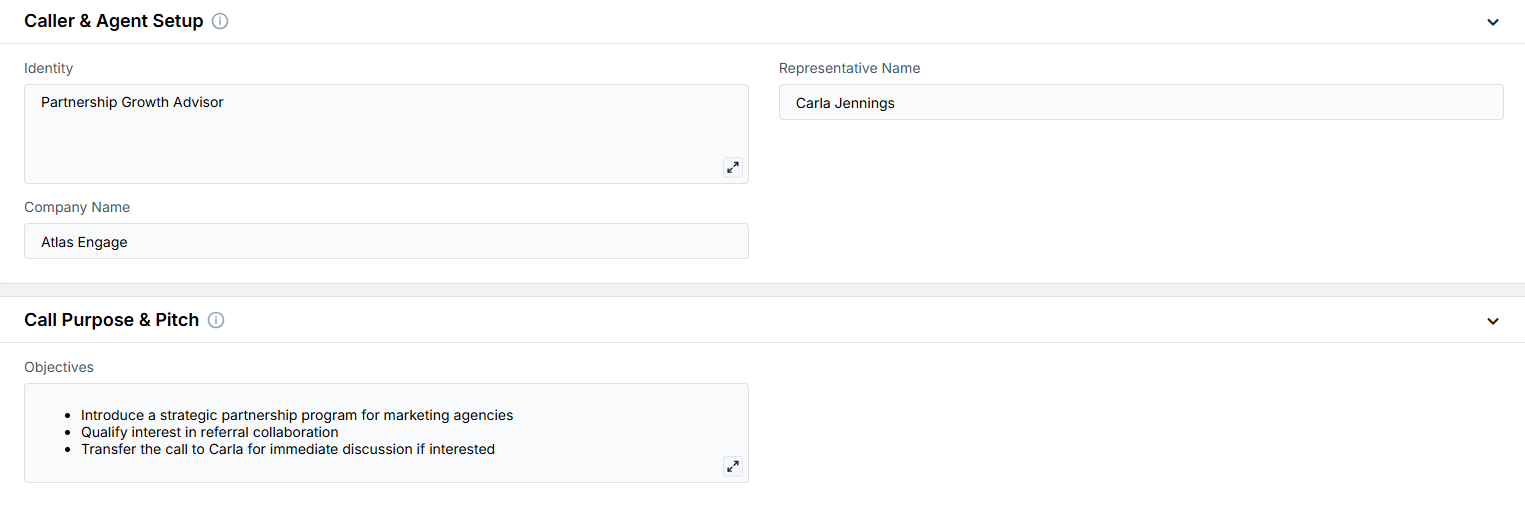
**Caller and Agent Setup**\
Fields that define who the AI is representing and the framing of the conversation.
* **Identity**: The persona or role the AI should present (e.g., “Customer Retention Specialist”).
* **Representative Name**: The person or title the AI is calling on behalf of.
* **Company Name**: The business name to include in the conversation.
***
**Call Purpose and Pitch**\
Defines what the outreach is meant to accomplish and what value is being offered.
* **Objectives**: Goals of the call, such as offering a resource, sharing insights, or prompting a transfer.
***
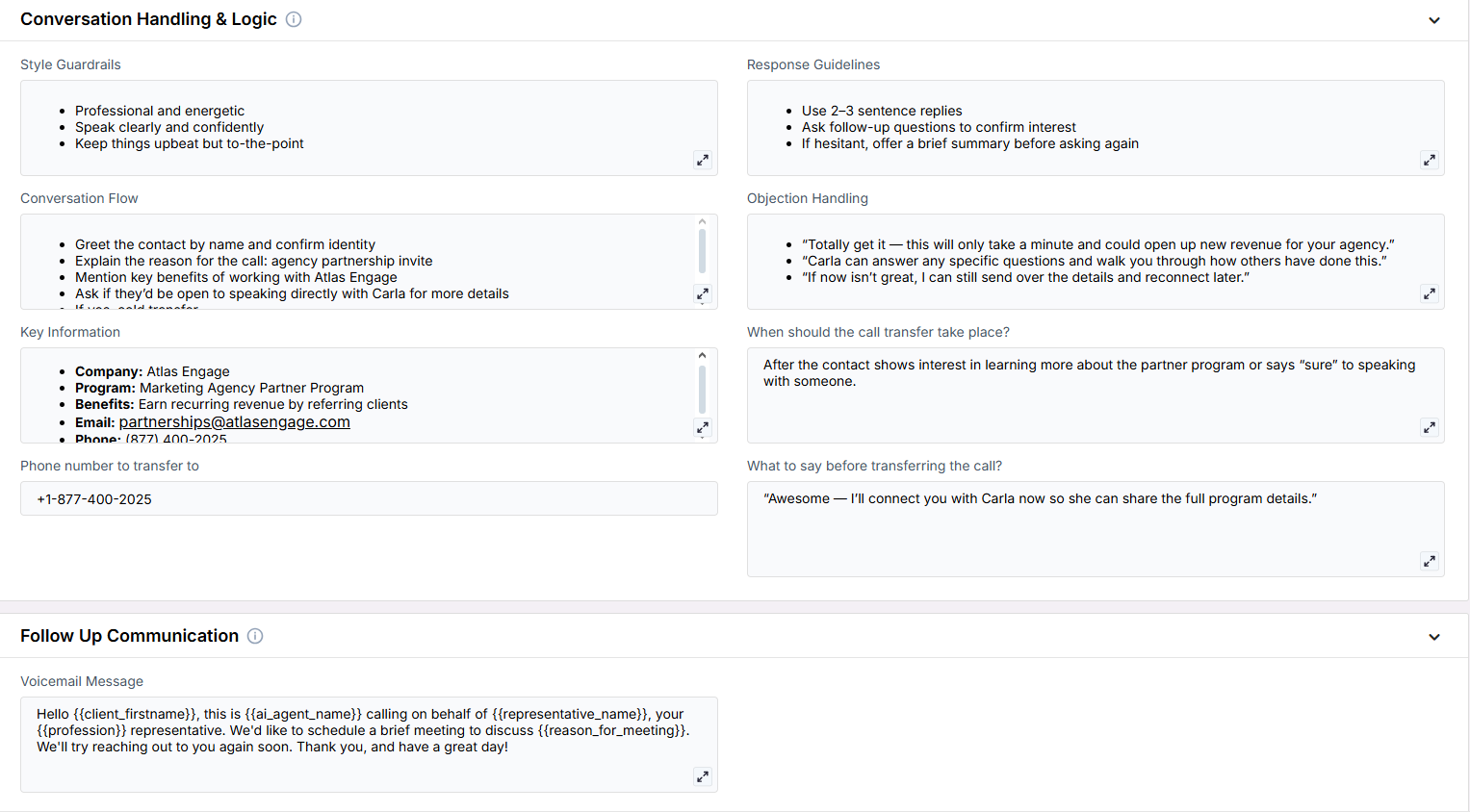
**Conversation Handling & Logic**\
These fields shape how the AI should behave, respond, and control the tone throughout the conversation.
* **Agent Approach**: Describe tone and presentation style (e.g., “Empathetic and concise”).
c
* **Response Guidelines**: Instructions the AI should follow when replying.
* **Conversation Flow**: Outline of the intended interaction path.
* **Objection Handling**: Rebuttals the AI can use to address concerns.
* **Key Information**: Must-mention details such as services, website, or business credentials.
* **When should the call transfer take place?**: Define the point at which a cold transfer should be attempted (e.g., after confirming interest).
* **Phone number to transfer to**: The phone number the call should be transferred to (e.g., +1-888-123-4567).
* **What to say before transferring the call?**: Phrase or transition line before executing the transfer (e.g., “Let me connect you now.”)
***
**Follow-Up Communication**\
Fallback messaging when the contact does not answer.
* **Voicemail Message**: Script the AI leaves when the contact doesn’t pick up.
***
3. **Objective**
* To offer personalized, high-value conversations that can escalate to a live human rep
* To maximize conversion opportunities by enabling real-time cold transfers
* To maintain flexible control over conversation tone, pitch, and flow
Here is the **Project Configurations** interface of this scenario, alongside instructions and some examples:
Remember that Scenarios are defined at the Project level, and every Campaign inherits the pre-filled fields from the Project, which means every Campaign can have different information in the input boxes, allowing you to tailor communications per Campaign to align with your customer/client or business needs.
## Example Configurations
1. **Identity**
* SaaS Sales Strategist
* Customer Loyalty Specialist
* Outreach Coordinator for Local Campaigns
2. **Objectives**
* Share value of service or offer a limited-time deal
* Confirm eligibility for next steps
* Connect to a live team member for further assistance
3. **Conversation Flow**
* Personalized greeting and introduction
* Present the value offer or topic of interest
* Qualify the contact based on predefined criteria
* Offer a transfer to a live agent if appropriate
* If declined, offer alternative next steps (e.g., send info via email)
4. **Objection Handling**
* “Totally understand — many clients felt the same before speaking to one of our team members.”
* “This will only take a few minutes and can clarify any questions right away.”
* “If now’s not a good time, I can connect you later or send the details over email.”
5. **Key Information**
* Company: Nova Solutions
* Services: B2B SaaS integrations, CRM onboarding
* Contact: [connect@nova-solutions.com](mailto:connect@nova-solutions.com) | (888) 555-1212
6. **Transfer Logic**
* **When should the call transfer take place?**\
After the AI confirms that the contact is interested in learning more or speaking with a human.
* **Phone number to transfer to:**\
+1-888-123-4567
* **What to say before transferring the call?**\
“Great — I’ll connect you now so you can speak with someone directly.”
7. **Style Guardrails**
* Friendly but authoritative
* Keep answers short and allow the contact to ask questions
* Make transitions smooth and natural when moving toward a transfer
8. **Response Guidelines**
* Stick to 2–3 sentence responses
* Confirm interest before offering to transfer
* Avoid pressure; focus on enabling the next step
## FAQs & Troubleshooting
### General Questions
This version includes the ability to perform **cold transfers**—allowing the AI to connect the call to a human agent mid-conversation.
No. The AI will first confirm interest with the contact before dialing the transfer number you've configured.
### Configuration
You can provide **fallback messaging** to use if the transfer doesn't go through, ensuring the call still ends professionally.
Yes. You can clone existing project configurations and simply add the new Cold Transfer fields to enable the feature.
### Usage and Results
The outcome of the transfer (successful, failed, skipped) will be captured in the call transcript and available in your analytics logs.
Absolutely. Each campaign can have its own transfer number and trigger phrase, depending on your outreach strategy.
***
For additional questions or guidance, try using our [**Virtual Support Agent**](/Thinkrr-Support-Agent)! Available 24/7 to help resolve most issues quickly at [thinkrr.ai/support](https://thinkrr.ai/support).
If you still need assistance, visit our support site at [help.thinkrr.ai](http://help.thinkrr.ai) and submit a [Ticket](/Support-Ticket-System) or contact our team directly at [hello@thinkrr.ai](mailto:hello@thinkrr.ai).
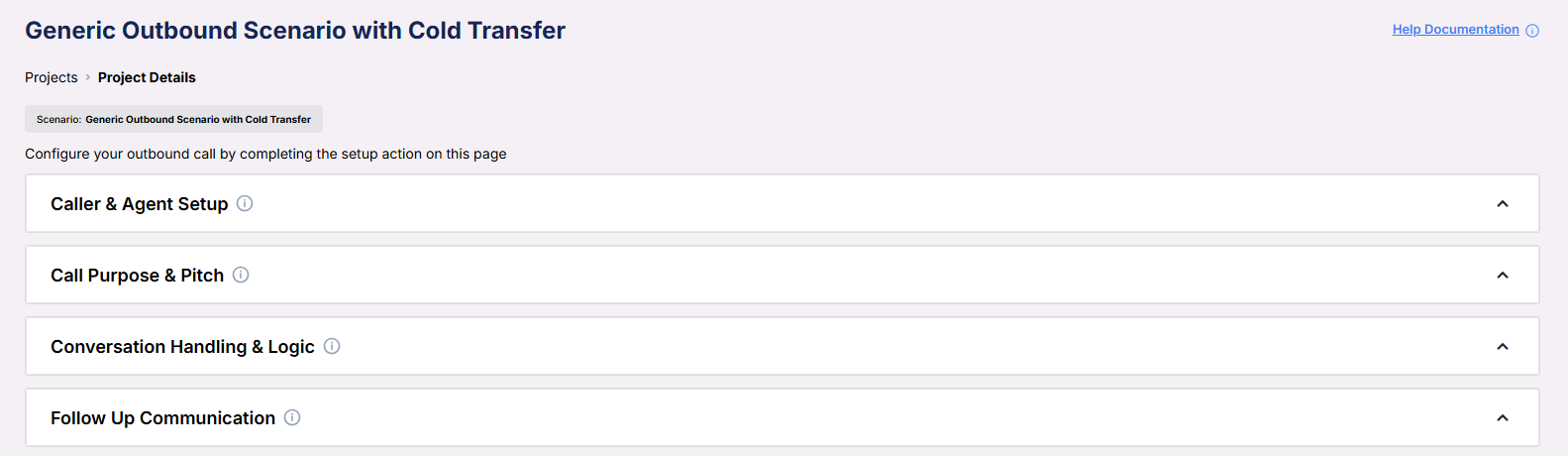 ***
**Caller and Agent Setup**\
Fields that define who the AI is representing and the framing of the conversation.
***
**Caller and Agent Setup**\
Fields that define who the AI is representing and the framing of the conversation.
 * **Identity**: The persona or role the AI should present (e.g., “Customer Retention Specialist”).
* **Representative Name**: The person or title the AI is calling on behalf of.
* **Company Name**: The business name to include in the conversation.
***
**Call Purpose and Pitch**\
Defines what the outreach is meant to accomplish and what value is being offered.
* **Identity**: The persona or role the AI should present (e.g., “Customer Retention Specialist”).
* **Representative Name**: The person or title the AI is calling on behalf of.
* **Company Name**: The business name to include in the conversation.
***
**Call Purpose and Pitch**\
Defines what the outreach is meant to accomplish and what value is being offered.
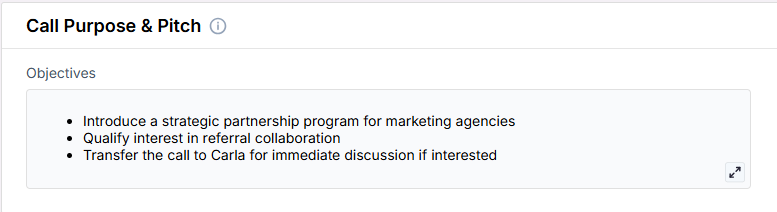 * **Objectives**: Goals of the call, such as offering a resource, sharing insights, or prompting a transfer.
***
**Conversation Handling & Logic**\
These fields shape how the AI should behave, respond, and control the tone throughout the conversation.
* **Objectives**: Goals of the call, such as offering a resource, sharing insights, or prompting a transfer.
***
**Conversation Handling & Logic**\
These fields shape how the AI should behave, respond, and control the tone throughout the conversation.
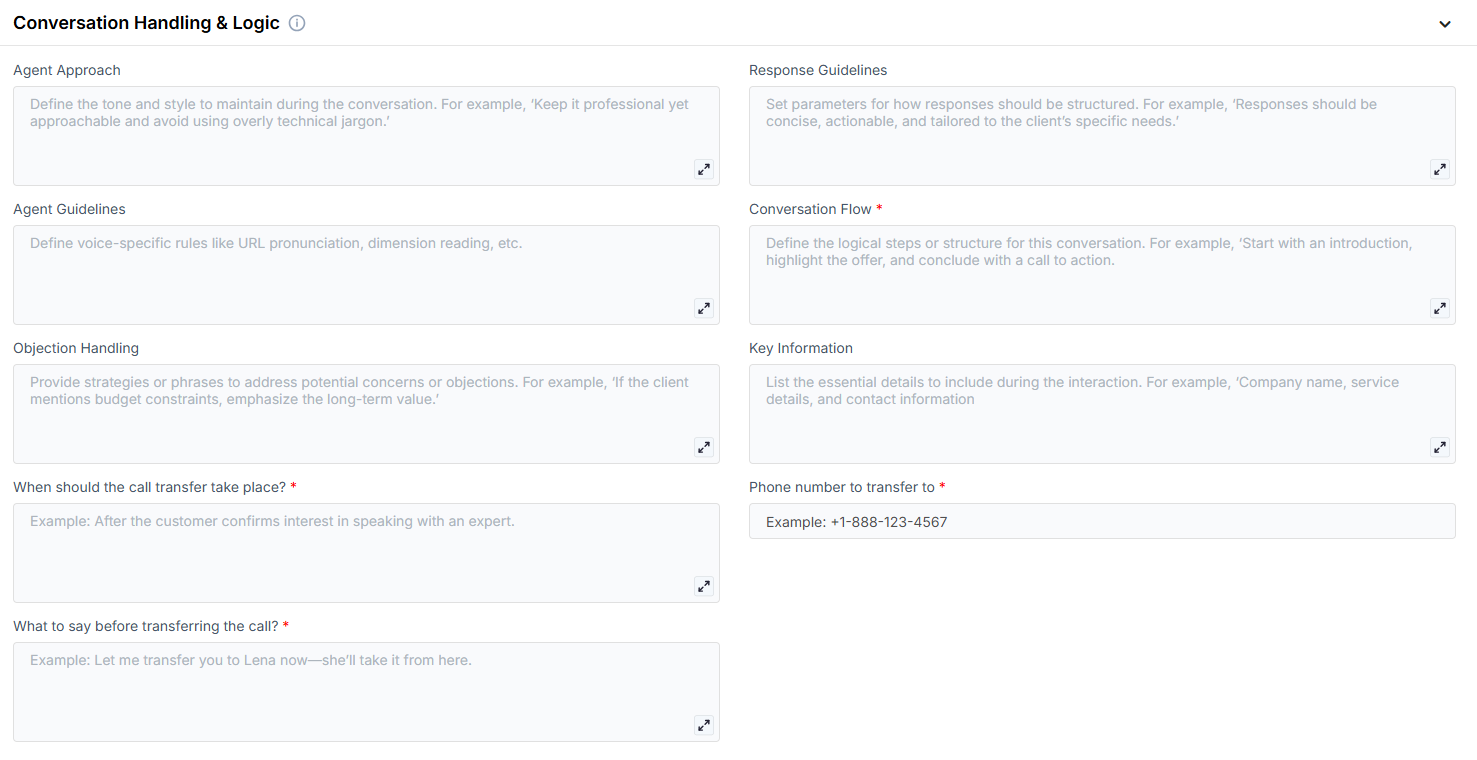 * **Agent Approach**: Describe tone and presentation style (e.g., “Empathetic and concise”).
c
* **Response Guidelines**: Instructions the AI should follow when replying.
* **Conversation Flow**: Outline of the intended interaction path.
* **Objection Handling**: Rebuttals the AI can use to address concerns.
* **Key Information**: Must-mention details such as services, website, or business credentials.
* **When should the call transfer take place?**: Define the point at which a cold transfer should be attempted (e.g., after confirming interest).
* **Phone number to transfer to**: The phone number the call should be transferred to (e.g., +1-888-123-4567).
* **What to say before transferring the call?**: Phrase or transition line before executing the transfer (e.g., “Let me connect you now.”)
***
**Follow-Up Communication**\
Fallback messaging when the contact does not answer.
* **Agent Approach**: Describe tone and presentation style (e.g., “Empathetic and concise”).
c
* **Response Guidelines**: Instructions the AI should follow when replying.
* **Conversation Flow**: Outline of the intended interaction path.
* **Objection Handling**: Rebuttals the AI can use to address concerns.
* **Key Information**: Must-mention details such as services, website, or business credentials.
* **When should the call transfer take place?**: Define the point at which a cold transfer should be attempted (e.g., after confirming interest).
* **Phone number to transfer to**: The phone number the call should be transferred to (e.g., +1-888-123-4567).
* **What to say before transferring the call?**: Phrase or transition line before executing the transfer (e.g., “Let me connect you now.”)
***
**Follow-Up Communication**\
Fallback messaging when the contact does not answer.
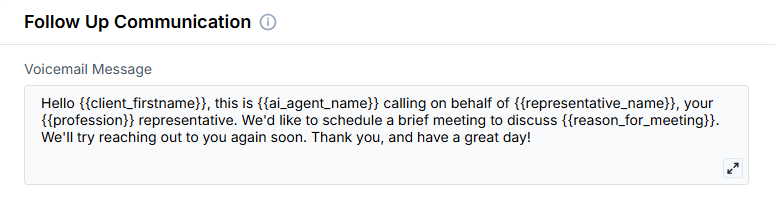 * **Voicemail Message**: Script the AI leaves when the contact doesn’t pick up.
***
3. **Objective**
* To offer personalized, high-value conversations that can escalate to a live human rep
* To maximize conversion opportunities by enabling real-time cold transfers
* To maintain flexible control over conversation tone, pitch, and flow
Here is the **Project Configurations** interface of this scenario, alongside instructions and some examples:
* **Voicemail Message**: Script the AI leaves when the contact doesn’t pick up.
***
3. **Objective**
* To offer personalized, high-value conversations that can escalate to a live human rep
* To maximize conversion opportunities by enabling real-time cold transfers
* To maintain flexible control over conversation tone, pitch, and flow
Here is the **Project Configurations** interface of this scenario, alongside instructions and some examples:
 Remember that Scenarios are defined at the Project level, and every Campaign inherits the pre-filled fields from the Project, which means every Campaign can have different information in the input boxes, allowing you to tailor communications per Campaign to align with your customer/client or business needs.
## Example Configurations
1. **Identity**
* SaaS Sales Strategist
* Customer Loyalty Specialist
* Outreach Coordinator for Local Campaigns
2. **Objectives**
* Share value of service or offer a limited-time deal
* Confirm eligibility for next steps
* Connect to a live team member for further assistance
3. **Conversation Flow**
* Personalized greeting and introduction
* Present the value offer or topic of interest
* Qualify the contact based on predefined criteria
* Offer a transfer to a live agent if appropriate
* If declined, offer alternative next steps (e.g., send info via email)
4. **Objection Handling**
* “Totally understand — many clients felt the same before speaking to one of our team members.”
* “This will only take a few minutes and can clarify any questions right away.”
* “If now’s not a good time, I can connect you later or send the details over email.”
5. **Key Information**
* Company: Nova Solutions
* Services: B2B SaaS integrations, CRM onboarding
* Contact: [connect@nova-solutions.com](mailto:connect@nova-solutions.com) | (888) 555-1212
6. **Transfer Logic**
* **When should the call transfer take place?**\
After the AI confirms that the contact is interested in learning more or speaking with a human.
* **Phone number to transfer to:**\
+1-888-123-4567
* **What to say before transferring the call?**\
“Great — I’ll connect you now so you can speak with someone directly.”
7. **Style Guardrails**
* Friendly but authoritative
* Keep answers short and allow the contact to ask questions
* Make transitions smooth and natural when moving toward a transfer
8. **Response Guidelines**
* Stick to 2–3 sentence responses
* Confirm interest before offering to transfer
* Avoid pressure; focus on enabling the next step
## FAQs & Troubleshooting
### General Questions
Remember that Scenarios are defined at the Project level, and every Campaign inherits the pre-filled fields from the Project, which means every Campaign can have different information in the input boxes, allowing you to tailor communications per Campaign to align with your customer/client or business needs.
## Example Configurations
1. **Identity**
* SaaS Sales Strategist
* Customer Loyalty Specialist
* Outreach Coordinator for Local Campaigns
2. **Objectives**
* Share value of service or offer a limited-time deal
* Confirm eligibility for next steps
* Connect to a live team member for further assistance
3. **Conversation Flow**
* Personalized greeting and introduction
* Present the value offer or topic of interest
* Qualify the contact based on predefined criteria
* Offer a transfer to a live agent if appropriate
* If declined, offer alternative next steps (e.g., send info via email)
4. **Objection Handling**
* “Totally understand — many clients felt the same before speaking to one of our team members.”
* “This will only take a few minutes and can clarify any questions right away.”
* “If now’s not a good time, I can connect you later or send the details over email.”
5. **Key Information**
* Company: Nova Solutions
* Services: B2B SaaS integrations, CRM onboarding
* Contact: [connect@nova-solutions.com](mailto:connect@nova-solutions.com) | (888) 555-1212
6. **Transfer Logic**
* **When should the call transfer take place?**\
After the AI confirms that the contact is interested in learning more or speaking with a human.
* **Phone number to transfer to:**\
+1-888-123-4567
* **What to say before transferring the call?**\
“Great — I’ll connect you now so you can speak with someone directly.”
7. **Style Guardrails**
* Friendly but authoritative
* Keep answers short and allow the contact to ask questions
* Make transitions smooth and natural when moving toward a transfer
8. **Response Guidelines**
* Stick to 2–3 sentence responses
* Confirm interest before offering to transfer
* Avoid pressure; focus on enabling the next step
## FAQs & Troubleshooting
### General Questions