> ## Documentation Index
> Fetch the complete documentation index at: https://docs.thinkrr.ai/llms.txt
> Use this file to discover all available pages before exploring further.
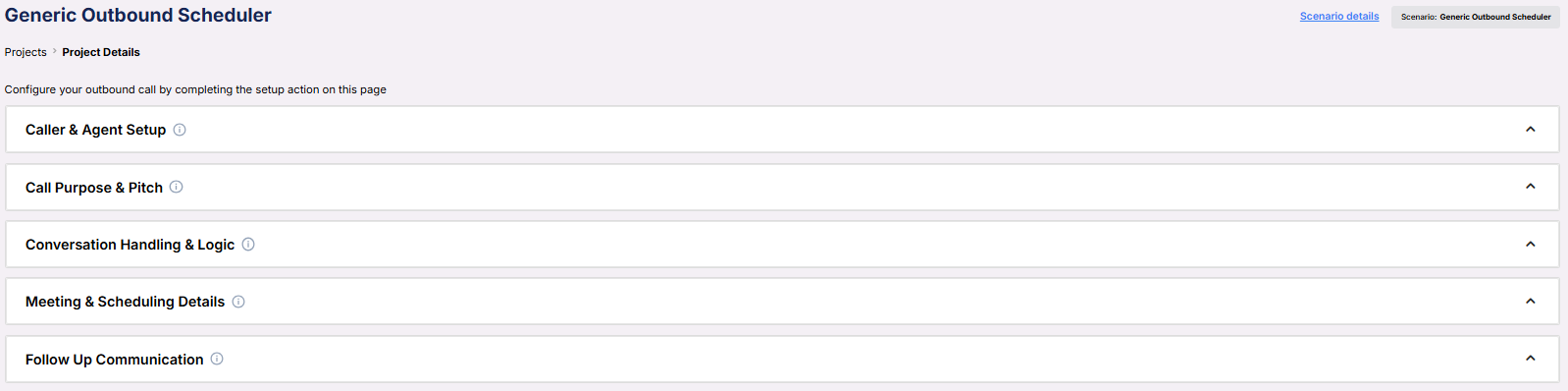
# Generic Outbound Scheduler
> Flexible outbound call framework with support for appointment scheduling. Customize tone, identity, pitch, objection handling, and meeting configuration for high-conversion conversations.
## Details
The **Generic Outbound Scheduler** scenario is designed for outbound campaigns where the primary goal is to engage contacts and convert interest into scheduled meetings. It retains all the conversational flexibility of the **Generic Outbound Scenario** — including identity framing, tone, objection handling, and response flow — while adding support for real-time appointment booking into connected calendars.
This scenario is ideal for sales teams, consultants, and service providers who want to drive deeper engagement through structured, value-first calls that conclude with a meeting invite.
## Key Features
1. **Purpose**
* Launch value-based outbound calls across industries
* Guide conversations toward a scheduled appointment
* Support fully customizable tone, structure, and logic
* Equip AI agents with fallback voicemail messages
2. **Customizable User Input Fields:**
***
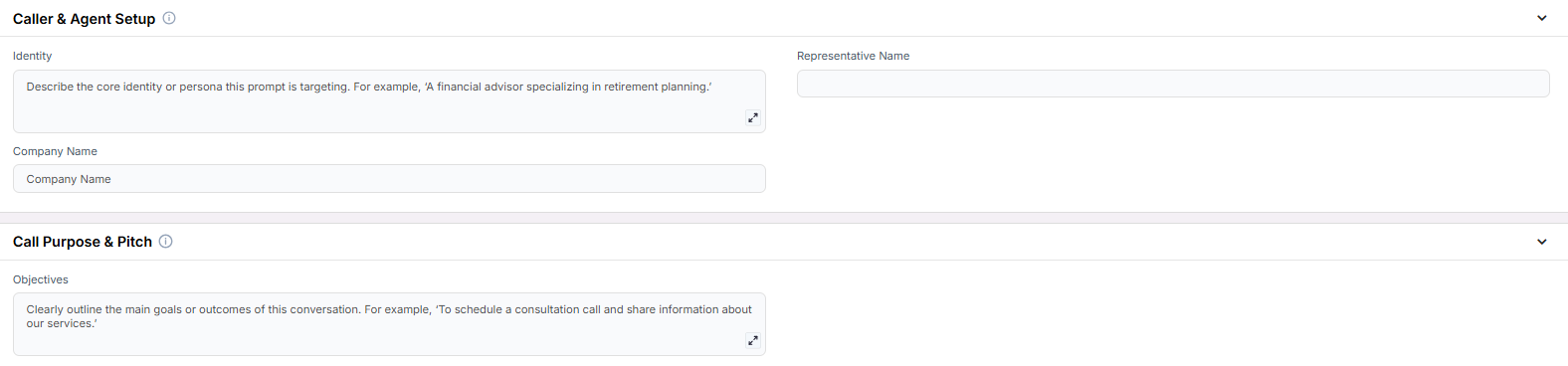
**Caller & Agent Setup**
Fields that define who the AI represents and how it presents itself to the contact.
* **Identity**: Describe the caller’s persona (e.g., “A financial advisor specializing in retirement planning”).
* **Representative Name**: The person or role the agent is calling on behalf of.
* **Company Name**: The business being represented.
***
**Call Purpose & Pitch**
Defines the goals of the call and the core message the AI should communicate.
* **Objectives**: Key goals such as “Book a consultation” or “Explain service benefits.”
***
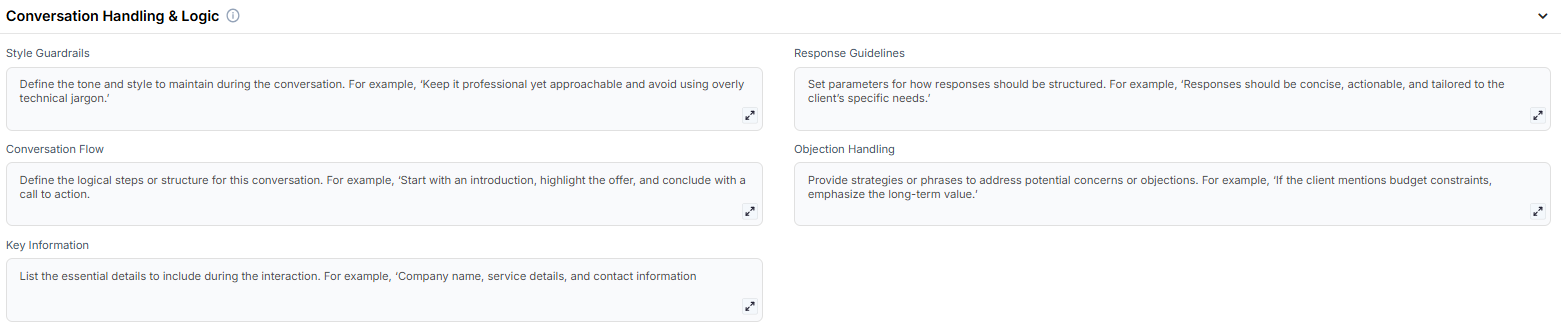
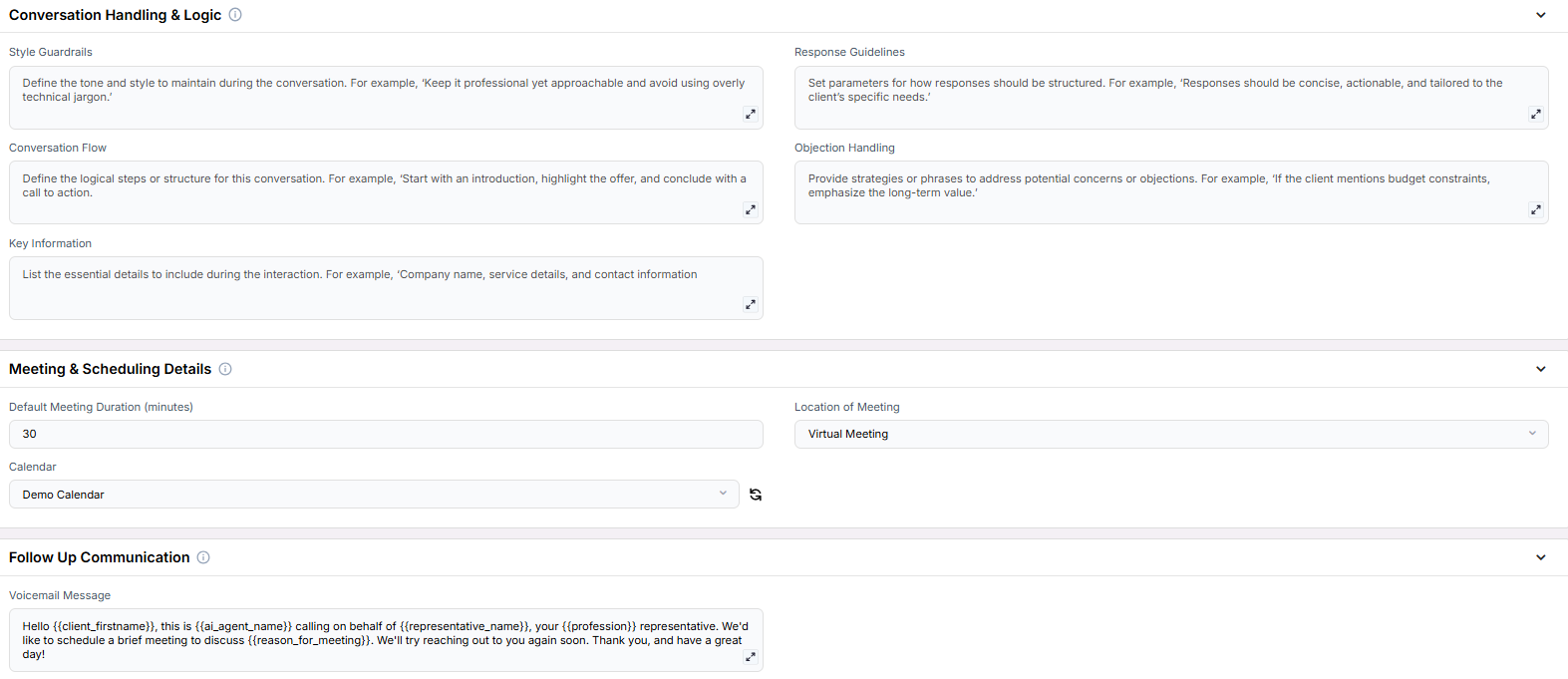
**Conversation Handling & Logic**
These fields shape the agent’s tone, logic, and how to handle objections and structure the dialogue.
* **Style Guardrails**: Set tone and boundaries (e.g., “Professional yet approachable”).
* **Response Guidelines**: Define format (e.g., “Short, specific, and client-centered”).
* **Conversation Flow**: Outline the high-level sequence (e.g., “Intro → Offer → CTA”).
* **Objection Handling**: Include phrases to deflect concerns (e.g., pricing hesitations).
* **Key Information**: Must-include facts like contact info, service names, or trust signals.
***
**Meeting & Scheduling Details**
Configure how the AI proposes and schedules appointments.
* **Default Meeting Duration (minutes)**: Set the default length (e.g., 30 minutes).
* **Location of Meeting**: Indicate whether it's virtual, in-person, or hybrid.
* **Calendar**: Assign a connected calendar for scheduling.
***
**Follow-Up Communication**
Voicemail fallback used if the contact does not answer.
* **Voicemail Message**: The scripted message the AI should leave.
3. **Objective**
* To engage leads through structured outbound calls
* To convert qualified contacts into scheduled meetings
* To reduce manual scheduling effort and ensure follow-through
Here is the **Project Configurations** interface of this scenario, alongside instructions and some examples:
Remember that Scenarios are defined at the Project level, and every Campaign inherits the pre-filled fields from the Project, allowing you to customize each outreach effort independently.
## Example Configuration & Demo
### Caller & Agent Setup
**Identity**\
A SaaS sales executive helping startups scale efficiently\
**Representative Name**\
John\
**Company Name**\
Analysis dot IO
### Call Purpose & Pitch
**Objectives**\
Schedule a demo or discovery session\
Share value of product or service\
Book a consultation with our specialist team
### Conversation Handling & Logic
**Style Guardrails**\
Professional yet approachable. Do not use overly technical language. Focus on the results the product can provide.\
**Response Guidelines**\
Short, specific, and client-centered\
**Conversation Flow**\
Introduction and value offer → Qualify lead → Propose a meeting → Confirm calendar invite\
**Objection Handling**\
“We can tailor the meeting to fit your availability.”\
“Many of our clients started with a short 15-minute intro.”\
“No pressure — this is just to see if there's a fit.”\
**Key Information**\
“We’re trusted by 200+ tech companies.”\
“Thinker dot AI’s solution integrates in under 10 minutes.”
### Meeting & Scheduling Details
**Default Meeting Duration (minutes)**\
30\
**Location of Meeting**\
Virtual Meeting\
**Calendar**\
Agent Testing
### Follow-Up Communication
**Voicemail Message**\
Hello {{client_firstname}}, this is {{ai_agent_name}} calling on behalf of {{representative_name}}, your {{profession}} representative. We'd like to schedule a brief meeting to discuss {{reason_for_meeting}}. We'll try reaching out to you again soon. Thank you, and have a great day!
## FAQs & Troubleshooting
### General Questions
This scenario includes the ability to book meetings directly into a connected calendar, making it ideal for appointment-setting workflows. It retains all the customization flexibility of the Generic Outbound flow.
Yes, it’s perfect for cold calling with a value-first pitch followed by a scheduling CTA.
### Configuration
Yes, you must assign a connected calendar to enable meeting scheduling. If no calendar is selected, the AI will skip that part of the conversation.
Yes, you can adjust the **Default Meeting Duration** field to reflect your preferences or availability.
### Usage and Results
The AI will leave the configured **Voicemail Message** if set. If no voicemail is defined, the call will end without follow-up.
Yes. If a time is accepted, the AI confirms and logs the meeting into your assigned calendar.
***
For additional questions or guidance, try using our [**Virtual Support Agent**](/Thinkrr-Support-Agent)! Available 24/7 to help resolve most issues quickly at [thinkrr.ai/support](https://thinkrr.ai/support).
If you still need assistance, visit our support site at [help.thinkrr.ai](http://help.thinkrr.ai) and submit a [Ticket](/Support-Ticket-System) or contact our team directly at [hello@thinkrr.ai](mailto:hello@thinkrr.ai).
 ***
**Caller & Agent Setup**
Fields that define who the AI represents and how it presents itself to the contact.
* **Identity**: Describe the caller’s persona (e.g., “A financial advisor specializing in retirement planning”).
* **Representative Name**: The person or role the agent is calling on behalf of.
* **Company Name**: The business being represented.
***
**Caller & Agent Setup**
Fields that define who the AI represents and how it presents itself to the contact.
* **Identity**: Describe the caller’s persona (e.g., “A financial advisor specializing in retirement planning”).
* **Representative Name**: The person or role the agent is calling on behalf of.
* **Company Name**: The business being represented.
 ***
**Call Purpose & Pitch**
Defines the goals of the call and the core message the AI should communicate.
* **Objectives**: Key goals such as “Book a consultation” or “Explain service benefits.”
***
**Call Purpose & Pitch**
Defines the goals of the call and the core message the AI should communicate.
* **Objectives**: Key goals such as “Book a consultation” or “Explain service benefits.”
 ***
**Conversation Handling & Logic**
These fields shape the agent’s tone, logic, and how to handle objections and structure the dialogue.
* **Style Guardrails**: Set tone and boundaries (e.g., “Professional yet approachable”).
* **Response Guidelines**: Define format (e.g., “Short, specific, and client-centered”).
* **Conversation Flow**: Outline the high-level sequence (e.g., “Intro → Offer → CTA”).
* **Objection Handling**: Include phrases to deflect concerns (e.g., pricing hesitations).
* **Key Information**: Must-include facts like contact info, service names, or trust signals.
***
**Conversation Handling & Logic**
These fields shape the agent’s tone, logic, and how to handle objections and structure the dialogue.
* **Style Guardrails**: Set tone and boundaries (e.g., “Professional yet approachable”).
* **Response Guidelines**: Define format (e.g., “Short, specific, and client-centered”).
* **Conversation Flow**: Outline the high-level sequence (e.g., “Intro → Offer → CTA”).
* **Objection Handling**: Include phrases to deflect concerns (e.g., pricing hesitations).
* **Key Information**: Must-include facts like contact info, service names, or trust signals.
 ***
**Meeting & Scheduling Details**
Configure how the AI proposes and schedules appointments.
* **Default Meeting Duration (minutes)**: Set the default length (e.g., 30 minutes).
* **Location of Meeting**: Indicate whether it's virtual, in-person, or hybrid.
* **Calendar**: Assign a connected calendar for scheduling.
***
**Meeting & Scheduling Details**
Configure how the AI proposes and schedules appointments.
* **Default Meeting Duration (minutes)**: Set the default length (e.g., 30 minutes).
* **Location of Meeting**: Indicate whether it's virtual, in-person, or hybrid.
* **Calendar**: Assign a connected calendar for scheduling.
 ***
**Follow-Up Communication**
Voicemail fallback used if the contact does not answer.
* **Voicemail Message**: The scripted message the AI should leave.
***
**Follow-Up Communication**
Voicemail fallback used if the contact does not answer.
* **Voicemail Message**: The scripted message the AI should leave.
 3. **Objective**
* To engage leads through structured outbound calls
* To convert qualified contacts into scheduled meetings
* To reduce manual scheduling effort and ensure follow-through
Here is the **Project Configurations** interface of this scenario, alongside instructions and some examples:
3. **Objective**
* To engage leads through structured outbound calls
* To convert qualified contacts into scheduled meetings
* To reduce manual scheduling effort and ensure follow-through
Here is the **Project Configurations** interface of this scenario, alongside instructions and some examples:
 Remember that Scenarios are defined at the Project level, and every Campaign inherits the pre-filled fields from the Project, allowing you to customize each outreach effort independently.
## Example Configuration & Demo
### Caller & Agent Setup
**Identity**\
A SaaS sales executive helping startups scale efficiently\
**Representative Name**\
John\
**Company Name**\
Analysis dot IO
### Call Purpose & Pitch
**Objectives**\
Schedule a demo or discovery session\
Share value of product or service\
Book a consultation with our specialist team
### Conversation Handling & Logic
**Style Guardrails**\
Professional yet approachable. Do not use overly technical language. Focus on the results the product can provide.\
**Response Guidelines**\
Short, specific, and client-centered\
**Conversation Flow**\
Introduction and value offer → Qualify lead → Propose a meeting → Confirm calendar invite\
**Objection Handling**\
“We can tailor the meeting to fit your availability.”\
“Many of our clients started with a short 15-minute intro.”\
“No pressure — this is just to see if there's a fit.”\
**Key Information**\
“We’re trusted by 200+ tech companies.”\
“Thinker dot AI’s solution integrates in under 10 minutes.”
### Meeting & Scheduling Details
**Default Meeting Duration (minutes)**\
30\
**Location of Meeting**\
Virtual Meeting\
**Calendar**\
Agent Testing
### Follow-Up Communication
**Voicemail Message**\
Hello {{client_firstname}}, this is {{ai_agent_name}} calling on behalf of {{representative_name}}, your {{profession}} representative. We'd like to schedule a brief meeting to discuss {{reason_for_meeting}}. We'll try reaching out to you again soon. Thank you, and have a great day!
## FAQs & Troubleshooting
### General Questions
Remember that Scenarios are defined at the Project level, and every Campaign inherits the pre-filled fields from the Project, allowing you to customize each outreach effort independently.
## Example Configuration & Demo
### Caller & Agent Setup
**Identity**\
A SaaS sales executive helping startups scale efficiently\
**Representative Name**\
John\
**Company Name**\
Analysis dot IO
### Call Purpose & Pitch
**Objectives**\
Schedule a demo or discovery session\
Share value of product or service\
Book a consultation with our specialist team
### Conversation Handling & Logic
**Style Guardrails**\
Professional yet approachable. Do not use overly technical language. Focus on the results the product can provide.\
**Response Guidelines**\
Short, specific, and client-centered\
**Conversation Flow**\
Introduction and value offer → Qualify lead → Propose a meeting → Confirm calendar invite\
**Objection Handling**\
“We can tailor the meeting to fit your availability.”\
“Many of our clients started with a short 15-minute intro.”\
“No pressure — this is just to see if there's a fit.”\
**Key Information**\
“We’re trusted by 200+ tech companies.”\
“Thinker dot AI’s solution integrates in under 10 minutes.”
### Meeting & Scheduling Details
**Default Meeting Duration (minutes)**\
30\
**Location of Meeting**\
Virtual Meeting\
**Calendar**\
Agent Testing
### Follow-Up Communication
**Voicemail Message**\
Hello {{client_firstname}}, this is {{ai_agent_name}} calling on behalf of {{representative_name}}, your {{profession}} representative. We'd like to schedule a brief meeting to discuss {{reason_for_meeting}}. We'll try reaching out to you again soon. Thank you, and have a great day!
## FAQs & Troubleshooting
### General Questions