> ## Documentation Index
> Fetch the complete documentation index at: https://docs.thinkrr.ai/llms.txt
> Use this file to discover all available pages before exploring further.
# Generic Sales Closer Scheduler
> Guides sales conversations using the CLOSER framework to understand prospect needs, overcome objections, and schedule meetings.
## Details
This scenario supports sales teams in guiding prospects through a structured, persuasive conversation that leads to scheduled meetings. Built around the CLOSER framework, it emphasizes understanding prospect needs, communicating value, handling objections, and prompting next steps.
## Key Features
1. **Purpose:**
Guide the prospect through the CLOSER methodology — Connect, Learn, Outline, Secure, Explain, and Request — to identify their needs and encourage commitment. This is especially useful for consultative sales, SaaS, and CRM-based solutions.
2. **Customizable User Input Fields:**
The Generic Sales Closer Scheduler is designed for product demos and final-stage sales conversations. The customizable fields below allow you to define the agent’s messaging, position the product or service, and guide the contact toward a booking. Fields are grouped into logical sections to align with each phase of the AI’s conversation.
***
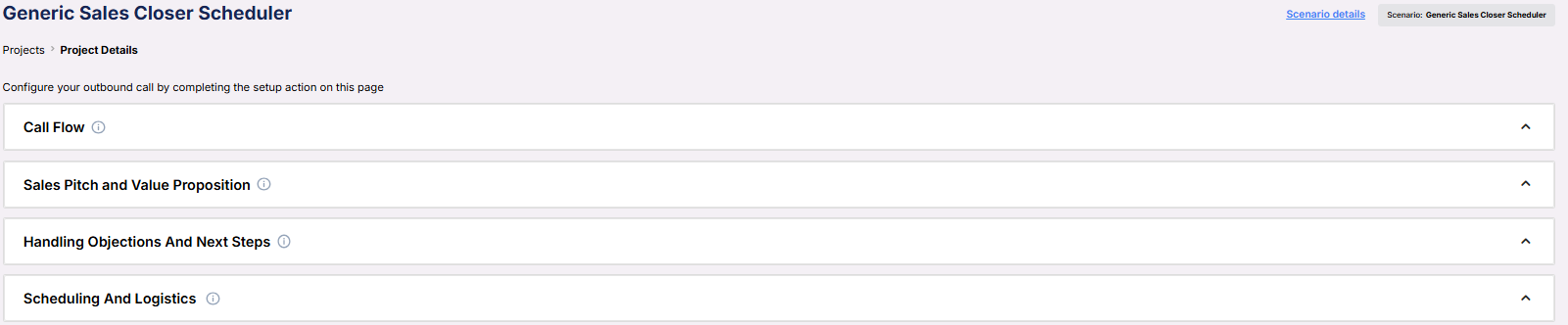
**Call Flow**\
Establishes the company identity and introduces the representative and product.
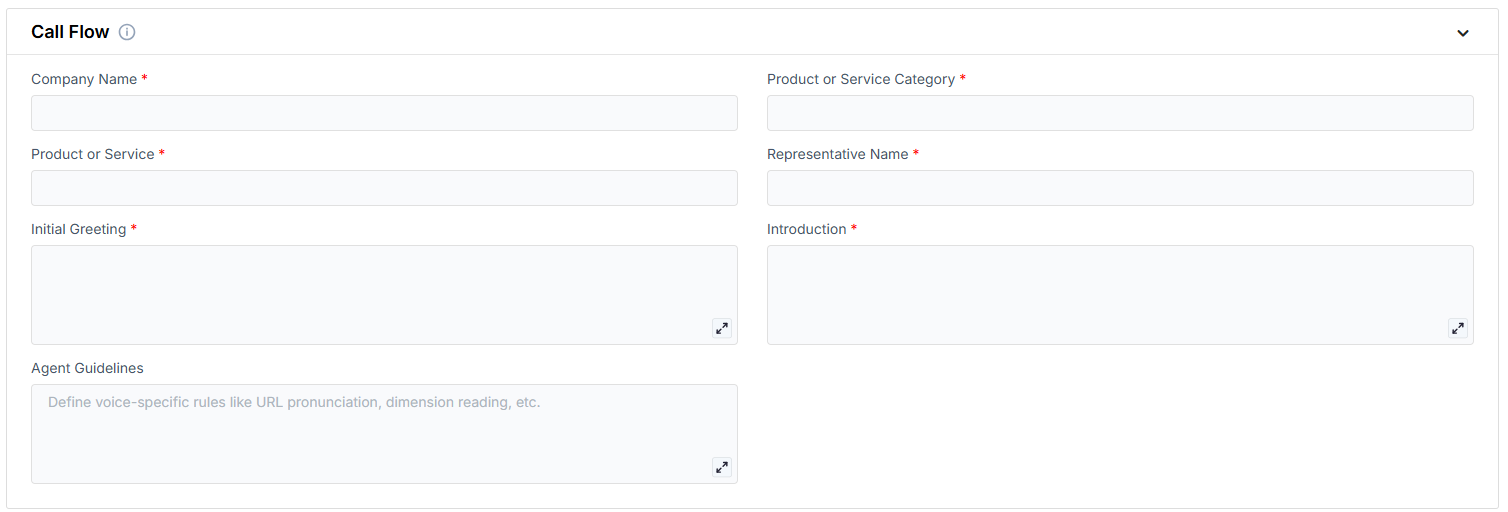
* **Company Name**: The organization offering the product or service.
* **Product or Service Category**: The general type of solution being presented (e.g., Sales Automation Suite).
* **Product or Service**: The specific product being offered, along with a brief description.
* **Representative Name**: The person the AI is scheduling the demo with.
* **Initial Greeting**: The opening message used to begin the call and confirm the contact's identity.
* **Introduction**: A follow-up message that establishes credibility and frames the outreach.
* **Agent Guidelines**: Behavior constraints you can set to shape how the AI communicates (e.g. emphasis, or handling edge cases).
***
**Sales Pitch and Value Proposition**\
Defines the purpose of the call, communicates product value, and outlines specific benefits.
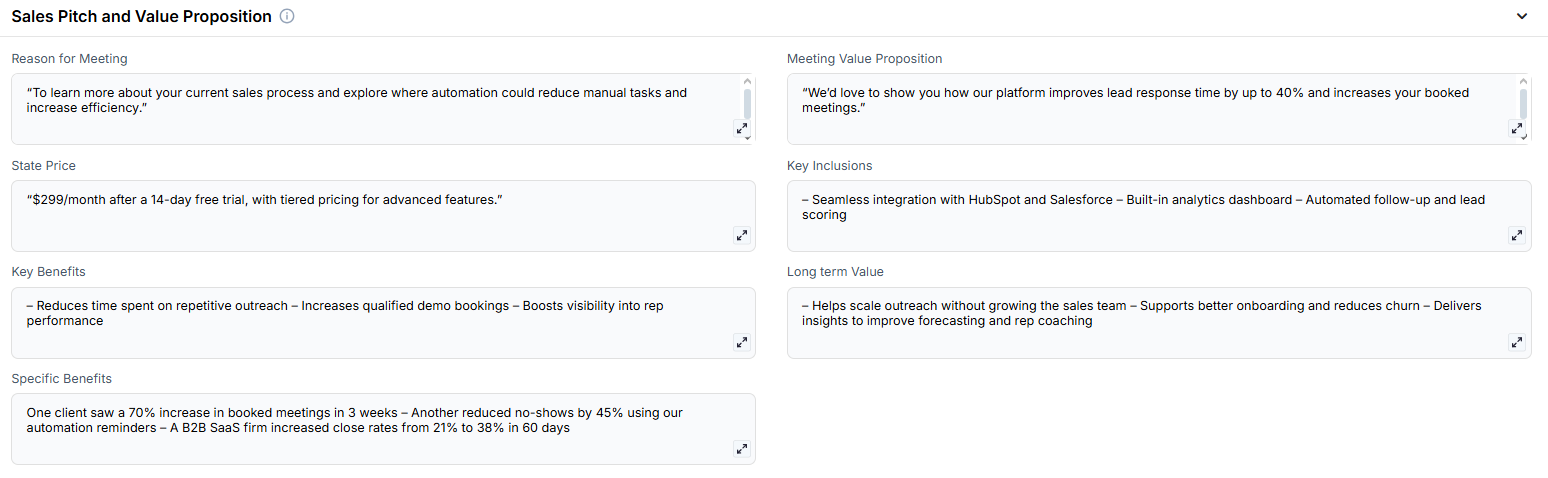
* **Reason for Meeting**: Explains why the call is happening and what it aims to accomplish.
* **Meeting Value Proposition**: A concise explanation of the benefit the contact will gain by booking the meeting.
* **State Price**: Communicates the product cost or pricing model.
* **Key Inclusions**: Core features included in the product or service.
* **Key Benefits**: Primary business benefits of using the product or service.
* **Long Term Value**: Describes ongoing strategic value over time.
* **Specific Benefits**: Real-world results or proof points achieved by existing clients.
***
**Handling Objections and Next Steps**\
Preconfigured responses to common objections and a prompt to move the conversation toward scheduling.
* **Objection Handling**: A list of objections and corresponding rebuttals to keep the conversation on track.
* **Next Step**: The transition statement used to propose a meeting and prompt the contact to commit.
***
**Scheduling and Logistics**\
Specifies the calendar where the demo will be booked.
* **Calendar**: The connected calendar where meetings are scheduled.
***
3. **Objective:**
Move the prospect through an intentional, persuasive flow that highlights benefits, addresses objections, and encourages calendar scheduling.
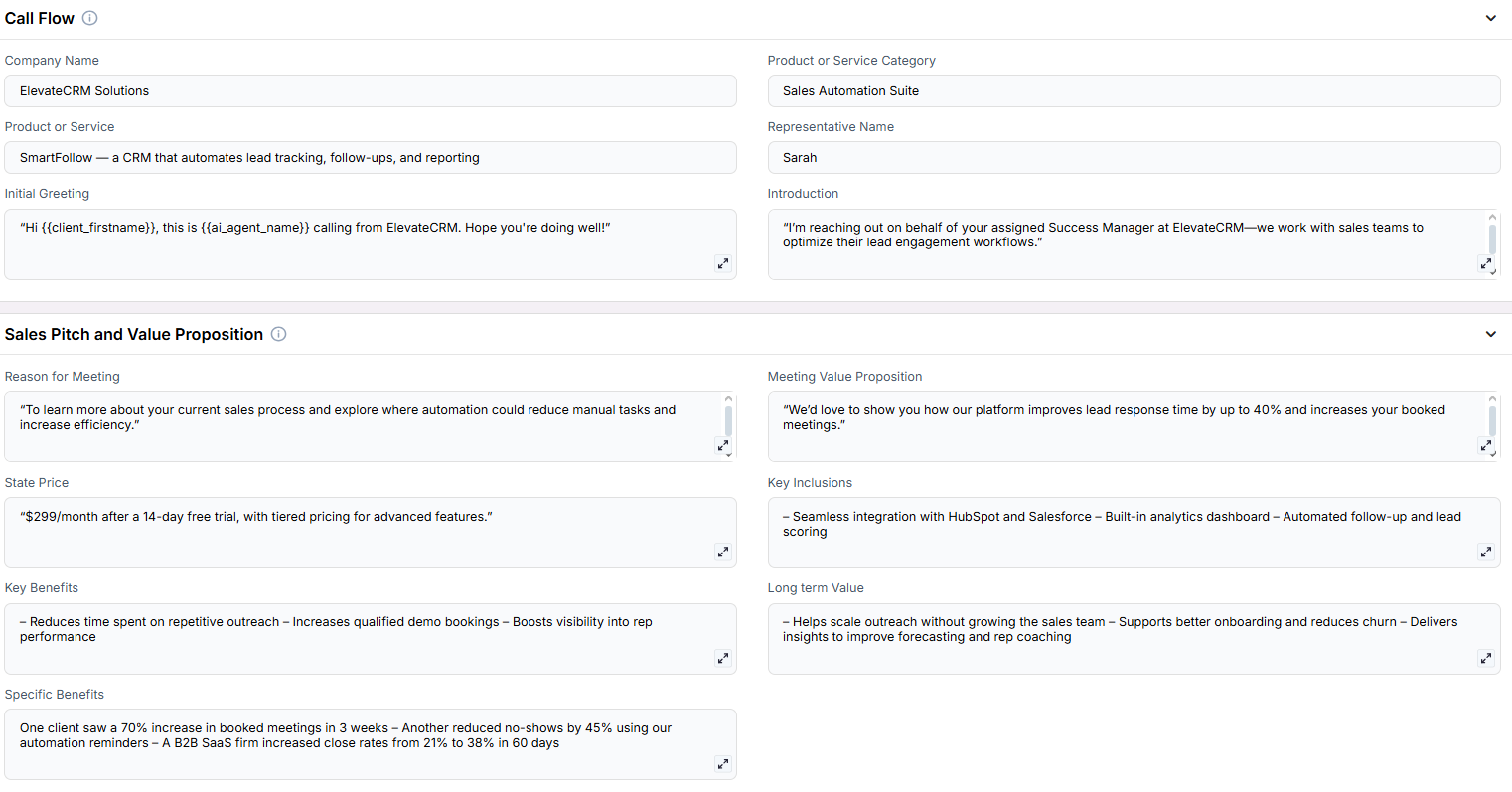
Here is the **Project Configurations** interface of this scenario, alongside instructions and some examples:
Remember that Scenarios are defined at the Project level, and every Campaign inherits the pre-filled fields from the Project, which means every Campaign can have different information in the input boxes, allowing you to tailor communications per Campaign to align with your customer/client or business needs.
## Example Configurations
1. **Product or Service Category**
* CRM Platform
* Sales Automation Suite
* Marketing Analytics Tool
2. **State Price**
* "\$299/month after the 14-day free trial"
* "Custom pricing depending on feature bundle"
* "Starts at \$1,500 per onboarding"
3. **Reason for Meeting**
* Understand your current sales process and identify friction points
* Explore automation opportunities in your lead pipeline
* Review how similar businesses scaled using our solution
4. **Meeting Value Proposition**
* Discover how our CRM can unify your lead pipeline and improve response time by 40%
* Learn how our automation tools can cut manual tasks in half and scale outbound efforts
* See how we help agencies close more deals using smart automation workflows
5. **Key Inclusions**
* Built-in analytics dashboard
* Seamless CRM integrations
* Automated follow-up sequences
6. **Key Benefits**
* Streamlines the lead-to-close process
* Increases demo show-up rates through better qualification
* Delivers real-time visibility into client engagement
7. **Specific Benefits**
* Boosted booked meetings by 70% within 3 weeks for a marketing agency
* Reduced no-shows by 45% through automated reminders
* Increased pipeline conversion rate from 18% to 34% in 2 months
8. **Long Term Value**
* Reduces churn by reinforcing consistent outreach and onboarding
* Scales your sales operations without additional headcount
* Builds better visibility and forecasting into long-term sales trends
9. **Next Step**
* Book a 15-minute discovery call
* Schedule a platform demo with our onboarding specialist
* Connect with your assigned Success Manager for tailored onboarding
10. **Objection Handling**
* *Price Concern:* “We typically see full ROI in under 30 days due to saved rep hours.”
* *Timing Concern:* “Even a 10-minute walkthrough can show how this aligns with your current goals.”
* *Skepticism:* “We’ve helped agencies just like yours double conversion rates with this exact solution.”
## FAQs & Troubleshooting
### General Questions
The CLOSER framework is a sales methodology that stands for Connect, Learn, Outline, Secure, Explain, and Request — it structures the conversation to drive toward a close.
### Configuration
If optional fields are left blank, the AI will skip them gracefully and still attempt a natural conversation based on available context.
### Usage and Results
When paired with solid qualification and follow-up, this scenario typically improves engagement and conversion rates, especially for B2B solutions and agencies selling automation or CRM tools.
***
For additional questions or guidance, try using our [**Virtual Support Agent**](/Thinkrr-Support-Agent)! Available 24/7 to help resolve most issues quickly at [thinkrr.ai/support](https://thinkrr.ai/support).
If you still need assistance, visit our support site at [help.thinkrr.ai](http://help.thinkrr.ai) and submit a [Ticket](/Support-Ticket-System) or contact our team directly at [hello@thinkrr.ai](mailto:hello@thinkrr.ai).
 ***
**Call Flow**\
Establishes the company identity and introduces the representative and product.
***
**Call Flow**\
Establishes the company identity and introduces the representative and product.
 * **Company Name**: The organization offering the product or service.
* **Product or Service Category**: The general type of solution being presented (e.g., Sales Automation Suite).
* **Product or Service**: The specific product being offered, along with a brief description.
* **Representative Name**: The person the AI is scheduling the demo with.
* **Initial Greeting**: The opening message used to begin the call and confirm the contact's identity.
* **Introduction**: A follow-up message that establishes credibility and frames the outreach.
* **Agent Guidelines**: Behavior constraints you can set to shape how the AI communicates (e.g. emphasis, or handling edge cases).
***
**Sales Pitch and Value Proposition**\
Defines the purpose of the call, communicates product value, and outlines specific benefits.
* **Company Name**: The organization offering the product or service.
* **Product or Service Category**: The general type of solution being presented (e.g., Sales Automation Suite).
* **Product or Service**: The specific product being offered, along with a brief description.
* **Representative Name**: The person the AI is scheduling the demo with.
* **Initial Greeting**: The opening message used to begin the call and confirm the contact's identity.
* **Introduction**: A follow-up message that establishes credibility and frames the outreach.
* **Agent Guidelines**: Behavior constraints you can set to shape how the AI communicates (e.g. emphasis, or handling edge cases).
***
**Sales Pitch and Value Proposition**\
Defines the purpose of the call, communicates product value, and outlines specific benefits.
 * **Reason for Meeting**: Explains why the call is happening and what it aims to accomplish.
* **Meeting Value Proposition**: A concise explanation of the benefit the contact will gain by booking the meeting.
* **State Price**: Communicates the product cost or pricing model.
* **Key Inclusions**: Core features included in the product or service.
* **Key Benefits**: Primary business benefits of using the product or service.
* **Long Term Value**: Describes ongoing strategic value over time.
* **Specific Benefits**: Real-world results or proof points achieved by existing clients.
***
**Handling Objections and Next Steps**\
Preconfigured responses to common objections and a prompt to move the conversation toward scheduling.
* **Reason for Meeting**: Explains why the call is happening and what it aims to accomplish.
* **Meeting Value Proposition**: A concise explanation of the benefit the contact will gain by booking the meeting.
* **State Price**: Communicates the product cost or pricing model.
* **Key Inclusions**: Core features included in the product or service.
* **Key Benefits**: Primary business benefits of using the product or service.
* **Long Term Value**: Describes ongoing strategic value over time.
* **Specific Benefits**: Real-world results or proof points achieved by existing clients.
***
**Handling Objections and Next Steps**\
Preconfigured responses to common objections and a prompt to move the conversation toward scheduling.
 * **Objection Handling**: A list of objections and corresponding rebuttals to keep the conversation on track.
* **Next Step**: The transition statement used to propose a meeting and prompt the contact to commit.
***
**Scheduling and Logistics**\
Specifies the calendar where the demo will be booked.
* **Objection Handling**: A list of objections and corresponding rebuttals to keep the conversation on track.
* **Next Step**: The transition statement used to propose a meeting and prompt the contact to commit.
***
**Scheduling and Logistics**\
Specifies the calendar where the demo will be booked.
 * **Calendar**: The connected calendar where meetings are scheduled.
***
3. **Objective:**
Move the prospect through an intentional, persuasive flow that highlights benefits, addresses objections, and encourages calendar scheduling.
Here is the **Project Configurations** interface of this scenario, alongside instructions and some examples:
* **Calendar**: The connected calendar where meetings are scheduled.
***
3. **Objective:**
Move the prospect through an intentional, persuasive flow that highlights benefits, addresses objections, and encourages calendar scheduling.
Here is the **Project Configurations** interface of this scenario, alongside instructions and some examples:
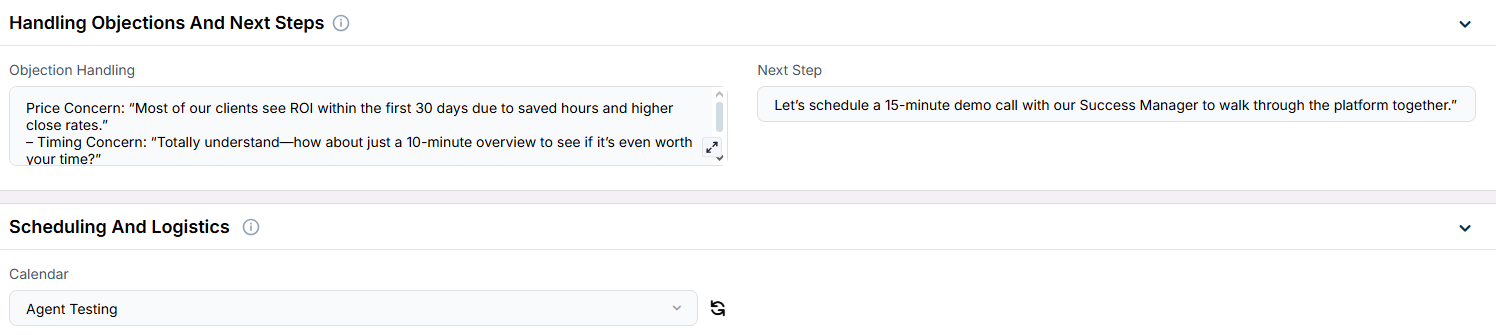 Remember that Scenarios are defined at the Project level, and every Campaign inherits the pre-filled fields from the Project, which means every Campaign can have different information in the input boxes, allowing you to tailor communications per Campaign to align with your customer/client or business needs.
## Example Configurations
1. **Product or Service Category**
* CRM Platform
* Sales Automation Suite
* Marketing Analytics Tool
2. **State Price**
* "\$299/month after the 14-day free trial"
* "Custom pricing depending on feature bundle"
* "Starts at \$1,500 per onboarding"
3. **Reason for Meeting**
* Understand your current sales process and identify friction points
* Explore automation opportunities in your lead pipeline
* Review how similar businesses scaled using our solution
4. **Meeting Value Proposition**
* Discover how our CRM can unify your lead pipeline and improve response time by 40%
* Learn how our automation tools can cut manual tasks in half and scale outbound efforts
* See how we help agencies close more deals using smart automation workflows
5. **Key Inclusions**
* Built-in analytics dashboard
* Seamless CRM integrations
* Automated follow-up sequences
6. **Key Benefits**
* Streamlines the lead-to-close process
* Increases demo show-up rates through better qualification
* Delivers real-time visibility into client engagement
7. **Specific Benefits**
* Boosted booked meetings by 70% within 3 weeks for a marketing agency
* Reduced no-shows by 45% through automated reminders
* Increased pipeline conversion rate from 18% to 34% in 2 months
8. **Long Term Value**
* Reduces churn by reinforcing consistent outreach and onboarding
* Scales your sales operations without additional headcount
* Builds better visibility and forecasting into long-term sales trends
9. **Next Step**
* Book a 15-minute discovery call
* Schedule a platform demo with our onboarding specialist
* Connect with your assigned Success Manager for tailored onboarding
10. **Objection Handling**
* *Price Concern:* “We typically see full ROI in under 30 days due to saved rep hours.”
* *Timing Concern:* “Even a 10-minute walkthrough can show how this aligns with your current goals.”
* *Skepticism:* “We’ve helped agencies just like yours double conversion rates with this exact solution.”
## FAQs & Troubleshooting
### General Questions
Remember that Scenarios are defined at the Project level, and every Campaign inherits the pre-filled fields from the Project, which means every Campaign can have different information in the input boxes, allowing you to tailor communications per Campaign to align with your customer/client or business needs.
## Example Configurations
1. **Product or Service Category**
* CRM Platform
* Sales Automation Suite
* Marketing Analytics Tool
2. **State Price**
* "\$299/month after the 14-day free trial"
* "Custom pricing depending on feature bundle"
* "Starts at \$1,500 per onboarding"
3. **Reason for Meeting**
* Understand your current sales process and identify friction points
* Explore automation opportunities in your lead pipeline
* Review how similar businesses scaled using our solution
4. **Meeting Value Proposition**
* Discover how our CRM can unify your lead pipeline and improve response time by 40%
* Learn how our automation tools can cut manual tasks in half and scale outbound efforts
* See how we help agencies close more deals using smart automation workflows
5. **Key Inclusions**
* Built-in analytics dashboard
* Seamless CRM integrations
* Automated follow-up sequences
6. **Key Benefits**
* Streamlines the lead-to-close process
* Increases demo show-up rates through better qualification
* Delivers real-time visibility into client engagement
7. **Specific Benefits**
* Boosted booked meetings by 70% within 3 weeks for a marketing agency
* Reduced no-shows by 45% through automated reminders
* Increased pipeline conversion rate from 18% to 34% in 2 months
8. **Long Term Value**
* Reduces churn by reinforcing consistent outreach and onboarding
* Scales your sales operations without additional headcount
* Builds better visibility and forecasting into long-term sales trends
9. **Next Step**
* Book a 15-minute discovery call
* Schedule a platform demo with our onboarding specialist
* Connect with your assigned Success Manager for tailored onboarding
10. **Objection Handling**
* *Price Concern:* “We typically see full ROI in under 30 days due to saved rep hours.”
* *Timing Concern:* “Even a 10-minute walkthrough can show how this aligns with your current goals.”
* *Skepticism:* “We’ve helped agencies just like yours double conversion rates with this exact solution.”
## FAQs & Troubleshooting
### General Questions