> ## Documentation Index
> Fetch the complete documentation index at: https://docs.thinkrr.ai/llms.txt
> Use this file to discover all available pages before exploring further.
# Real Estate Interest Qualifier Scheduler
> Qualifies real estate buying interest, segments clients by purchase timeline, schedules immediate buyers, and maintains engagement with market updates.
## Details
The **Real Estate Interest Qualifier Scheduler** is designed to streamline the process of identifying serious buyers, categorizing leads by urgency, and automatically scheduling appointments with high-intent prospects. This scenario helps agents focus on qualified opportunities while nurturing long-term leads with relevant updates.
## Key Features
1. **Purpose:**
* To identify serious home buyers and categorize them based on their purchase timeline
* To schedule qualified buyers for meetings and provide follow-up to long-term leads
* To streamline initial buyer engagement and reduce manual qualification efforts
2. **Customizable User Input Fields:**
This scenario is designed to assess interest and offer value early in the real estate journey. The customizable fields below define how the AI introduces itself, communicates purpose, handles objections, and facilitates scheduling. Fields are grouped by their role in the conversation.
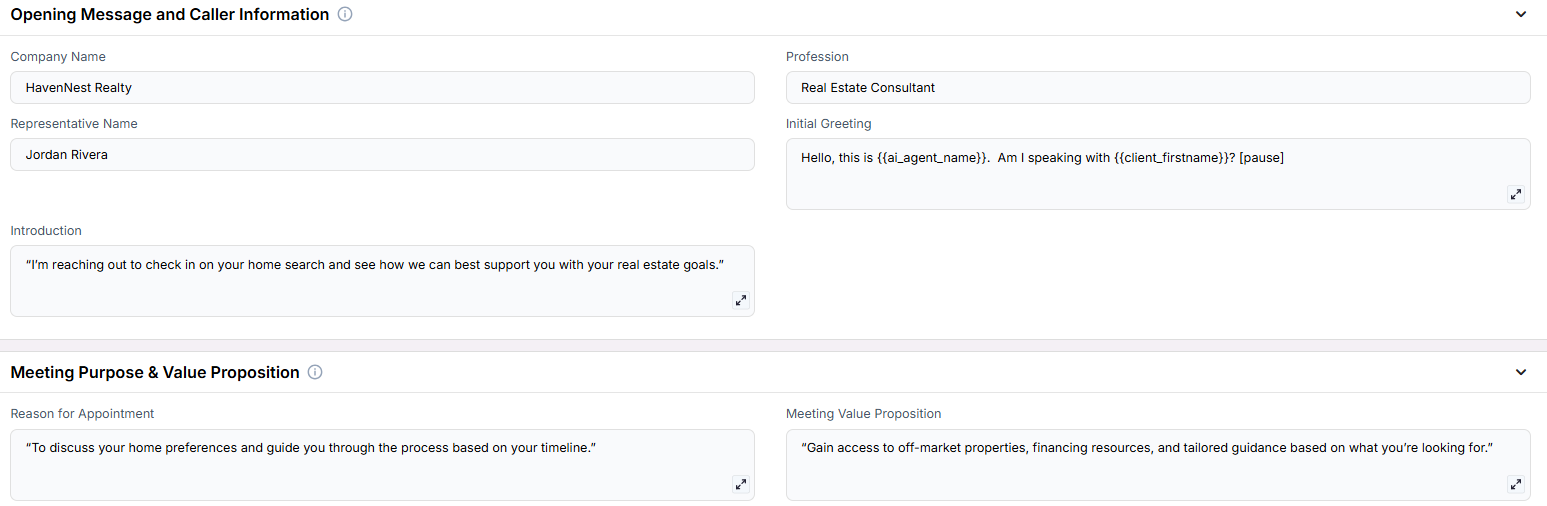
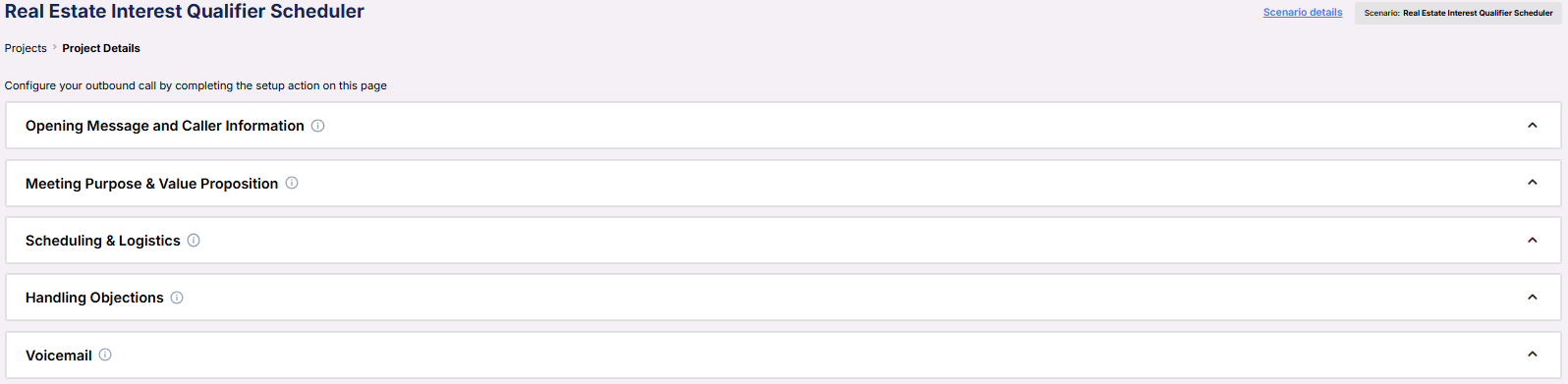 **Opening Message and Caller Information**\
These fields define who the AI is representing and how the call is introduced.
**Opening Message and Caller Information**\
These fields define who the AI is representing and how the call is introduced.
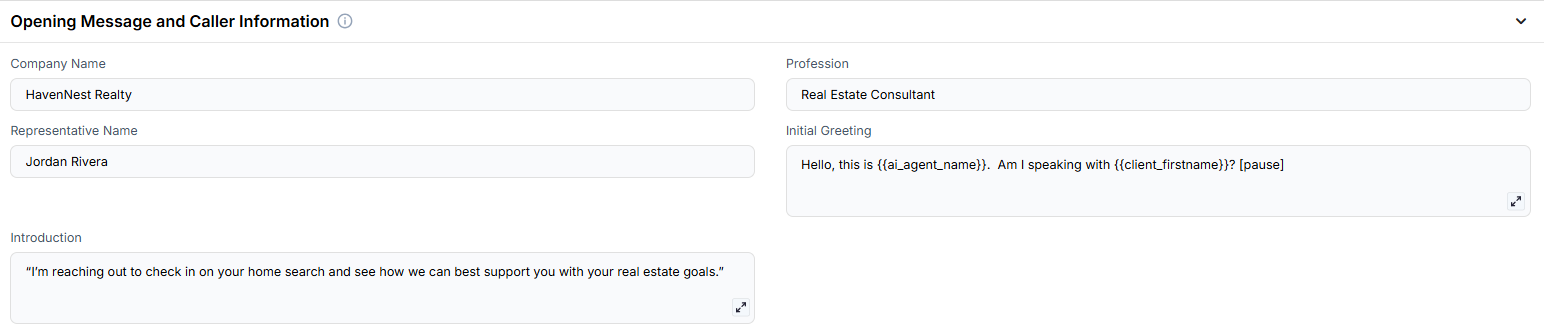 * **Company Name**: The real estate agency the AI is calling on behalf of.
* **Profession**: The role or title of the representative being introduced.
* **Representative Name**: The person the prospect will be speaking with.
* **Initial Greeting**: The opening line to confirm who the AI is speaking with.
* **Introduction**: A brief message that states the AI’s purpose and offers assistance.
***
**Meeting Purpose & Value Proposition**\
These fields frame the reason for the call and what value the prospect can expect from engaging.
* **Company Name**: The real estate agency the AI is calling on behalf of.
* **Profession**: The role or title of the representative being introduced.
* **Representative Name**: The person the prospect will be speaking with.
* **Initial Greeting**: The opening line to confirm who the AI is speaking with.
* **Introduction**: A brief message that states the AI’s purpose and offers assistance.
***
**Meeting Purpose & Value Proposition**\
These fields frame the reason for the call and what value the prospect can expect from engaging.
 * **Reason for Appointment**: Describes the objective of the conversation and what the agent hopes to cover.
* **Meeting Value Proposition**: Summarizes the benefits of attending the meeting, such as exclusive listings or financing support.
***
**Scheduling & Logistics**\
Defines when and how the meeting will be scheduled.
* **Reason for Appointment**: Describes the objective of the conversation and what the agent hopes to cover.
* **Meeting Value Proposition**: Summarizes the benefits of attending the meeting, such as exclusive listings or financing support.
***
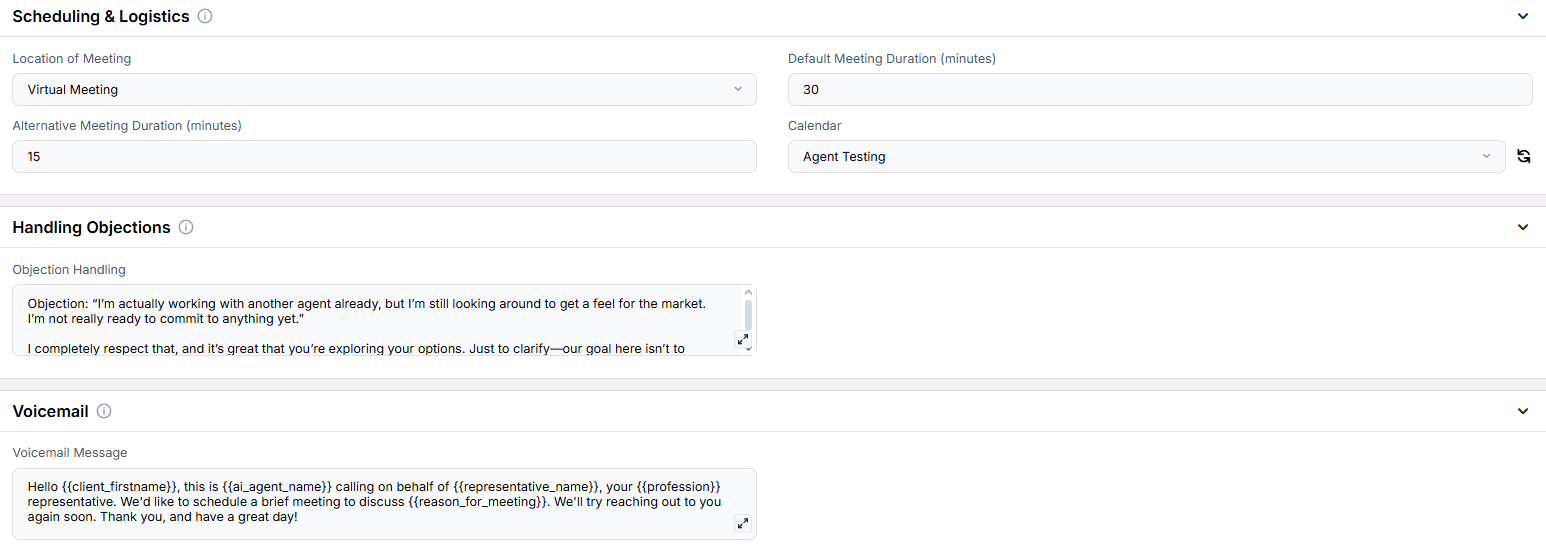
**Scheduling & Logistics**\
Defines when and how the meeting will be scheduled.
 * **Location of Meeting**: Whether the meeting will be held virtually or in person.
* **Default Meeting Duration (minutes)**: The standard time block for the session.
* **Alternative Meeting Duration (minutes)**: A shorter meeting option that can be offered.
* **Calendar**: The connected calendar where appointments will be booked.
***
**Handling Objections**\
Used when the prospect expresses hesitation or says they’re already working with someone else.
* **Location of Meeting**: Whether the meeting will be held virtually or in person.
* **Default Meeting Duration (minutes)**: The standard time block for the session.
* **Alternative Meeting Duration (minutes)**: A shorter meeting option that can be offered.
* **Calendar**: The connected calendar where appointments will be booked.
***
**Handling Objections**\
Used when the prospect expresses hesitation or says they’re already working with someone else.
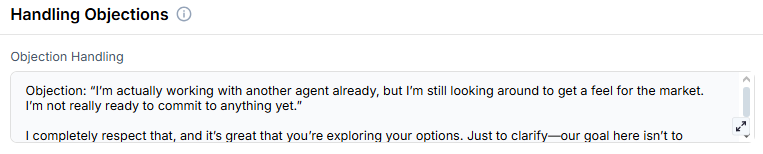 * **Objection Handling**: Prewritten response to ease hesitation and offer a low-pressure consultation option.
***
**Voicemail**\
Fallback messaging used when the contact doesn’t answer the call.
* **Objection Handling**: Prewritten response to ease hesitation and offer a low-pressure consultation option.
***
**Voicemail**\
Fallback messaging used when the contact doesn’t answer the call.
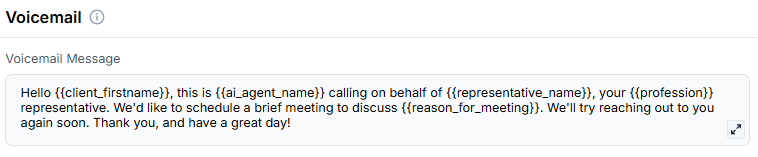 * **Voicemail Message**: A message the AI leaves if the contact is unavailable.
***
3. **Objective:**
* To qualify real estate leads by assessing their buying timeline and intent
* To schedule appointments with serious buyers while tracking and nurturing others
* To support real estate agents with automated engagement and calendar scheduling
Here is the **Project Configurations** interface of this scenario, alongside instructions and some examples:
* **Voicemail Message**: A message the AI leaves if the contact is unavailable.
***
3. **Objective:**
* To qualify real estate leads by assessing their buying timeline and intent
* To schedule appointments with serious buyers while tracking and nurturing others
* To support real estate agents with automated engagement and calendar scheduling
Here is the **Project Configurations** interface of this scenario, alongside instructions and some examples:
 Remember that Scenarios are defined at the Project level, and every Campaign inherits the pre-filled fields from the Project, which means every Campaign can have different information in the input boxes, allowing you to tailor communications per Campaign to align with your customer/client or business needs.
## Example Configurations
1. **Reason for Appointment:**
* “To discuss your home preferences and guide you through the purchase process.”
2. **Meeting Value Proposition:**
* “Gain access to pre-market listings and expert guidance tailored to your needs.”
3. **Objection Handling:**
* **Objection:** “I’m just browsing right now.”
* **Response:** “That’s perfectly fine! We often help clients in the early stages understand market trends. Would a short call help you plan ahead?”
4. **Voicemail Message:**
* “Hi, this is \[AI Name] calling on behalf of \[Representative Name] at \[Company Name]. We wanted to touch base regarding your interest in the market. Feel free to call us back or use the calendar link in your messages to book a time.”
## FAQs & Troubleshooting
### General Questions
This scenario helps qualify real estate prospects and schedule meetings with those most ready to buy, while keeping long-term leads engaged through follow-ups and updates.
### Configuration
At minimum, you should configure the **Initial Greeting**, **Reason for Appointment**, **Representative Name**, and **Calendar**. To improve performance, include **Objection Handling** and **Meeting Value Proposition**.
Yes. In the **Location of Meeting** field, specify whether the appointment will be virtual (e.g., Zoom) or physical (e.g., office address).
### Usage and Results
The AI can tag or mark leads as “long-term” and continue following up with updates, allowing your team to focus on ready buyers.
The AI uses your integrated **Calendar** to schedule qualified buyers directly into available time slots.
***
For additional questions or guidance, try using our [**Virtual Support Agent**](/Thinkrr-Support-Agent)! Available 24/7 to help resolve most issues quickly at [thinkrr.ai/support](https://thinkrr.ai/support).
If you still need assistance, visit our support site at [help.thinkrr.ai](http://help.thinkrr.ai) and submit a [Ticket](/Support-Ticket-System) or contact our team directly at [hello@thinkrr.ai](mailto:hello@thinkrr.ai).
Remember that Scenarios are defined at the Project level, and every Campaign inherits the pre-filled fields from the Project, which means every Campaign can have different information in the input boxes, allowing you to tailor communications per Campaign to align with your customer/client or business needs.
## Example Configurations
1. **Reason for Appointment:**
* “To discuss your home preferences and guide you through the purchase process.”
2. **Meeting Value Proposition:**
* “Gain access to pre-market listings and expert guidance tailored to your needs.”
3. **Objection Handling:**
* **Objection:** “I’m just browsing right now.”
* **Response:** “That’s perfectly fine! We often help clients in the early stages understand market trends. Would a short call help you plan ahead?”
4. **Voicemail Message:**
* “Hi, this is \[AI Name] calling on behalf of \[Representative Name] at \[Company Name]. We wanted to touch base regarding your interest in the market. Feel free to call us back or use the calendar link in your messages to book a time.”
## FAQs & Troubleshooting
### General Questions
This scenario helps qualify real estate prospects and schedule meetings with those most ready to buy, while keeping long-term leads engaged through follow-ups and updates.
### Configuration
At minimum, you should configure the **Initial Greeting**, **Reason for Appointment**, **Representative Name**, and **Calendar**. To improve performance, include **Objection Handling** and **Meeting Value Proposition**.
Yes. In the **Location of Meeting** field, specify whether the appointment will be virtual (e.g., Zoom) or physical (e.g., office address).
### Usage and Results
The AI can tag or mark leads as “long-term” and continue following up with updates, allowing your team to focus on ready buyers.
The AI uses your integrated **Calendar** to schedule qualified buyers directly into available time slots.
***
For additional questions or guidance, try using our [**Virtual Support Agent**](/Thinkrr-Support-Agent)! Available 24/7 to help resolve most issues quickly at [thinkrr.ai/support](https://thinkrr.ai/support).
If you still need assistance, visit our support site at [help.thinkrr.ai](http://help.thinkrr.ai) and submit a [Ticket](/Support-Ticket-System) or contact our team directly at [hello@thinkrr.ai](mailto:hello@thinkrr.ai).