> ## Documentation Index
> Fetch the complete documentation index at: https://docs.thinkrr.ai/llms.txt
> Use this file to discover all available pages before exploring further.
# Real Estate Market Engagement
> Delivers personalized neighborhood market insights and real estate trends. Adapts to client needs, from scheduling viewings to market updates.
## Details
The **Real Estate Market Engagement** scenario is designed for agencies and realtors looking to deliver personalized neighborhood insights, real estate trends, and home-buying opportunities. This AI-powered agent adapts conversations to individual client interests—whether they’re looking to explore a new neighborhood, receive market updates, or schedule a viewing.
By combining dynamic scripting with customizable fields, this scenario helps you scale outreach, stay top-of-mind with leads, and streamline booking directly onto your calendar.
## Key Features of the Real Estate Market Engagement
1. **Purpose:**
* Deliver localized market insights based on client interests
* Engage prospects by highlighting real estate trends in their target neighborhoods
* Encourage viewings or follow-up meetings with personalized outreach
* Automate lead engagement while maintaining a professional, human tone
2. **Customizable User Input Fields:**
The customizable fields in the Real Estate Market Engagement scenario are grouped by function to help the AI Agent personalize outreach, deliver relevant market insights, and coordinate meetings efficiently. Each section supports a key phase of the call.
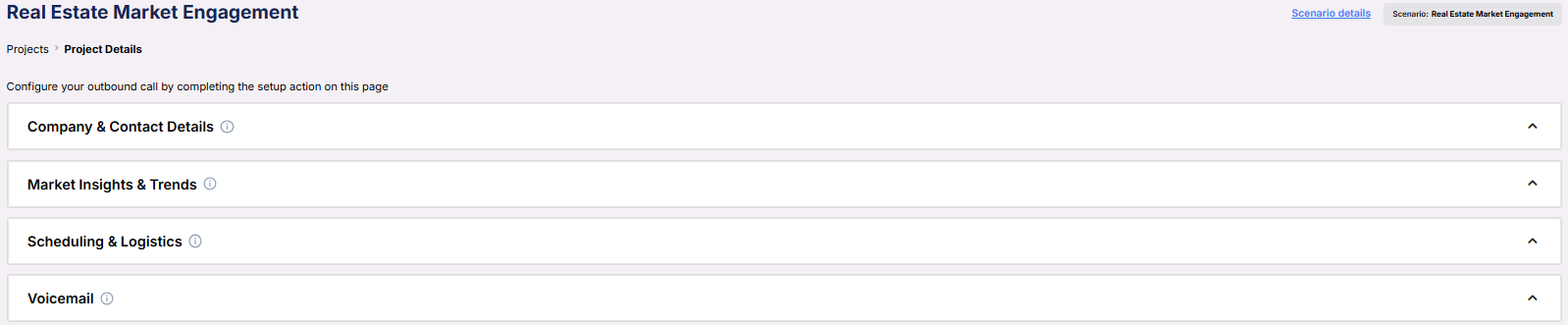 **Company & Contact Details**\
This section defines who the AI is representing and which neighborhood or market is being targeted.
**Company & Contact Details**\
This section defines who the AI is representing and which neighborhood or market is being targeted.
 * **Real Estate Company**: The agency or brokerage the AI is representing.
* **Prospect Neighborhood**: The geographic focus of the outreach, often tied to the contact's area of interest.
* **Representative Name**: The agent or rep that the contact will be speaking with.
* **Company Phone Number**: A callback number or direct contact line for the real estate company.
***
**Market Insights & Trends**\
Allows you to surface relevant local trends to support the outreach with current data.
* **Real Estate Company**: The agency or brokerage the AI is representing.
* **Prospect Neighborhood**: The geographic focus of the outreach, often tied to the contact's area of interest.
* **Representative Name**: The agent or rep that the contact will be speaking with.
* **Company Phone Number**: A callback number or direct contact line for the real estate company.
***
**Market Insights & Trends**\
Allows you to surface relevant local trends to support the outreach with current data.
 * **Market Trend**: A short statement describing recent price movements, demand shifts, or other relevant insights for the target area.
***
**Scheduling & Logistics**\
Fields used to configure the meeting time, delivery method, and calendar routing.
* **Market Trend**: A short statement describing recent price movements, demand shifts, or other relevant insights for the target area.
***
**Scheduling & Logistics**\
Fields used to configure the meeting time, delivery method, and calendar routing.
 * **Default Meeting Duration (minutes)**: The standard meeting length offered.
* **Alternative Meeting Duration (minutes)**: An optional second time slot.
* **Location of Meeting**: Whether the meeting will be virtual or held in person.
* **Calendar**: The connected calendar where the AI will book meetings.
***
**Voicemail**\
Defines the message left when the contact doesn’t answer.
* **Default Meeting Duration (minutes)**: The standard meeting length offered.
* **Alternative Meeting Duration (minutes)**: An optional second time slot.
* **Location of Meeting**: Whether the meeting will be virtual or held in person.
* **Calendar**: The connected calendar where the AI will book meetings.
***
**Voicemail**\
Defines the message left when the contact doesn’t answer.
 * **Voicemail Message**: The script or recording content the AI uses when leaving a voicemail.
***
3. **Objective:**
* To re-engage or nurture prospective buyers and sellers
* To provide personalized and relevant real estate insights
* To convert market interest into scheduled appointments or property viewings
Here is the **Project Configurations** interface of this scenario, alongside instructions and some examples:
* **Voicemail Message**: The script or recording content the AI uses when leaving a voicemail.
***
3. **Objective:**
* To re-engage or nurture prospective buyers and sellers
* To provide personalized and relevant real estate insights
* To convert market interest into scheduled appointments or property viewings
Here is the **Project Configurations** interface of this scenario, alongside instructions and some examples:
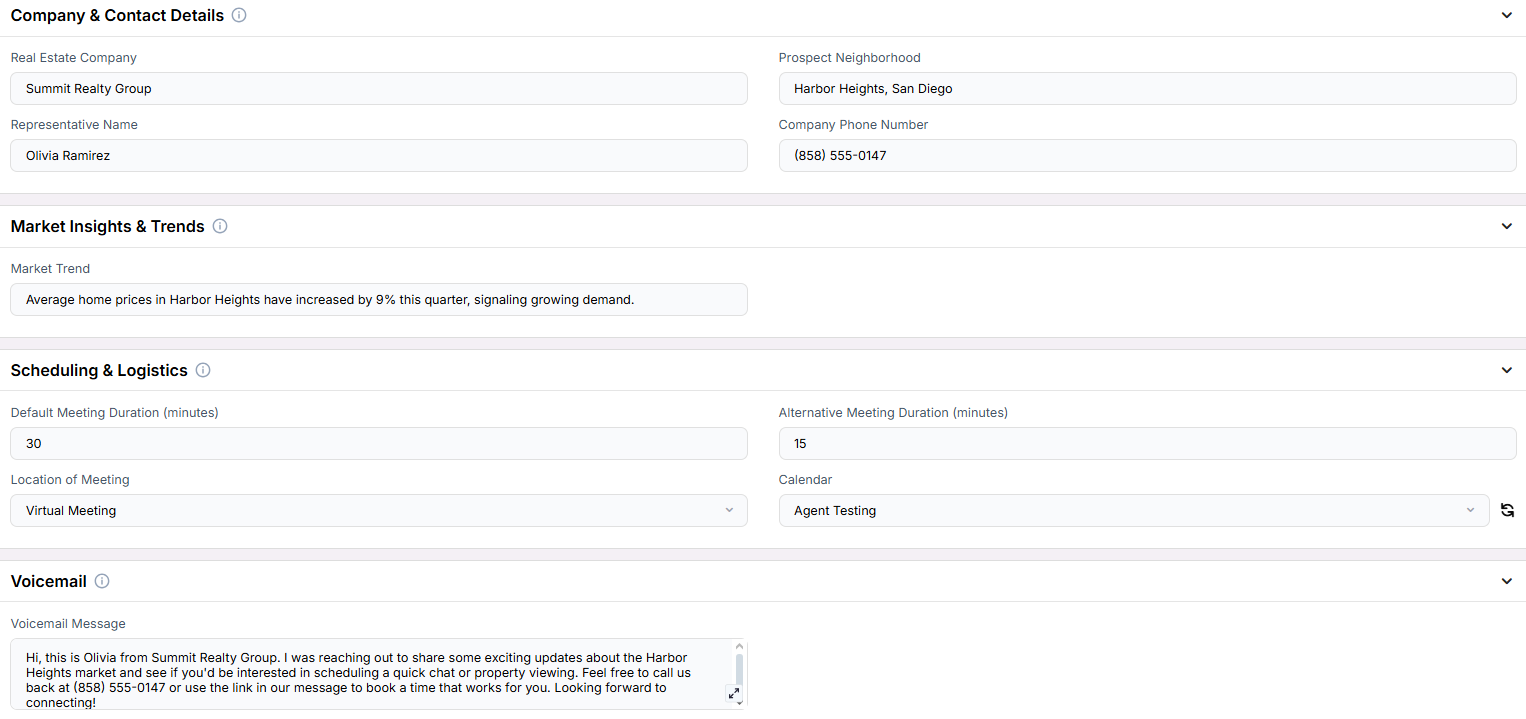 Remember that Scenarios are defined at the Project level, and every Campaign inherits the pre-filled fields from the Project, which means every Campaign can have different information in the input boxes, allowing you to tailor communications per Campaign to align with your customer/client or business needs.
## Example Configurations
1. **Prospect Neighborhood**
* Lakeview District
* Midtown Atlanta
* Silver Lake, Los Angeles
2. **Market Trend**
* “Home inventory in Midtown has dropped by 20%, making it a strong seller’s market.”
* “Lakeview District properties are up 12% in value this quarter.”
* “Silver Lake saw a spike in new listings last month—an ideal time for buyers to enter.”
3. **Reason for Meeting**
* “We’d love to walk you through some listings that match your budget and location preferences.”
* “Let’s schedule a short call to go over recent changes in your neighborhood’s market trends.”
* “We’d like to invite you to an open house this weekend—are you available to chat before then?”
## FAQs & Troubleshooting
### General Questions
Both. You can customize the messaging based on the audience—use buyer-focused trends and listings, or seller insights like recent sales data.
Yes. You can include open house invitations as part of the messaging and configure the meeting location accordingly.
This scenario is tailored specifically for real estate, enabling targeted conversations with hyperlocal insights to drive engagement and trust.
### Configuration
Absolutely. Each campaign inherits fields from the Project level, allowing you to update neighborhood names, trends, or other key data as needed.
No. You can omit optional fields like **Alternative Meeting Duration** or **Voicemail Message** depending on your strategy.
Use multiple campaigns with representative-specific configurations, or rotate leads using your CRM and dynamic field mapping.
### Usage and Results
By sharing relevant insights and trends, the AI creates value in every interaction, prompting prospects to take the next step sooner.
Brokerages, real estate teams, or solo agents who want to scale prospecting with personalized, data-driven outreach.
Yes. Use CRM-integrated fields and dynamic token replacement to match data to each prospect’s profile or preferences.
***
For additional questions or guidance, try using our [**Virtual Support Agent**](/Thinkrr-Support-Agent)! Available 24/7 to help resolve most issues quickly at [thinkrr.ai/support](https://thinkrr.ai/support).
If you still need assistance, visit our support site at [help.thinkrr.ai](http://help.thinkrr.ai) and submit a [Ticket](/Support-Ticket-System) or contact our team directly at [hello@thinkrr.ai](mailto:hello@thinkrr.ai).
Remember that Scenarios are defined at the Project level, and every Campaign inherits the pre-filled fields from the Project, which means every Campaign can have different information in the input boxes, allowing you to tailor communications per Campaign to align with your customer/client or business needs.
## Example Configurations
1. **Prospect Neighborhood**
* Lakeview District
* Midtown Atlanta
* Silver Lake, Los Angeles
2. **Market Trend**
* “Home inventory in Midtown has dropped by 20%, making it a strong seller’s market.”
* “Lakeview District properties are up 12% in value this quarter.”
* “Silver Lake saw a spike in new listings last month—an ideal time for buyers to enter.”
3. **Reason for Meeting**
* “We’d love to walk you through some listings that match your budget and location preferences.”
* “Let’s schedule a short call to go over recent changes in your neighborhood’s market trends.”
* “We’d like to invite you to an open house this weekend—are you available to chat before then?”
## FAQs & Troubleshooting
### General Questions
Both. You can customize the messaging based on the audience—use buyer-focused trends and listings, or seller insights like recent sales data.
Yes. You can include open house invitations as part of the messaging and configure the meeting location accordingly.
This scenario is tailored specifically for real estate, enabling targeted conversations with hyperlocal insights to drive engagement and trust.
### Configuration
Absolutely. Each campaign inherits fields from the Project level, allowing you to update neighborhood names, trends, or other key data as needed.
No. You can omit optional fields like **Alternative Meeting Duration** or **Voicemail Message** depending on your strategy.
Use multiple campaigns with representative-specific configurations, or rotate leads using your CRM and dynamic field mapping.
### Usage and Results
By sharing relevant insights and trends, the AI creates value in every interaction, prompting prospects to take the next step sooner.
Brokerages, real estate teams, or solo agents who want to scale prospecting with personalized, data-driven outreach.
Yes. Use CRM-integrated fields and dynamic token replacement to match data to each prospect’s profile or preferences.
***
For additional questions or guidance, try using our [**Virtual Support Agent**](/Thinkrr-Support-Agent)! Available 24/7 to help resolve most issues quickly at [thinkrr.ai/support](https://thinkrr.ai/support).
If you still need assistance, visit our support site at [help.thinkrr.ai](http://help.thinkrr.ai) and submit a [Ticket](/Support-Ticket-System) or contact our team directly at [hello@thinkrr.ai](mailto:hello@thinkrr.ai).