> ## Documentation Index
> Fetch the complete documentation index at: https://docs.thinkrr.ai/llms.txt
> Use this file to discover all available pages before exploring further.
# Thinkrr Think Tank Webinar
> The Thinkrr Think Tank Webinar is our weekly flagship event where users, creators, and innovators come together to dive into the latest in Voice AI. Hosted live every Thursday, it’s a space to learn, ask questions, and stay ahead of the curve — directly from the team behind Thinkrr.
### **Overview**
The **Thinkrr Think Tank Webinars** are weekly live sessions hosted via Zoom, designed to keep users informed on the latest product releases, features, and best practices. Led by expert members of the Thinkrr team, these webinars offer valuable insights, practical guidance, and a chance to engage in real-time discussion.
Held every **Thursday at 8:00 PM EST (GMT-5)**, the Think Tank is an excellent opportunity for users to stay ahead of updates, explore innovative use cases, and interact directly with our product experts.
### **Details**
* **Free to Join** – Open to all Thinkrr users and members of the community
* **Weekly Schedule** – Every **Thursday at 8:00 PM EST (GMT-5)**
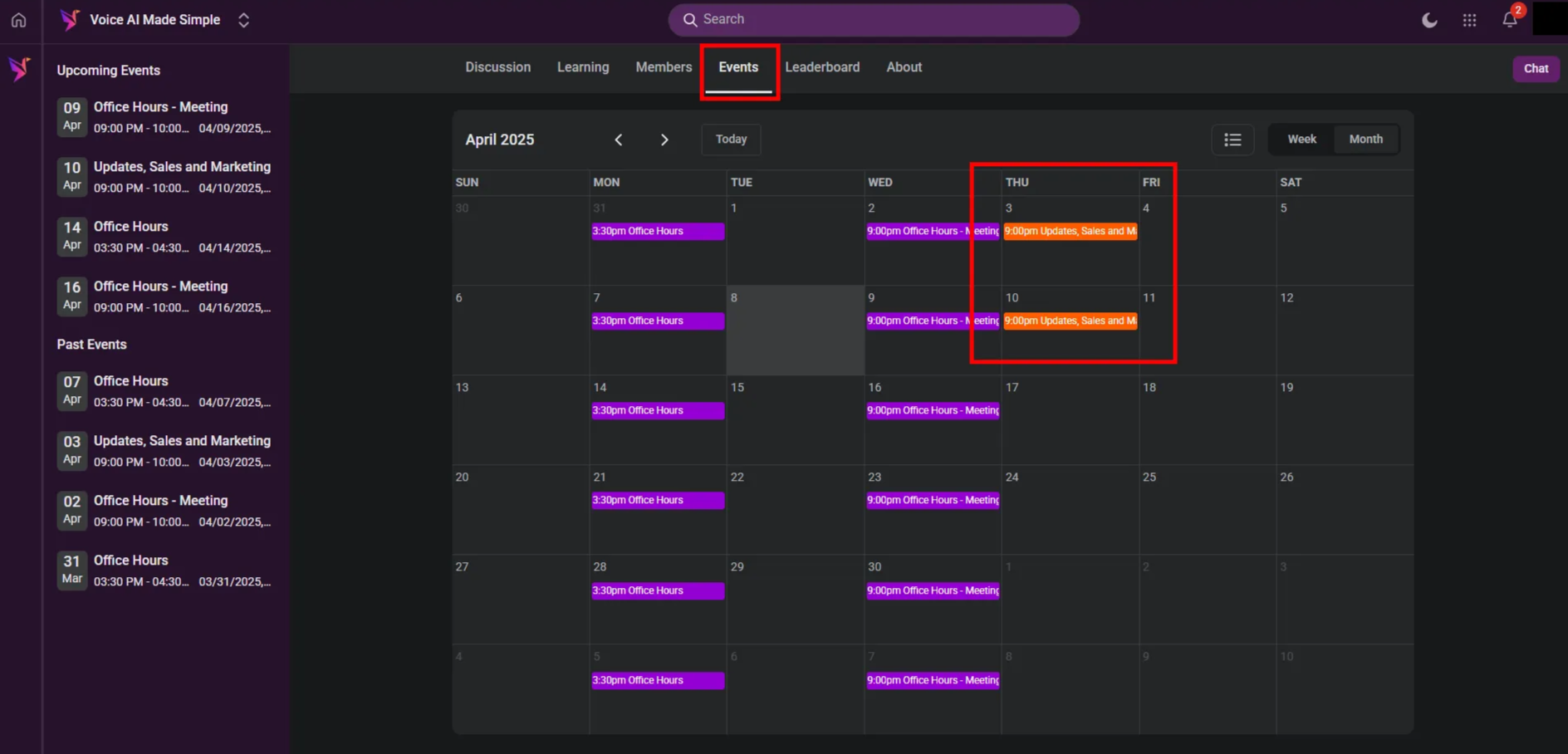
* **Location** – Conducted via Zoom. The event link is provided in the **Events section** of the **Voice AI Made Simple** private group in the Community Forum
* **Live Interaction** – Speak directly with expert members of the Thinkrr team
* **Knowledge Sharing** – Learn about product updates, usage strategies, and successful case studies
* **Q\&A Opportunity** – Ask questions live and receive answers in real-time
* **Idea Sharing** – Present your own suggestions, feedback, or innovative ways you're using the platform
### **How to Attend**
To join the webinar:
 ### **Benefits of Attending**
* Stay updated with the latest product developments
* Gain deeper insight into using Thinkrr effectively
* Connect with like-minded users and experts
* Access recordings later under **Agency Webinars** in the Learning section of the Community Forum
### **FAQs & Troubleshooting**
To attend, you must first be a member of the **Voice AI Made Simple** community group within the Community Forum. Once you’ve joined (free of charge), you’ll be able to view the **Events** section where an orange Zoom link for the webinar is posted. No additional registration is required beyond being part of the community.
No problem! All sessions are recorded and made available in the **Learning tab** under **Agency Webinars** within the Community Forum. You can revisit them anytime.
No, the Thinkrr Think Tank Webinars are **completely free** for all users and community members.
You can ask questions using Zoom’s built-in features. We recommend:
* Typing your question into the **chat box** during the session
* Using the **“Raise Hand”** feature found under the **Reactions** tab to indicate you'd like to speak
* Waiting for the **dedicated Q\&A portion** of the webinar when live questions are encouraged
Yes! We welcome your suggestions. You can share your ideas directly in the **Discussion Board** of the Community Forum or during a live session.
Make sure you're logged into your Community Forum with your members account and have joined the **Voice AI Made Simple** group. If you're still having trouble, check your browser settings to allow pop-ups or contact [**hello@thinkrr.ai**](mailto:hello@thinkrr.ai) for assistance.
Topics often include product updates, sales and marketing strategies, success stories from the community, expert walkthroughs of new features, and live demos of real use cases.
***
For additional questions or guidance, try using our [**Virtual Support Agent**](/Thinkrr-Support-Agent)! Available 24/7 to help resolve most issues quickly at [thinkrr.ai/support](https://thinkrr.ai/support).
If you still need assistance, visit our support site at [help.thinkrr.ai](http://help.thinkrr.ai) and submit a [Ticket](/Support-Ticket-System) or contact our team directly at [hello@thinkrr.ai](mailto:hello@thinkrr.ai).
### **Benefits of Attending**
* Stay updated with the latest product developments
* Gain deeper insight into using Thinkrr effectively
* Connect with like-minded users and experts
* Access recordings later under **Agency Webinars** in the Learning section of the Community Forum
### **FAQs & Troubleshooting**
To attend, you must first be a member of the **Voice AI Made Simple** community group within the Community Forum. Once you’ve joined (free of charge), you’ll be able to view the **Events** section where an orange Zoom link for the webinar is posted. No additional registration is required beyond being part of the community.
No problem! All sessions are recorded and made available in the **Learning tab** under **Agency Webinars** within the Community Forum. You can revisit them anytime.
No, the Thinkrr Think Tank Webinars are **completely free** for all users and community members.
You can ask questions using Zoom’s built-in features. We recommend:
* Typing your question into the **chat box** during the session
* Using the **“Raise Hand”** feature found under the **Reactions** tab to indicate you'd like to speak
* Waiting for the **dedicated Q\&A portion** of the webinar when live questions are encouraged
Yes! We welcome your suggestions. You can share your ideas directly in the **Discussion Board** of the Community Forum or during a live session.
Make sure you're logged into your Community Forum with your members account and have joined the **Voice AI Made Simple** group. If you're still having trouble, check your browser settings to allow pop-ups or contact [**hello@thinkrr.ai**](mailto:hello@thinkrr.ai) for assistance.
Topics often include product updates, sales and marketing strategies, success stories from the community, expert walkthroughs of new features, and live demos of real use cases.
***
For additional questions or guidance, try using our [**Virtual Support Agent**](/Thinkrr-Support-Agent)! Available 24/7 to help resolve most issues quickly at [thinkrr.ai/support](https://thinkrr.ai/support).
If you still need assistance, visit our support site at [help.thinkrr.ai](http://help.thinkrr.ai) and submit a [Ticket](/Support-Ticket-System) or contact our team directly at [hello@thinkrr.ai](mailto:hello@thinkrr.ai).