> ## Documentation Index
> Fetch the complete documentation index at: https://docs.thinkrr.ai/llms.txt
> Use this file to discover all available pages before exploring further.
# Twilio Integration
> **Twilio integration** enables users to import their Twilio phone numbers into thinkrr seamlessly, allowing full functionality for inbound and outbound calling.
## Overview
Whether importing numbers during setup or adding them later, thinkrr ensures flexibility without limitations on usage. While Twilio phone numbers offer great compatibility, users should be mindful of associated costs and best practices for maintaining clean, high-quality numbers.
## Details
We’ve made it super easy to import Twilio phone numbers into the thinkrr Voice AI platform. Every new account includes **one free phone number**, which can be claimed at any time.
Additional phone numbers can be purchased for **\$1.90 per month each**, billed as a recurring subscription. All numbers available within thinkrr — including those purchased directly through the platform — are **Twilio-based**, and users can buy up to **50 numbers at a time** in a single batch.
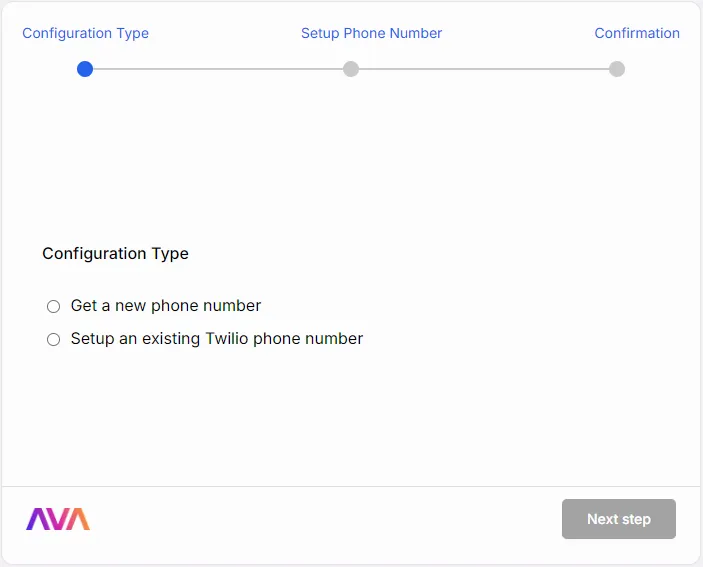
**During Initial Setup:**\
After signing into thinkrr for the first time, users are prompted to redeem their free thinkrr phone number or import a Twilio phone number.
 **From the Phone Numbers Section:**\
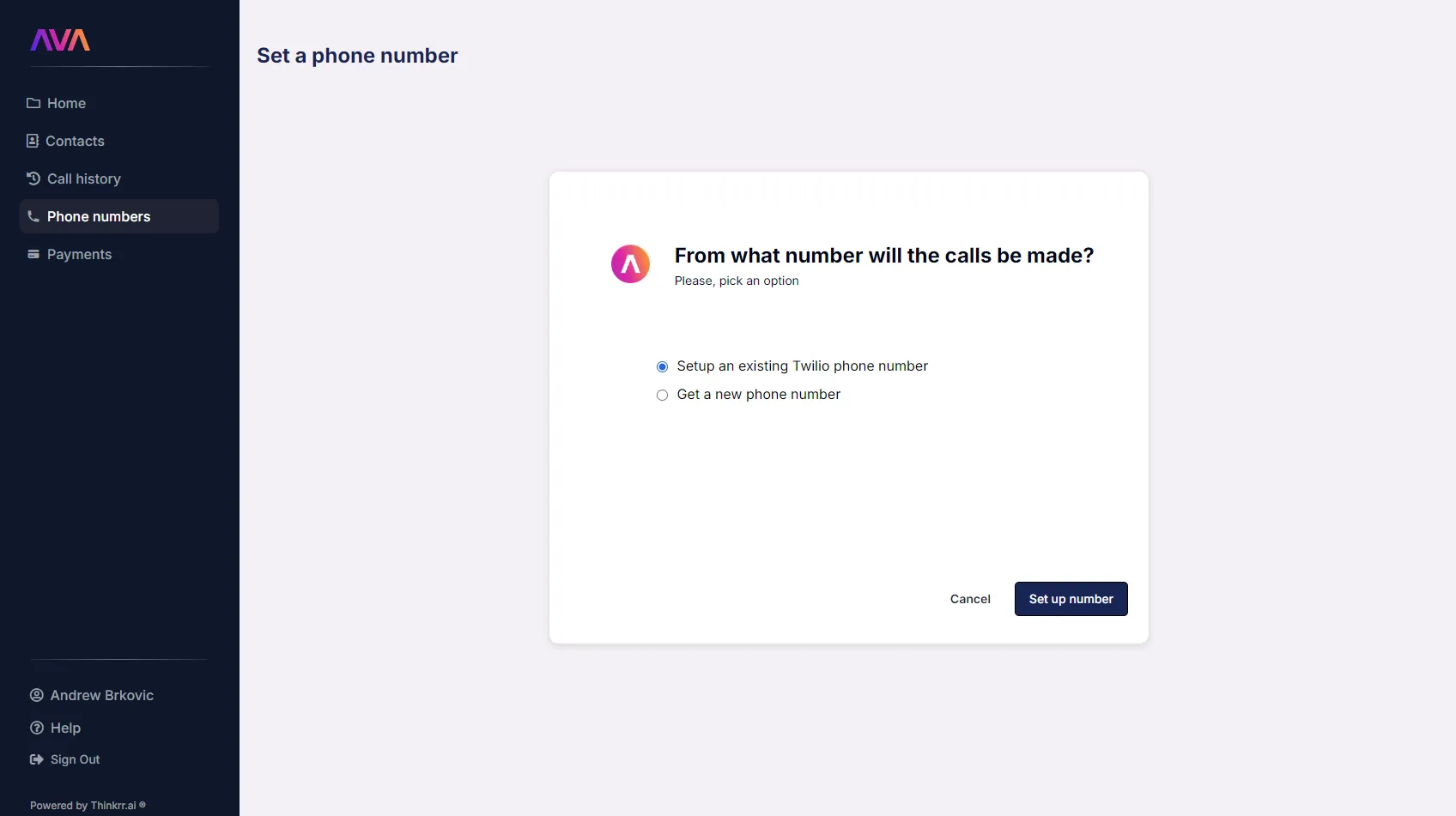
Navigate to **Phone Numbers** in the side panel and click the **Setup Phone Number** button in the top-right corner.
**From the Phone Numbers Section:**\
Navigate to **Phone Numbers** in the side panel and click the **Setup Phone Number** button in the top-right corner.
 **Information Needed to Import Twilio Numbers:**
* Twilio phone number
* Twilio account ID
* Twilio account auth token
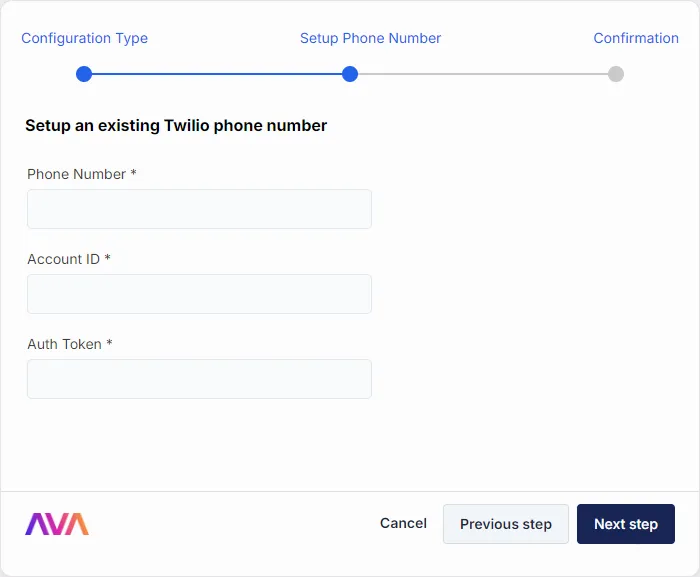
**Information Needed to Import Twilio Numbers:**
* Twilio phone number
* Twilio account ID
* Twilio account auth token
 Please refer to Twilio documentation for instructions on where to find this information.
**Using Imported Numbers:**
* Once successfully imported, Twilio numbers can:
* Be attached to **Inbound Agents**.
* Serve as the **Call From** number in **Projects** and **Campaigns**.
Numbers can be easily managed and deleted within the **Phone Numbers** section of the thinkrr Voice AI platform. Simply click the red trashcan button to delete, and confirm your choice.
Note that if you delete a phone number that is attached to an AI Agent, the AI Agent will also be deleted.
Please refer to Twilio documentation for instructions on where to find this information.
**Using Imported Numbers:**
* Once successfully imported, Twilio numbers can:
* Be attached to **Inbound Agents**.
* Serve as the **Call From** number in **Projects** and **Campaigns**.
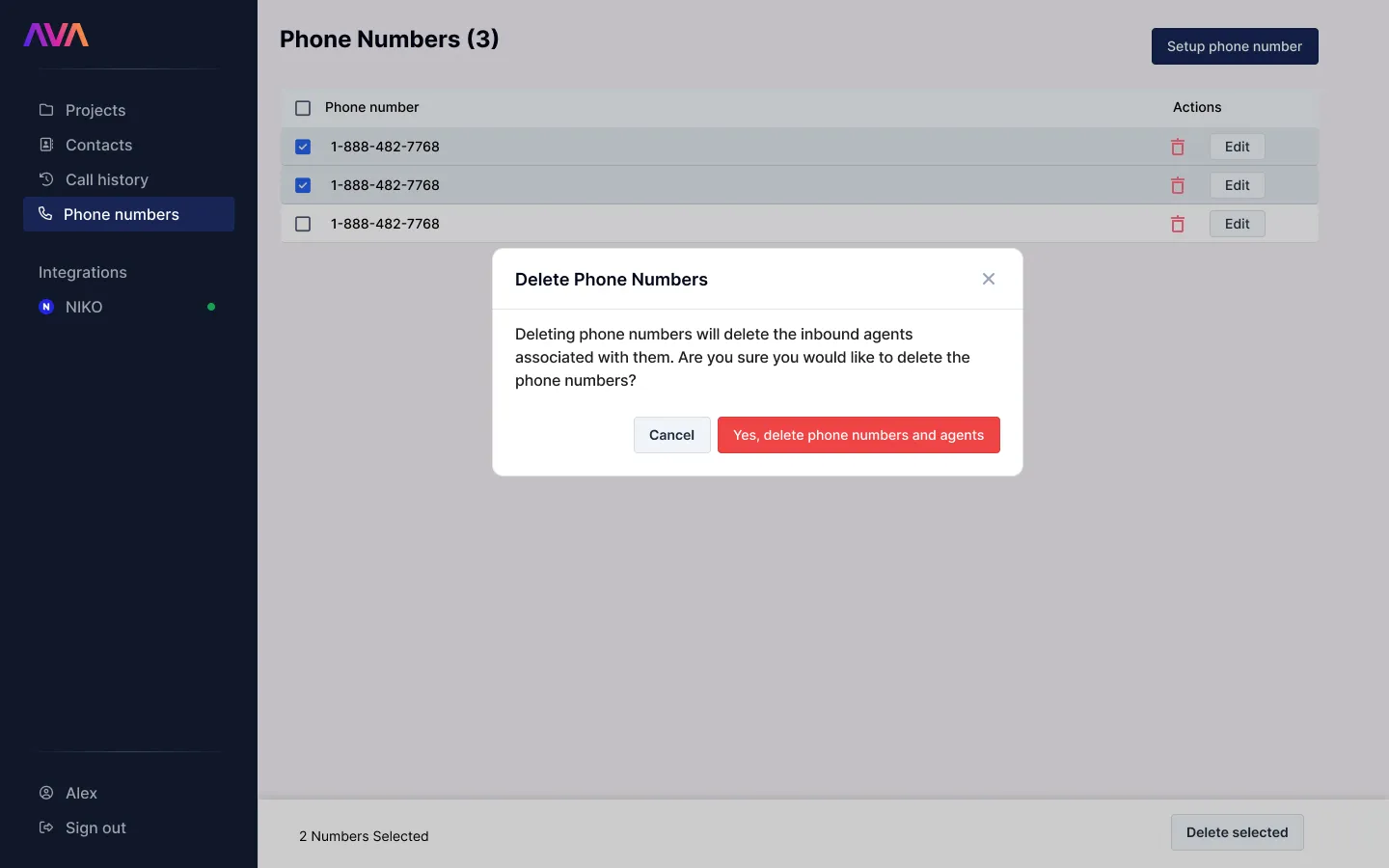
Numbers can be easily managed and deleted within the **Phone Numbers** section of the thinkrr Voice AI platform. Simply click the red trashcan button to delete, and confirm your choice.
Note that if you delete a phone number that is attached to an AI Agent, the AI Agent will also be deleted.
 ## Twilio Number Quality & Cleanliness
Although Twilio numbers are imported from an external provider, it's still important to ensure that the phone numbers you bring into thinkrr are clean and not flagged as spam. Flagged numbers can negatively impact outbound campaigns, connection rates, and overall deliverability.
### Recommended Pre-Import Checks
Before importing Twilio numbers into thinkrr, run them through these third-party lookup tools:
* [Robokiller Lookup](https://lookup.robokiller.com/)
* [Should I Answer?](http://www.shouldianswer.com/)
* [Nomorobo Lookup](https://www.nomorobo.com/lookup)
* Search the number on Google using quotes (e.g., "614-758-2315") to check for public spam complaints.
> ⚠️ **Important:**\
> Once a number is flagged as spam, it is extremely difficult (often impossible) to remove it from global spam lists. Regularly auditing your numbers helps maintain deliverability.
## FAQs & Troubleshooting
### General Questions
Not yet. The option to purchase additional numbers within thinkrr is under development.
No, thinkrr currently supports only Twilio phone numbers.
Yes, any numbers purchased from, or imported into thinkrr will be available for use in GHL via the thinkrr Voice AI Integration actions.
### Phone Number Quality and Cleanliness
To ensure your numbers are not flagged as spam, run them through these tools before importing:
* [Robokiller Lookup](https://lookup.robokiller.com/).
* [Should I Answer?](http://www.shouldianswer.com/).
* [Nomorobo Lookup](https://www.nomorobo.com/lookup).
* Google the number in quotes (e.g., “614-758-2315”) to check for spam complaints.
Regularly check your numbers weekly, monthly, or quarterly, depending on outbound call volume. Once a number is flagged as spam, it is almost impossible to remove it from spam lists.
Flagged numbers may lead to lower connection rates and could harm campaign performance. Use clean numbers to ensure better outcomes.
### Feature and Functionality
No, Twilio numbers have the same functionality as thinkrr-provided numbers.
Yes, there is no limit to how many Twilio numbers you can import into thinkrr.
Contact thinkrr support for assistance with resolving deletion errors.
### International Numbers & Calling
No, thinkrr-provided phone numbers, including the free phone number included with your account, do not support international calls. This includes both inbound and outbound calls outside of the US and Canada.
Yes, but you’ll need to import a Twilio phone number for the specific country where you want to make calls. Twilio offers international phone numbers and calling functionality, which you can subscribe to separately and import into thinkrr for use.
Yes, imported Twilio numbers — whether international or domestic — can be assigned to inbound agents, outbound campaigns, or both, just like any other phone number in thinkrr.
***
For additional questions or guidance, try using our [**Virtual Support Agent**](/Thinkrr-Support-Agent)! Available 24/7 to help resolve most issues quickly at [thinkrr.ai/support](https://thinkrr.ai/support).
If you still need assistance, visit our support site at [help.thinkrr.ai](http://help.thinkrr.ai) and submit a [Ticket](/Support-Ticket-System) or contact our team directly at [hello@thinkrr.ai](mailto:hello@thinkrr.ai).
## Twilio Number Quality & Cleanliness
Although Twilio numbers are imported from an external provider, it's still important to ensure that the phone numbers you bring into thinkrr are clean and not flagged as spam. Flagged numbers can negatively impact outbound campaigns, connection rates, and overall deliverability.
### Recommended Pre-Import Checks
Before importing Twilio numbers into thinkrr, run them through these third-party lookup tools:
* [Robokiller Lookup](https://lookup.robokiller.com/)
* [Should I Answer?](http://www.shouldianswer.com/)
* [Nomorobo Lookup](https://www.nomorobo.com/lookup)
* Search the number on Google using quotes (e.g., "614-758-2315") to check for public spam complaints.
> ⚠️ **Important:**\
> Once a number is flagged as spam, it is extremely difficult (often impossible) to remove it from global spam lists. Regularly auditing your numbers helps maintain deliverability.
## FAQs & Troubleshooting
### General Questions
Not yet. The option to purchase additional numbers within thinkrr is under development.
No, thinkrr currently supports only Twilio phone numbers.
Yes, any numbers purchased from, or imported into thinkrr will be available for use in GHL via the thinkrr Voice AI Integration actions.
### Phone Number Quality and Cleanliness
To ensure your numbers are not flagged as spam, run them through these tools before importing:
* [Robokiller Lookup](https://lookup.robokiller.com/).
* [Should I Answer?](http://www.shouldianswer.com/).
* [Nomorobo Lookup](https://www.nomorobo.com/lookup).
* Google the number in quotes (e.g., “614-758-2315”) to check for spam complaints.
Regularly check your numbers weekly, monthly, or quarterly, depending on outbound call volume. Once a number is flagged as spam, it is almost impossible to remove it from spam lists.
Flagged numbers may lead to lower connection rates and could harm campaign performance. Use clean numbers to ensure better outcomes.
### Feature and Functionality
No, Twilio numbers have the same functionality as thinkrr-provided numbers.
Yes, there is no limit to how many Twilio numbers you can import into thinkrr.
Contact thinkrr support for assistance with resolving deletion errors.
### International Numbers & Calling
No, thinkrr-provided phone numbers, including the free phone number included with your account, do not support international calls. This includes both inbound and outbound calls outside of the US and Canada.
Yes, but you’ll need to import a Twilio phone number for the specific country where you want to make calls. Twilio offers international phone numbers and calling functionality, which you can subscribe to separately and import into thinkrr for use.
Yes, imported Twilio numbers — whether international or domestic — can be assigned to inbound agents, outbound campaigns, or both, just like any other phone number in thinkrr.
***
For additional questions or guidance, try using our [**Virtual Support Agent**](/Thinkrr-Support-Agent)! Available 24/7 to help resolve most issues quickly at [thinkrr.ai/support](https://thinkrr.ai/support).
If you still need assistance, visit our support site at [help.thinkrr.ai](http://help.thinkrr.ai) and submit a [Ticket](/Support-Ticket-System) or contact our team directly at [hello@thinkrr.ai](mailto:hello@thinkrr.ai).