> ## Documentation Index
> Fetch the complete documentation index at: https://docs.thinkrr.ai/llms.txt
> Use this file to discover all available pages before exploring further.
# Video Tutorials
> A growing library of expert-led video tutorials, crafted to help you master Thinkrr's tools with real-world examples and step-by-step guidance. Whether you're a beginner or a seasoned pro, these lessons are here to elevate your workflow.
### **Overview**
The **Video Tutorials** are a curated collection of short to medium-length videos created by expert members of the Thinkrr team. These tutorials provide step-by-step instructions, examples, and best practices to help users get the most out of Thinkrr’s software tools and integrations. Whether you're just getting started or looking to sharpen your skills, these videos are designed to accelerate your learning and improve your efficiency.
### **Details**
* **Where to Access**\
Available within the **Voice AI Made Simple** private group in the Community Forum
* **Location**\
Found under the **Learning** tab once you're inside the group
* **Content Structure**\
Organized into themed courses with multiple videos, each featuring a progress bar to track your completion from 0–100%
* **Format**\
All content is delivered in video format with clear, practical demonstrations and explanations
### **How to Access**
You can access the Video Tutorials by following these steps:
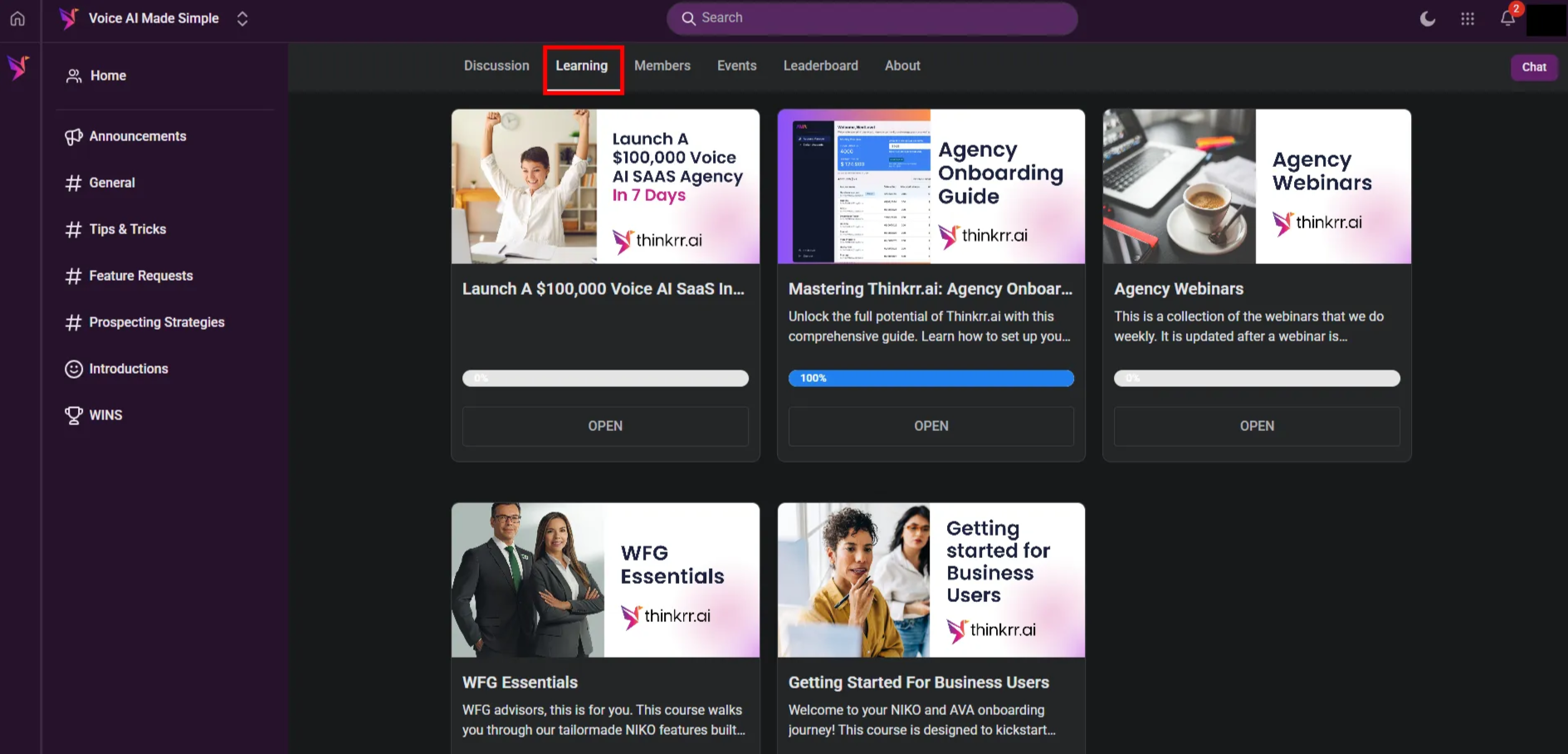 This section contains structured courses, each with multiple videos covering essential topics, features, and use cases. A built-in progress bar tracks your completion from 0–100%, making it easy to stay organized and pick up where you left off.
### **Benefits**
* **Accelerated Learning** – Get up to speed quickly with step-by-step video guides
* **Visual & Practical** – Watch real use cases and walkthroughs of how to operate tools inside Thinkrr
* **Expert Insights** – Learn from seasoned team members who provide best practices, pro tips, and creative applications
* **Flexible Pace** – Learn on your own schedule — rewind, replay, or jump to specific lessons as needed
* **Up-to-Date Content** – Includes the latest product changes and integrations
### **FAQs & Troubleshooting**
No, access to the tutorials is completely free — but you must be accepted into the **Voice AI Made Simple** group inside the Community Forum.
Yes! Recordings of webinars and other instructional content are archived under the **Agency Webinars** course within the Learning tab.
Yes. Many videos go over integrations with CRM systems, scheduling tools, and outbound calling platforms, with examples shown in action.
Try the following steps:
* Make sure you’re logged in and that your membership to the private group has been approved
* Refresh the page or try a different browser
* Disable browser extensions that may block video players
* If the issue persists, report it through the Support Ticket System or email us at [**hello@thinkrr.ai**](mailto:hello@thinkrr.ai)
***
For additional questions or guidance, try using our [**Virtual Support Agent**](/Thinkrr-Support-Agent)! Available 24/7 to help resolve most issues quickly at [thinkrr.ai/support](https://thinkrr.ai/support).
If you still need assistance, visit our support site at [help.thinkrr.ai](http://help.thinkrr.ai) and submit a [Ticket](/Support-Ticket-System) or contact our team directly at [hello@thinkrr.ai](mailto:hello@thinkrr.ai).
This section contains structured courses, each with multiple videos covering essential topics, features, and use cases. A built-in progress bar tracks your completion from 0–100%, making it easy to stay organized and pick up where you left off.
### **Benefits**
* **Accelerated Learning** – Get up to speed quickly with step-by-step video guides
* **Visual & Practical** – Watch real use cases and walkthroughs of how to operate tools inside Thinkrr
* **Expert Insights** – Learn from seasoned team members who provide best practices, pro tips, and creative applications
* **Flexible Pace** – Learn on your own schedule — rewind, replay, or jump to specific lessons as needed
* **Up-to-Date Content** – Includes the latest product changes and integrations
### **FAQs & Troubleshooting**
No, access to the tutorials is completely free — but you must be accepted into the **Voice AI Made Simple** group inside the Community Forum.
Yes! Recordings of webinars and other instructional content are archived under the **Agency Webinars** course within the Learning tab.
Yes. Many videos go over integrations with CRM systems, scheduling tools, and outbound calling platforms, with examples shown in action.
Try the following steps:
* Make sure you’re logged in and that your membership to the private group has been approved
* Refresh the page or try a different browser
* Disable browser extensions that may block video players
* If the issue persists, report it through the Support Ticket System or email us at [**hello@thinkrr.ai**](mailto:hello@thinkrr.ai)
***
For additional questions or guidance, try using our [**Virtual Support Agent**](/Thinkrr-Support-Agent)! Available 24/7 to help resolve most issues quickly at [thinkrr.ai/support](https://thinkrr.ai/support).
If you still need assistance, visit our support site at [help.thinkrr.ai](http://help.thinkrr.ai) and submit a [Ticket](/Support-Ticket-System) or contact our team directly at [hello@thinkrr.ai](mailto:hello@thinkrr.ai).