> ## Documentation Index
> Fetch the complete documentation index at: https://docs.thinkrr.ai/llms.txt
> Use this file to discover all available pages before exploring further.
# Zoom Integration
> Integrating **Zoom** with GHL enables seamless scheduling and management of virtual meetings.
## Overview
This feature ensures that meeting links are generated automatically, synchronized with calendars, and updated in real-time to avoid scheduling conflicts. By combining GHL’s organizational capabilities with **Zoom’s** virtual meeting tools, users can streamline communication, enhance coordination, and reduce manual effort.
## Details
**Zoom** integration within GHL simplifies meeting scheduling and management while ensuring synchronization across platforms.
* Navigate to **Settings** in the GHL side-panel.
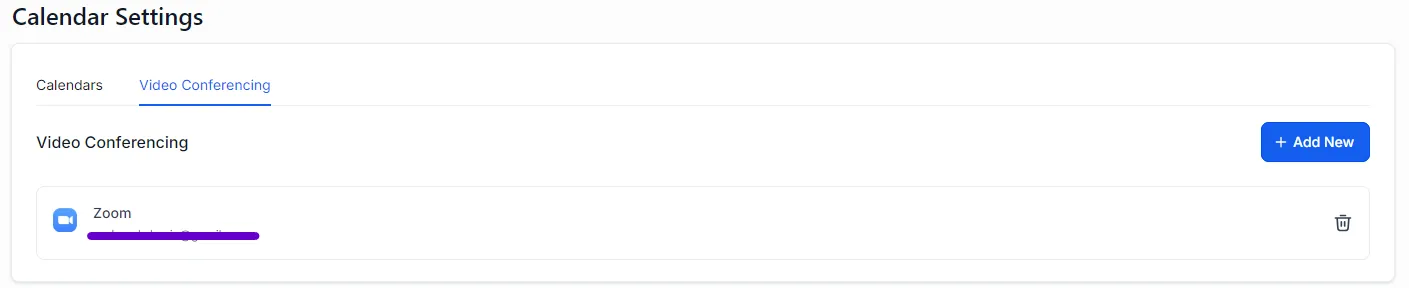
* Select **My Profile** and scroll to **Video Conferencing Settings.**
* Click **Add New** and select **Zoom** from the options.
* Follow the prompts to log into your **Zoom** account and authorize the connection.
* Once connected, **Zoom** will appear as a linked platform, ready for use in meeting scheduling.
 * **Unique Meeting Links:**
* Each meeting scheduled through GHL generates a unique **Zoom** meeting link automatically.
* **Real-Time Updates:**
* Rescheduling or cancellations made in GHL calendars are reflected instantly in **Zoom**.
* **Notification Automation:**
* Participants automatically receive notifications with meeting details and updates, ensuring better attendance and reduced manual effort.
* **Comprehensive Tracking:**
* Track data such as meeting attendance, duration, and participant details directly from the **Zoom** platform for actionable insights.
* Scheduled **Zoom** meetings appear in GHL calendars with unique meeting links.
* If third-party calendars like Google Calendar are connected, these events will reflect there as well, enabling cohesive time management across all platforms.
## FAQs & Troubleshooting
### Integration and Setup
**Zoom** integration allows users to schedule virtual meetings with unique links directly from GHL. It synchronizes events with GHL calendars and connected third-party calendars while reflecting real-time updates in the **Zoom** platform.
Go to **Settings** > **My Profile** > **Video Conferencing Settings**, click **Add New**, and select **Zoom**. Log in and authorize the connection to link your account.
### Scheduling and Synchronization
Yes, reschedules and cancellations made in GHL calendars are updated in real-time in **Zoom** to prevent discrepancies.
Yes, meetings scheduled via GHL with **Zoom** links will appear in third-party calendars like Google Calendar if those calendars are connected.
Yes, the integration automatically sends notifications with meeting details, updates, or cancellations to participants, improving attendance.
### Data Tracking
**Zoom** tracks data such as meeting attendance, duration, and participant details. This information can be used for performance analysis and improving business processes.
You can view all scheduled meetings in your **Zoom** app, GHL calendars, and any connected third-party calendars.
***
For additional questions or guidance, try using our [Virtual Support Agent](/Thinkrr-Support-Agent)! Available 24/7 to help resolve most issues quickly at [thinkrr.ai/support](https://thinkrr.ai/support).
If you still need assistance, visit our support site at help.thinkrr.ai and submit a [Ticket](/Support-Ticket-System) or contact our team directly at [hello@thinkrr.ai](mailto:hello@thinkrr.ai).
* **Unique Meeting Links:**
* Each meeting scheduled through GHL generates a unique **Zoom** meeting link automatically.
* **Real-Time Updates:**
* Rescheduling or cancellations made in GHL calendars are reflected instantly in **Zoom**.
* **Notification Automation:**
* Participants automatically receive notifications with meeting details and updates, ensuring better attendance and reduced manual effort.
* **Comprehensive Tracking:**
* Track data such as meeting attendance, duration, and participant details directly from the **Zoom** platform for actionable insights.
* Scheduled **Zoom** meetings appear in GHL calendars with unique meeting links.
* If third-party calendars like Google Calendar are connected, these events will reflect there as well, enabling cohesive time management across all platforms.
## FAQs & Troubleshooting
### Integration and Setup
**Zoom** integration allows users to schedule virtual meetings with unique links directly from GHL. It synchronizes events with GHL calendars and connected third-party calendars while reflecting real-time updates in the **Zoom** platform.
Go to **Settings** > **My Profile** > **Video Conferencing Settings**, click **Add New**, and select **Zoom**. Log in and authorize the connection to link your account.
### Scheduling and Synchronization
Yes, reschedules and cancellations made in GHL calendars are updated in real-time in **Zoom** to prevent discrepancies.
Yes, meetings scheduled via GHL with **Zoom** links will appear in third-party calendars like Google Calendar if those calendars are connected.
Yes, the integration automatically sends notifications with meeting details, updates, or cancellations to participants, improving attendance.
### Data Tracking
**Zoom** tracks data such as meeting attendance, duration, and participant details. This information can be used for performance analysis and improving business processes.
You can view all scheduled meetings in your **Zoom** app, GHL calendars, and any connected third-party calendars.
***
For additional questions or guidance, try using our [Virtual Support Agent](/Thinkrr-Support-Agent)! Available 24/7 to help resolve most issues quickly at [thinkrr.ai/support](https://thinkrr.ai/support).
If you still need assistance, visit our support site at help.thinkrr.ai and submit a [Ticket](/Support-Ticket-System) or contact our team directly at [hello@thinkrr.ai](mailto:hello@thinkrr.ai).